

In LearnDash vs Tutor LMS, Tutor LMS costs less for most solo course sellers. Its free plugin takes PayPal, and Pro is $199 a year or $499 once for 1 site. LearnDash starts at $259 a year with no free version, and pulls ahead for selling seats to companies on Elite at $599.
The 2 split on whether a free version can take payment, whether you can pay once, and what a lapsed licence means. Tutor’s documentation says its plugin keeps working without updates. LearnDash’s terms bar using its Services after expiry, yet license its plugins under the GPL, so ask before letting one lapse. Every current price here comes from the 2 vendors’ own pricing pages.
4 of the comparison guides on page 1 of Google list the same 3 prices for both plugins: $199, $399 and $799 a year.
Only Tutor LMS charges those today. They are what LearnDash charged new buyers before it rebuilt its plans, and it now sells Essentials, Pro and Elite at $259, $399 and $599.
So I sorted the decision by the 5 situations that split buyers: a PayPal-only launch, paying once, other instructors, a checkout you already run and selling to companies.
A later section covers what happens to your courses when you stop paying, which none of the 7 ranking guides explains.
Key Takeaways
- Tutor LMS is cheaper on 1 site. Pro costs $199 a year against LearnDash Essentials at $259, and Tutor also sells a $499 lifetime licence.
- Free Tutor LMS can take money. It sells through PayPal and manual payments, while Stripe, subscriptions and guest checkout need Pro.
- LearnDash packs more into its entry plan. Stripe, PayPal, memberships and ThriveCart and SamCart connections all come with the $259 Essentials plan.
- Page 1 still quotes LearnDash’s old price. 6 of the 7 ranking comparisons put LearnDash at $199 a year, a price new buyers cannot get.
- Lapsed licences are documented differently. Tutor says its plugin keeps running without updates. LearnDash’s terms bar use after expiry yet license its plugins under the GPL.
What LearnDash and Tutor LMS cost today
Tutor LMS Pro costs $199, $399 or $799 a year for 1, 10 or unlimited sites, and LearnDash costs $259, $399 or $599 a year for 3 feature tiers. Tutor LMS also has a free plugin and a pay-once option. LearnDash has neither.
Before you pay for a licence, check that the course offer is worth selling. The Online Selling Mistakes Challenge covers 5 selling mistakes solo creators make, 1 email a day for 5 days.
On 1 site, Tutor LMS Pro is $199 a year or $499 once, LearnDash Essentials is $259 a year, and only Tutor LMS offers a free version or a lifetime licence.
| Plan | Yearly | Pay once | Sites | Takes Stripe |
|---|---|---|---|---|
| Tutor LMS Free | $0 | $0 | Any | No, PayPal and manual only |
| Tutor LMS Individual | $199 | $499 | 1 | Yes |
| Tutor LMS Business | $399 | $999 | Up to 10 | Yes |
| Tutor LMS Agency | $799 | $1,999 | Unlimited yearly, 50 once | Yes |
| LearnDash Essentials | $259 | Not sold | Not on the page | Yes |
| LearnDash Pro | $399 | Not sold | Not on the page | Yes |
| LearnDash Elite | $599 | Not sold | Not on the page | Yes |
The 2 ladders climb for different reasons. Every Tutor LMS Pro tier carries “All pro add-ons & features”, so you pay more only for more websites.
LearnDash’s tiers add features instead. Pro adds the ProPanel reporting dashboard and a gradebook. Elite adds group seat sales, an instructor role and front-end course creation.
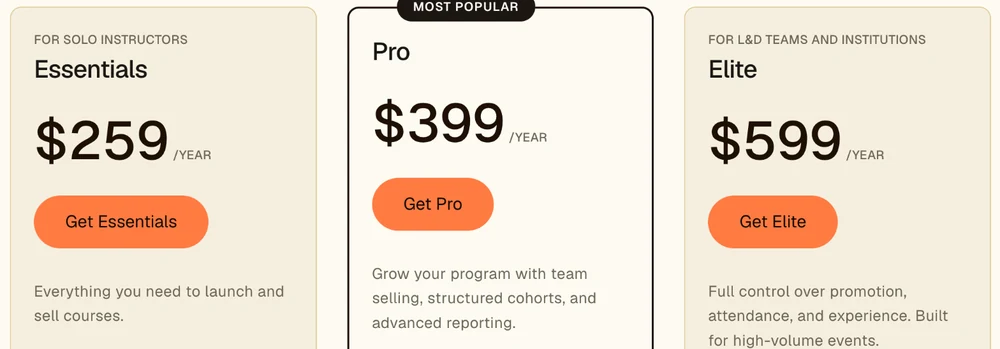
LearnDash’s pricing page. 3 yearly plans, no free tier and no lifetime option.
LearnDash’s pricing page never states how many websites each plan covers. It says “One license, unlimited courses, unlimited learners. Renews annually, cancel any time.” The announcement of the new plans adds: “Volume discounts are available for 3+ sites.” The licensing detail, including how subdomains count, is in my LearnDash pricing breakdown.
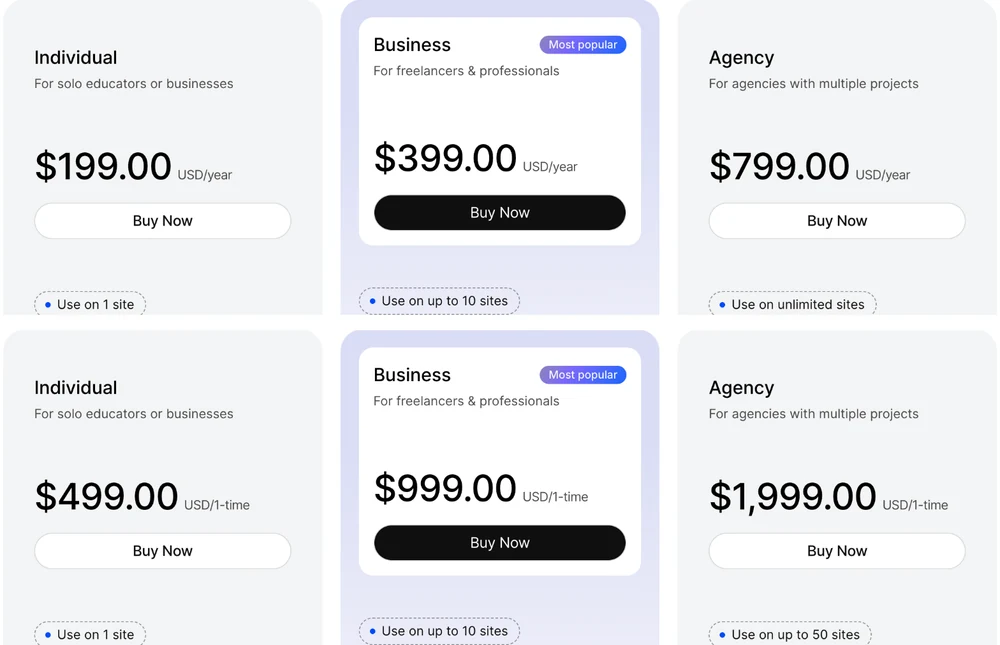
Tutor LMS’s pricing page, yearly cards on top and the lifetime cards below. The lifetime Agency plan stops at 50 sites.
Neither price includes hosting. Both plugins run on a WordPress site you pay for and look after, and a course site is heavier than a blog. A developer in an r/Wordpress thread put it plainly: “LearnDash and similar plugins are much heavier on the database than most WP sites.” Budget for decent hosting whichever plugin you pick.
Why page 1 makes them look the same price
Page 1 makes LearnDash and Tutor LMS look identically priced because 6 of the 7 ranking comparisons still put LearnDash at $199 a year, the price of its old 1-site licence.
LearnDash used to sell by website count, and the guides still list that old ladder: $199 for 1 site, $399 for 10 and $799 for unlimited. LearnDash’s own licence documentation still lists the 1-site, 10-site and unlimited-site licences too. Tutor LMS sells by website count today, at exactly $199, $399 and $799. When LearnDash moved to Essentials, Pro and Elite, the guides kept the old ladder, and side by side the 2 columns now match digit for digit.
6 of the 7 guides price LearnDash at $199, the 7th prints no prices at all, and only Rowerr gets Tutor LMS’s lifetime prices right.
| Guide | Who publishes it | LearnDash price shown | Tutor LMS price shown |
|---|---|---|---|
| Miha Cacic | Independent reviewer, affiliate links | $199 to $799 a year, plus a $24 a month Cloud plan | $399 and $799, lifetime mentioned with no price |
| Masteriyo | Sells a rival LMS plugin | $199, $399, $799 | $199, $399, $799, “No Lifetime Plan” |
| WisdmLabs | Sells LearnDash services and add-ons | $199, $399, $799 | $199, $399, $799, lifetime $599 for 1 site |
| WooNinjas | Sells LearnDash and Tutor LMS add-ons | $199, $399, $799 | $199, $399, $799, lifetime not mentioned |
| Uteach | Sells a rival course platform | None | None |
| elearningevolve.com | Sells LearnDash development | $199, $229, $369 | “From $149/year” |
| Rowerr | WordPress agency | $199, $399, $799, plus Cloud plans | $199, $399, $799, lifetime $499, $999, $1,999 |
That same $199 to $799 ladder shows up in the AI summary above the results. It says LearnDash “starts at $199/year for a single site up to $799/year” and offers a hosted Cloud option for $24 a month.
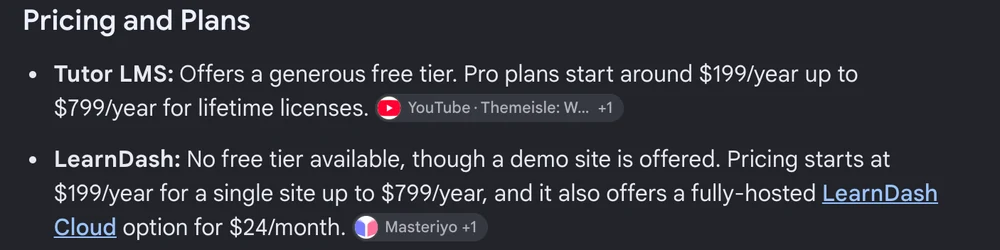
The AI Overview Google shows for “learndash vs tutor lms”. Its LearnDash line still carries the retired $199 to $799 ladder.
LearnDash’s current pricing page sells no hosted plan at all. The same announcement only tells existing Cloud customers where to log in.
Budget off page 1 and you plan for $199 a year, then find $259 on LearnDash’s pricing page. Worse, you never see the option that changes the long-run math, which is Tutor LMS’s lifetime licence. Only 1 of the 7 guides prices it correctly.
5 situations decide LearnDash vs Tutor LMS
5 situations decide LearnDash vs Tutor LMS: a PayPal-only launch, paying once, other instructors, an existing ThriveCart or SamCart checkout, and selling seats to companies.
Both plugins build courses with lessons and quizzes, and both issue certificates. Tutor LMS says it takes no cut of course revenue, and LearnDash charges no per-student fee.
If PayPal is enough to take your first payment
Free Tutor LMS is the pick if you have 1 course, a WordPress site already running, and want the course on sale this week without buying a licence. It is the only one of the 2 you can sell with for $0. Its free version includes a native checkout with coupons, tax settings and order management, and it takes PayPal plus manual payments such as bank transfer. That is enough to take real money on day one.
A developer in that same r/Wordpress thread explained why they built a client project on Tutor LMS: “Also client wanted the free version of the plugin.” Its WordPress.org listing shows over 100,000 active installs and a 4.4 out of 5 rating from 589 reviews.
LearnDash has no free version. The closest thing is a 48-hour demo with no credit card, after which the entry price is $259.
What you give up on free Tutor LMS is listed in its own free-versus-Pro table on the pricing page. The WordPress.org listing describes the free and Pro versions together, so check the table rather than the listing:
- No Stripe. Card payments through Stripe, plus 8 other gateways, need Pro.
- No guest checkout. Buyers create an account before they pay.
- No subscriptions or memberships. One-off course sales only.
- No drip, bundles or certificate builder. Basic certificates only.
When the first sales prove the course works, Pro is $199 a year. My guide to WordPress LMS plugins shows which free plugin takes a Stripe payment without a licence.
One more option before you install anything. If your course is a PDF workbook plus a few videos you already host on YouTube or Vimeo, with no quizzes or progress tracking, you may not need an LMS plugin at all. A checkout with protected file delivery can sell it without a WordPress site. CartMango, the checkout I run, delivers PDFs, audio and other downloadable files this way, with videos hosted on YouTube or Vimeo. Payhip and Gumroad also sell files from a hosted page, each with its own pricing.
If you would rather pay once than renew every year
Tutor LMS’s $499 lifetime licence is the pick if you expect to run the same course site for 3 years or more and would rather not see a renewal invoice. It covers 1 site with “Updates for lifetime”, against “Updates for 1 year” on the yearly plans. LearnDash does not sell a lifetime licence on any plan.
Here is how the 3 single-site options add up if prices stay where they are today:
- LearnDash Essentials: $259 in year 1, $777 after 3 years, $1,295 after 5.
- Tutor LMS Individual, yearly: $199 in year 1, $597 after 3 years, $995 after 5.
- Tutor LMS Individual, lifetime: $499 once, the same in year 5.
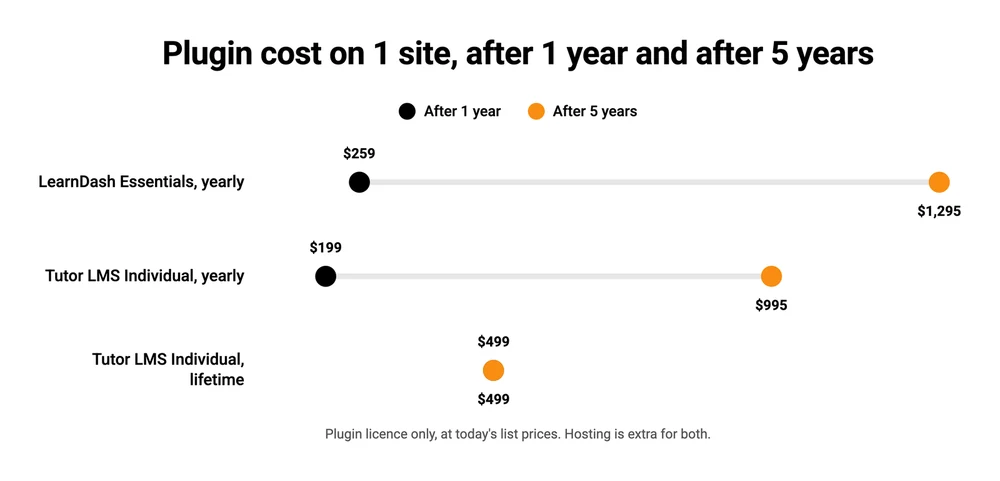
The lifetime licence costs less than 2 years of LearnDash ($518) and less than 3 years of Tutor’s own yearly plan ($597). LearnDash’s terms and conditions say “we may increase Fees for the Services upon renewal.” Tutor’s terms, under a heading called Price Changes, reserve the right to modify or discontinue the product “at any time,” so I would not assume either yearly price stays fixed.
Now the catch, and I have paid for it myself. A few years ago I had bought 54 lifetime software deals and still had not used 90% of the apps. A lifetime price only beats a yearly one if the site is still running in year 3, so my rule since then is to buy a lifetime deal only when I need the tool now or within the next 6 months.
2 more things to check before paying $499. Lifetime covers the plugin and its updates, not your hosting. And read Tutor LMS’s refund policy before you click buy. The pricing page offers a 30-day money-back guarantee with “exclusions may apply” beside it, and the policy lists them. It reserves the right to refuse a refund once “the license key was activated,” and says “We don’t offer any refund for any item that you buy/bought at a discounted price.”
If other teachers will sell courses on your site
Tutor LMS Pro, at $199 a year, is the pick if guest instructors will publish their own courses on your site and earn a share of each sale. Multi-instructor support is in the free version, and Pro adds the “Earning & commission allocation” feature from Tutor’s own comparison table. Tutor’s listing describes the admin side plainly: you can “manage earnings, set commission rates, deduct charges,” and instructors withdraw their earnings by bank transfer, PayPal or eCheck.
LearnDash puts its instructor tools on Elite only. Its feature table crosses out the instructor role, front-end course creation and multi-instructor courses on Essentials and Pro, so a multi-teacher site costs $599 a year, which is $400 a year more than Tutor LMS Pro. Its pricing page also never mentions splitting revenue with instructors on any plan.
What you give up with Tutor LMS is depth on the corporate side. LearnDash pitches Elite at training teams, with group management and seat sales built in, which matters if your instructors teach companies rather than individuals. That is the last situation below.
If your checkout already runs on ThriveCart or SamCart
LearnDash is the pick if you already sell through ThriveCart or SamCart and want course access to switch on the moment an order goes through. Its feature table ticks ThriveCart and SamCart connections on all 3 plans, Essentials included, along with WooCommerce. Tutor LMS’s listing names WooCommerce, Easy Digital Downloads and Paid Memberships Pro among the selling plugins it supports, and does not mention ThriveCart or SamCart.
WooCommerce users do not need LearnDash for this. Both plugins connect to WooCommerce, so price decides it again and Tutor LMS wins. The AI summary above the results also contradicts Tutor’s own listing. It says Tutor LMS “relies on e-commerce tools like WooCommerce for payments,” while the listing says its native checkout sells courses “without relying on third-party plugins.”
If you have not picked a WordPress checkout yet, my SureCart vs WooCommerce comparison prices 2 popular ones.
My own checkout, CartMango, is on neither plugin’s connection list, so I would not pair it with either plugin for course access today.
What you give up with LearnDash in this situation is the free starting point. You pay $259 from day one, even while the course is still unproven.
If you sell training to companies by the seat
LearnDash Elite, at $599 a year, is the pick if a business buys your course for 20 staff at once and wants to enrol and manage its own people. Its feature table lists “Groups Management (sell seats, multi-instructor)” on Elite only. Its pricing page describes companies enrolling “entire teams at once with seat-based pricing,” while you set the price per seat. Neither Tutor LMS’s pricing page nor its WordPress.org listing mentions seat sales at all.
Reporting is a weak reason to pay for LearnDash. Its ProPanel dashboard starts on the $399 Pro plan, and Tutor LMS Pro at $199 already lists detailed learner and course reports plus analytics export.
What you give up is the price gap, paid every year. Elite costs $599 against Tutor LMS Pro’s $199, and LearnDash’s terms allow that $599 to rise at renewal.
What happens to your courses when you stop paying
Stop paying for Tutor LMS Pro and the plugin keeps working without updates. Stop paying for LearnDash and its terms say you may not use its Services after your order expires, though the same terms license its plugins under the GPL.
Tutor LMS is explicit about it. Its licence documentation says that after the licence expires “you will stop receiving future updates,” then adds that “you will still be able to use the plugin as you were before without any disruption to your site.” The free core never expires at all.
LearnDash’s terms read the other way: “You may not use any Services or materials after the expiration or termination of your Order for the Services.” The same terms say its plug-ins “are licensed under the GNU General Public License,” which normally lets you keep running code you already have, so the 2 clauses pull in different directions.
The announcement adds a third line for existing customers: if a subscription lapses, “you’ll need to purchase one of the new software plans to reinstate access.” I am not a lawyer, and I have not tested what the plugin does when a licence lapses. If you plan to let a LearnDash licence run out and keep the site live, ask LearnDash in writing first.
Running without updates is a risk with either one. Updates carry security fixes, and a course site holds student logins and payment records. So do not leave a student-facing site on a lapsed licence for long, and renew before you take on new students.
Your lessons sit in your own WordPress database with both plugins. My LearnDash alternatives guide covers what happens to LearnDash courses the moment the plugin is switched off. If you leave LearnDash, Tutor LMS offers a free migration tool that moves users and course data. Test it on a copy of the site first.
Which one to pick, by situation
Tutor LMS wins 3 of the 5 situations on price, and LearnDash wins the 2 where an existing ThriveCart or SamCart checkout, or selling seats to companies, matters more than cost.
| Your situation | Pick | Cost | The catch |
|---|---|---|---|
| PayPal is enough for now | Tutor LMS Free | $0 | No Stripe, guest checkout or subscriptions |
| Pay once, run it for years | Tutor LMS lifetime | $499 once | Only wins if the site lasts past year 2 |
| Other teachers sell courses | Tutor LMS Pro | $199 a year | Less built for corporate training |
| Checkout runs on ThriveCart or SamCart | LearnDash Essentials | $259 a year | No free version to test with |
| Selling seats to companies | LearnDash Elite | $599 a year | $400 a year more than Tutor LMS Pro |
If none of the 5 fits cleanly, start on free Tutor LMS.
It costs nothing to install, and the first missing feature you hit (Stripe, guest checkout or subscriptions) tells you whether Pro is worth $199. For a step-by-step on getting the first sales, how to sell online courses covers the launch side.
FAQ
How much does LearnDash cost?
LearnDash costs $259 a year for Essentials, $399 for Pro and $599 for Elite. There is no free version and no lifetime licence, only a 48-hour demo that needs no credit card. Hosting is a separate bill, because LearnDash is a plugin for a WordPress site you run yourself, and its terms allow the price to rise at renewal.
How much does Tutor LMS cost?
Tutor LMS has a free plugin. Pro costs $199, $399 or $799 a year for 1, 10 or unlimited sites, or $499, $999 or $1,999 once for 1, 10 or 50 sites. Every Pro tier includes all add-ons, and Tutor LMS takes no cut of your course sales.
Is LearnDash a good LMS?
Yes, especially for company training and for sites that already sell through ThriveCart or SamCart. A developer in the r/Wordpress thread wrote: “If you’re talking hundreds or even thousands of users, then LearnDash is perfectly fine.” Its weak spot for a solo seller is price: $259 a year with no free version to test with first.
What are the top 5 LMS platforms?
5 WordPress LMS plugins worth comparing are Tutor LMS, LearnDash, LearnPress, LifterLMS and Sensei, and my WordPress LMS plugin guide prices them on their year 2 renewal. If you would rather not run WordPress at all, hosted platforms such as Thinkific, Teachable, Kajabi and LearnWorlds handle the hosting for you, and the best course platform guide compares what each one keeps per sale.
Do I need WooCommerce for Tutor LMS or LearnDash?
No. Tutor LMS has its own checkout, and LearnDash has Stripe and PayPal built in. Both connect to WooCommerce if you already use it.
Can I move from LearnDash to Tutor LMS later?
Yes. Tutor LMS’s pricing page offers a free Migration Tool plugin that moves users, course data and other content from LearnDash, LearnPress or LifterLMS. Test it on a copy of your site first.
Where the non-course products can live
Whichever way LearnDash vs Tutor LMS goes for you, the plugin hosts the course itself. A workbook, a template pack or a coaching call you sell beside the course does not need either plugin.
CartMango, my own checkout, sells those from a simple sales page it hosts for you, called a Mini Page, with no WordPress site and no cut of your sales. CartMango is free right now, and its paid plans start in November 2026 at $10 to $30 a year.
CartMango does not host courses yet. Its course hosting is planned for October 2026 on the $30 plan, so if your course needs lessons and quizzes today, pick one of the 2 plugins above.
About the Author

👋 I’m Welly, founder of CartMango (the site you’re on), a checkout platform for digital product sellers. We’ve previously processed $179M+. I also run BirdSend (email marketing tool, 3.1B+ emails sent). On the side I show other non-techie digital sellers how I use AI workflows to automate 50%+ of my operations. Find me on LinkedIn.
Related Reading
- LearnDash pricing: the $259 entry plan and what the licence leaves off your bill
- LearnDash alternatives: 8 options priced on what you pay in year 2
- Best WordPress LMS plugin: 7 plugins and which free versions can take a Stripe payment
- Best course platform: the hosted route if you would rather not run WordPress