

16 coupon codes went into LearnDash’s live cart, 11 drawn from LearnDash coupon code sites and 5 guesses, and the cart answered “does not exist” to every one, WPKUBE20 included. LearnDash is also no longer sold on its own: 1 site now costs $350 a year, bundled with 3 other products.
That bundle is the Nexcess Plugin Stack: LearnDash plus The Events Calendar, Give and Kadence, from $350 for 1 site up to $999 for 100 sites. Coupon pages still quote the retired $199 or $259 plans, which LearnDash replaced with the bundle in October 2026. For your own students, LearnDash’s built-in coupons only discount one-time Buy Now courses and groups.
If you searched for a LearnDash coupon code, you’re probably looking at a yearly price and hoping one of those 20% codes is real. Coupon sites say they are. TenereTeam’s page title promises 70%.
So I collected the codes listed on 5 of those sites, added a few obvious guesses, and typed each one into the cart where LearnDash is sold today. That cart runs on a price the coupon pages have not caught up with.
Below: what the cart said about each code, what LearnDash costs now, the few ways to genuinely pay less, and how to give your own students a coupon.
Key Takeaways
- None of the 16 codes I tried worked. 11 drawn from 5 coupon sites, plus 5 guesses, all returned “does not exist” in LearnDash’s live cart.
- LearnDash is no longer sold alone. 1 site costs $350 a year in the Nexcess Plugin Stack, bundled with The Events Calendar, Give and Kadence.
- $199 and $259 are retired prices. Google’s AI Overview still says $199, and Elite Content Marketer and Saver list $259 plans the cart no longer sells.
- Running 2 sites? Buy the 10-site plan. It costs $599 a year for up to 10 sites, less than 2 single-site plans at $700.
- LearnDash’s own coupons skip anything recurring. They cover Buy Now courses and groups. Memberships need MemberDash coupons, and WooCommerce sales use WooCommerce coupons.
Is there a LearnDash coupon code that works?
No LearnDash coupon code I could find works at its checkout, and LearnDash’s price page shows no code of its own. The cart has a coupon box, and every code I typed into it, 16 in all, came back with the same line: “cannot be applied because it does not exist.” LearnDash is now sold through the Nexcess software store, which runs on WooCommerce. WooCommerce uses that wording when it finds no coupon by that name at all, rather than one that has expired or doesn’t cover the item in the cart.
If a $350 plugin bill has you hunting for discounts, check the selling side of your course too. The Online Selling Mistakes Challenge walks through 5 common mistakes that cost creators sales, and how to fix them, over 5 days, free.
LearnDash promo codes from 5 coupon sites, tested
Every code I could read on 5 coupon sites returned “does not exist” in the Nexcess cart, including WPKUBE20 at a claimed 20% and THANKYOU30 at a claimed 30%. That is 9 codes printed in full, plus 2 tries at the 1 code ColorMango half-hides.
| Coupon site | Codes it lists | Discount claimed | Cart result |
|---|---|---|---|
| WPKube | WPKUBE20 | 20% | Does not exist |
| Master Blogging | 20MASTERBLOGGING26 | 20% | Does not exist |
| TenereTeam | WELCOME15, WPGIZ10, THANKYOU10, THANKYOU30, DESIGNBOMBS20 | 10% to 30% | Does not exist (all 5) |
| ColorMango | STELLARSALE202 plus 1 hidden digit (tried 2025 and 2026) | 30% | Does not exist (both) |
| TechJury | 40ADDON24, LDCLOUD15 | Add-ons, and 15% on LearnDash Cloud | Does not exist (both) |
ColorMango also half-hides codes from the other sites, such as DESIGNBOMBS and WELCOME with their last characters masked. The full versions are in the table. I also tried 5 guesses of my own: LEARNDASH20, SAVE20, WELCOME10, BLACKFRIDAY and BF2025. Same message for every one.
The cart’s error message repeats each code in lower case, so capital letters make no difference. I ran every test on the 1-site plan. Since the message says the code doesn’t exist in the store, switching to the 10-site or 100-site plan should not change the answer.
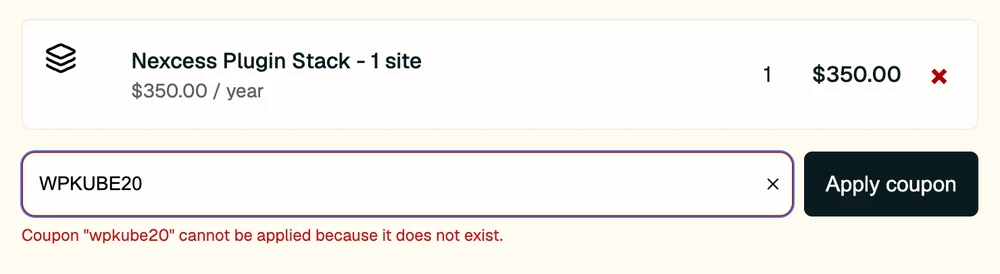
The Nexcess cart where LearnDash is sold. WPKUBE20, the code Google’s AI Overview names, is rejected and the total stays at $350.00.
How to spot a stale LearnDash coupon page
Many of the pages ranking for this search give themselves away within a few lines. Watch for these:
- It lists $199, $399 and $799 plans. WPKube still prices LearnDash as Basic $199, Plus $399 and Pro $799. That structure is gone. The page also lists the 20% saving on Basic as “~$29.80”, while its own Plus and Pro lines show 20% of the price, which on $199 is $39.80.
- It records a failed test and keeps the code anyway. TenereTeam’s own checkout tests from July 2026 show WPGIZ10, WELCOME15, THANKYOU10 and DESIGNBOMBS20 all rejected. A scroll further down, DESIGNBOMBS20 still sits under “Other Active Codes.”
- It offers things a plugin can’t have. NamoBOT advertises a “Free Shipping Offer” for LearnDash, which is a download.
- It asks you to try expired codes. Saver’s tips box says “even expired ones sometimes work.” None of the 16 codes I tried got past this cart.
The same pattern showed up when we tested ThriveCart’s coupon codes: 11 codes from coupon sites, 0 that worked.
What LearnDash costs now: $350 a year for 4 products
LearnDash costs $350 a year for 1 site, and you can no longer buy it by itself. The Nexcess plans page answers that question directly: “Can I still buy just one product? No. Every plan now includes all four products, starting at $350 a year for one site.”
The Nexcess Plugin Stack runs from $350 for 1 site to $999 for 100 sites, so the 100-site plan works out to $9.99 a site when every slot is used.
| Plan | Price a year | Cost per site | What you get |
|---|---|---|---|
| 1 site | $350 | $350 | LearnDash, The Events Calendar, Give, Kadence |
| Up to 10 sites | $599 | $59.90 | The same 4 products |
| Up to 25 sites | $799 | $31.96 | The same 4 products |
| Up to 50 sites | $899 | $17.98 | The same 4 products |
| Up to 100 sites | $999 | $9.99 | The same 4 products |
Every plan renews yearly, and Kadence Security costs extra. These prices match the LearnDash pricing page and the cart.
Why coupon pages still say $199 or $259
LearnDash has changed its price twice in about a year, and the coupon pages are 1 or 2 changes behind. An archived LearnDash pricing page from November 2025 shows “From $199/year” for 1 site, $399 for 10 sites and $799 for unlimited sites.
Earlier in 2026 LearnDash moved to 3 plans called Essentials, Pro and Elite, at $259, $399 and $599 a year, and an archived October 2026 copy still shows them. Elite Content Marketer and Saver still list those plans. The live page now shows only the bundle.
The $199 figure also sits in Google’s AI Overview for this search, next to WPKUBE20 as an example code.
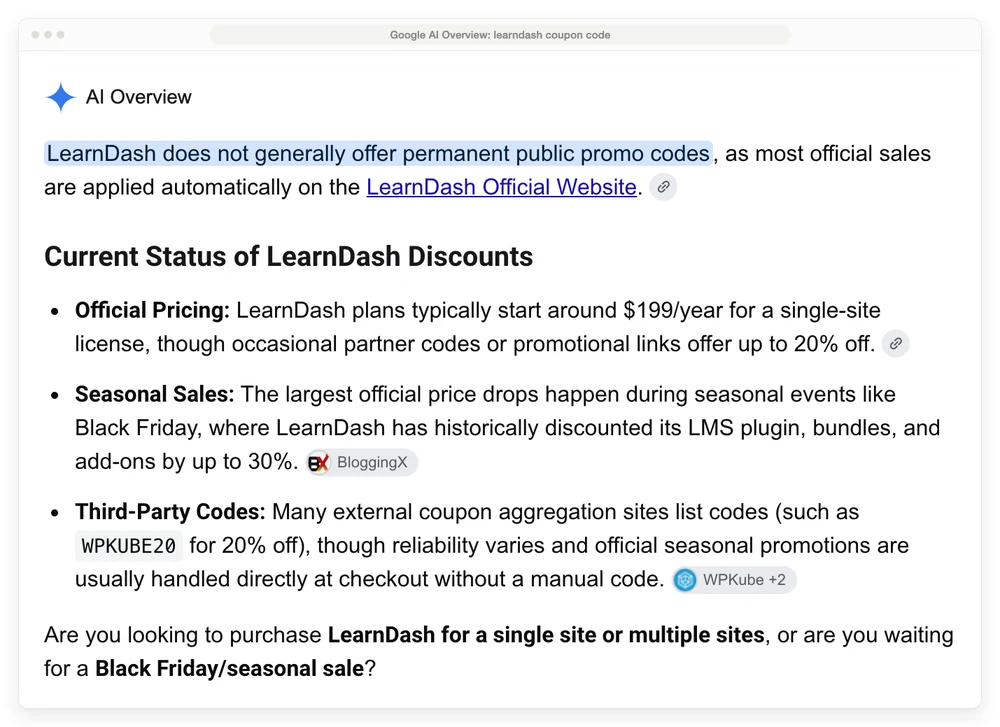
The AI Overview for “learndash coupon code.” Its $199 line is 2 price changes out of date, and WPKUBE20 doesn’t exist in the cart.
If you already own a LearnDash licence
Existing LearnDash owners keep their current plan until their next renewal on or after November 16, then move to the bundle. The Nexcess FAQ puts it this way: “Individual plugin subscriptions are being retired as licenses renew.” If your renewal date comes before November 16, the page doesn’t say what that earlier renewal costs.
Nexcess says it emails your new plan and price before the change, and renewal reminders go out 30 days before you’re charged. You can turn off auto-renewal or cancel before your renewal date.
If you don’t renew, Nexcess says your site keeps working. You stop getting support, automatic updates and security patches.
The change landed badly with some users. A r/Wordpress thread titled “LearnDash plugin community imploding” drew 81 comments, and 1 commenter put the split this way: “Most of the (understandable) outrage is coming from the segment of the market that is more price conscious, more prone to DIY, and more willing to migrate to another solution.” The original poster claimed 1 site went from $199 to $399, which doesn’t match the $350 the cart shows.
How to pay less for LearnDash without a coupon
You can pay less for LearnDash without a coupon by picking the right plan size, buying at the right moment, using the refund window, or skipping LearnDash. Here are your options:
- Running 2 or more sites? Buy the 10-site plan. $599 a year covers up to 10 sites. 2 separate 1-site plans would cost $700.
- Watch for a Black Friday sale. BloggingX reports last year’s LearnDash sale was 30% off and ran until December 3, and Elite Content Marketer says LearnDash’s seasonal discounts apply at checkout without a code. I couldn’t confirm either on LearnDash’s own pages, because its Black Friday address now forwards to the new price page. No 2026 sale is announced there yet.
- Use the 7-day guarantee. The Nexcess cart shows a “7-day guarantee” next to the checkout button. Build a test course that week and ask for a refund if it doesn’t fit. Elite Content Marketer still says 30 days, so go by the cart.
- Skip the renewal if you already own LearnDash. Your site keeps working without a renewal. You lose updates and security patches, which is a real risk on a site that takes payments.
- Start on Tutor LMS or LearnPress for free. Tutor LMS and LearnPress both have free versions on WordPress.org, with paid upgrades for more features.
One more option, for a smaller group of readers. If your “course” is really a PDF, some audio and a few private video links, you may not need a learning management system at all. CartMango can sell the downloads or bill a monthly membership, with coupons on all 3 of its plans, while the videos stay on a host like Vimeo or YouTube. I run CartMango, so weigh that, and know it doesn’t host lessons, quizzes or certificates today.
How to create a coupon in LearnDash for your students
LearnDash has a built-in coupon tool under LearnDash LMS > Coupons, and it discounts courses and groups that are set to Buy Now. Here is the setup, from the LearnDash coupons doc:
- Go to LearnDash LMS > Coupons and click Add New.
- Add a title, then type the code your students will enter.
- Pick the Type, Flat Rate or Percentage Off, and set the Amount.
- Set the Number of Redemptions (0 means unlimited), plus a Start Date and End Date.
- Choose all courses, all groups, or specific ones, then click Publish.
Your student clicks Take This Course, registers or logs in, and lands on a purchase page. They type the code there and click Apply Coupon before paying. The limit is in the doc too: “LearnDash coupons only apply to courses or groups set to Buy Now. They do not work for recurring courses or groups.” For anything that bills more than once, you need a different coupon tool.
A LearnDash site has 3 places to make a student coupon, and only the LearnDash one is limited to one-time Buy Now purchases.
| Coupon tool | Where you make it | Discount types | What it covers |
|---|---|---|---|
| LearnDash Coupons | LearnDash LMS > Coupons | Flat rate or % off | Buy Now courses and groups only, nothing recurring |
| MemberDash Coupons | MemberDash > Coupons | Dollar amount or % off | The memberships you pick, with dates and a usage limit |
| WooCommerce coupons | WooCommerce’s coupon screen | WooCommerce’s own types | Courses sold as WooCommerce products |
MemberDash is the membership tool built into LearnDash, and LearnDash’s page says it is “included in every LearnDash plan.” The WooCommerce route needs LearnDash’s WooCommerce add-on, and its doc says recurring billing there also needs the WooCommerce Subscriptions add-on. Our guide to WooCommerce coupon plugins covers what WooCommerce does for free and what the paid plugins add.
When the LearnDash coupon field doesn’t show up
3 setups make students miss the coupon box:
- The course is set to Recurring. LearnDash coupons skip subscription courses entirely. Use a MemberDash coupon instead.
- Registration isn’t set up. The doc says coupons work with LearnDash’s registration flow, so “you must have the registration option enabled and the registration pages configured” for new users.
- The course is sold through WooCommerce. Your buyer checks out in WooCommerce, so make the code in WooCommerce’s coupon screen.
Other WordPress membership plugins do this differently: MemberPress ships its own coupon tool, while WishList Member coupons lean on Stripe or a connected cart.
FAQ
Is there a free version of LearnDash?
No. Every LearnDash plan is part of the paid Nexcess Plugin Stack, starting at $350 a year for 1 site, and Nexcess confirms you can’t buy LearnDash alone. The LearnDash page offers a live demo you can try first. If you need free, Tutor LMS and LearnPress both have free versions on WordPress.org.
How can I get a LearnDash promo code?
None of the 16 codes I tested exist in LearnDash’s cart, so there’s no working code to grab right now. The confirmed saving is the 10-site plan if you run 2 or more sites. A Black Friday sale is possible but not announced, and the 7-day guarantee lets you try LearnDash before you’re locked in. Treat TenereTeam’s 70% headline, or any like it, as unproven until the cart agrees.
Is LearnDash a good LMS?
It fits people who sell courses on their own WordPress site and will use what $350 a year now buys. LearnDash’s page lists quizzes with 8 question types, certificates, group seats and built-in memberships, and claims 100K active installs. The catch is price: $350 a year buys 4 products whether you use 1 or all 4, and that change has upset some long-time users.
Does LearnDash have a Black Friday sale in 2026?
Nothing is announced on LearnDash’s price page yet. BloggingX says last year’s sale was 30% off and ran until December 3, and Elite Content Marketer says LearnDash’s seasonal discounts apply at checkout without a code. LearnDash’s own pages no longer show last year’s offer, so treat those numbers as reported, not confirmed.
Do LearnDash coupons work on subscriptions?
No. LearnDash’s coupon doc says they “do not work for recurring courses or groups.” For a recurring membership, create the coupon in MemberDash, which LearnDash’s page says is included in every plan. If you sell through WooCommerce, use WooCommerce’s coupons.
Will my old LearnDash licence keep its price?
Until your next renewal on or after November 16. From then Nexcess moves you to the bundle at the bundle price, and its FAQ says single-product plans “are being retired as licenses renew.” If you renew before November 16, the page doesn’t say what you’ll pay. Reminders go out 30 days before you’re charged.
Selling lessons without paying for 4 products
Hunting for a LearnDash coupon code ends at $350 a year for 1 site, with no code to bring it down. That buys a full course plugin plus an events calendar, a donations plugin and Kadence’s theme tools. If your students need quizzes, certificates and progress tracking on your own site, it can still be fair value.
If what you really sell is downloads like PDFs and audio, or a monthly membership, CartMango takes one-time payments and subscriptions, with coupons on every plan. CartMango doesn’t host courses yet: course hosting and community are planned for October 2026 on its $30 a year plan.
CartMango is free right now, and paid plans start in November 2026 from $10 a year, with no cut of your sales. If you ever leave, the subscriptions you created there keep paying you.
About the Author

👋 I’m Welly, founder of CartMango (the site you’re on), a checkout platform for digital product sellers. We’ve previously processed $179M+. I also run BirdSend (email marketing tool, 3.1B+ emails sent). On the side I show other non-techie digital sellers how I use AI workflows to automate 50%+ of my operations. Find me on LinkedIn.
Related Reading
- MemberPress Coupon Code: the code that is already applied at MemberPress’s checkout, and how MemberPress coupons work for your members
- WishList Member Coupon Code: the 1 code that works, and why WishList Member’s coupon box sometimes disappears
- Teachable Coupon Code: no public code on Teachable either, and the yearly discount that does work
- WooCommerce Coupon Plugin: what WooCommerce does for free and what a coupon plugin costs in year 2
- Paid Memberships Pro Pricing: another WordPress membership plugin, priced plan by plan