

$4.70 is the median asking price for an Excel template on Etsy’s first page of results, measured on 29 July 2026. Most people sell Excel templates on marketplaces like Etsy, or through their own checkout with a tool like Gumroad, Payhip, Sellfy or CartMango. At that price, a platform’s flat per-sale fee costs more than its percentage does.
Most guides on this topic tell you to charge at least $19, and to move off Etsy so you keep more of your money.
I went and measured the market before writing this. On Etsy’s first page for “excel template”, 38 of the 69 listings I counted were priced under $5. Not one was above $30.
So the advice and the market are describing 2 different businesses. Price changes which platform wins, and it changes it a lot.
What follows is the real fee arithmetic at the price these things actually sell for, a licence question that none of the top-ranking pages mention, and how to build a template that earns its way out of the bargain bin.
Key Takeaways
- The median Excel template on Etsy’s first page sells for $4.70, and 94% of listings run a permanent discount off an inflated “original price”.
- Gumroad takes 30% of a $4.70 sale once card processing is added, against Etsy’s 19%, which is the opposite of what Google’s AI Overview says.
- Sellfy’s $29 a month needs about 64 sales a month before it beats staying on Etsy at the median price.
- Microsoft’s licence terms bar Office Home and Student editions from “commercial, non-profit, or revenue-generating activities”. Check File then Account.
- Raising your price from $5 to $25 does more for your margin than any platform switch, because the fixed per-sale fees stop mattering.
If you want the shorter version of the mistakes that cost solo sellers the most money, the free 5-day Online Selling Mistakes Challenge covers the 5 that come up most.
What Excel templates actually sell for
I ran the search a buyer would run. On 29 July 2026 I pulled Etsy’s first page of results for “excel template” and recorded every unique listing price. 69 listings, all in US dollars.
The median was $4.70. The average was $6.14, dragged up by a handful of bundles. The cheapest was $0.50 and the most expensive was $28.96.
| Price band | Listings | Share | Running share |
|---|---|---|---|
| Under $5 | 38 | 55% | 55% |
| $5 to $15 | 25 | 36% | 91% |
| $15 to $30 | 6 | 9% | 100% |
| Over $30 | 0 | 0% | 100% |
91% of the front page sits under $15. Nothing at all sits above $30.
Now compare that against the advice on the pages ranking for this exact search.
Sellfy’s guide says “Never start under $19” and puts simple templates at $19 to $29. Kajabi’s guide puts basic budgeting templates at $5 to $15. Payhip’s page says anything from a couple of dollars up to $50 and above.
Only one of those matches what buyers are being shown.
The price data gives away a second thing. 65 of the 69 listings were displaying a discount off a higher “original price”, and 22 of those were exactly 50% off.
A $0.99 budget planner marked down from $1.98. A $3.99 task tracker marked down from $7.98. A $16.69 listing marked down from $33.39.
Those markdowns are permanent, not seasonal. If you list at a flat $19 with no strike-through, yours is the only shop on the page showing full price, and shoppers here have been trained to wait for the red number.
$19 is still reachable. It is a position you have to earn with a product the page does not already have, which is the whole job of the sections below. For the general version of this decision, our guide on how to price digital products walks through the same trade-off across product types.
What each platform actually takes at that price
Google’s AI Overview for this search, captured on 29 July 2026, tells sellers that Etsy has “low listing fees ($0.20 + 6.5% transaction fee)” and that “Sellfy or Gumroad allow you to keep more of your profits”.
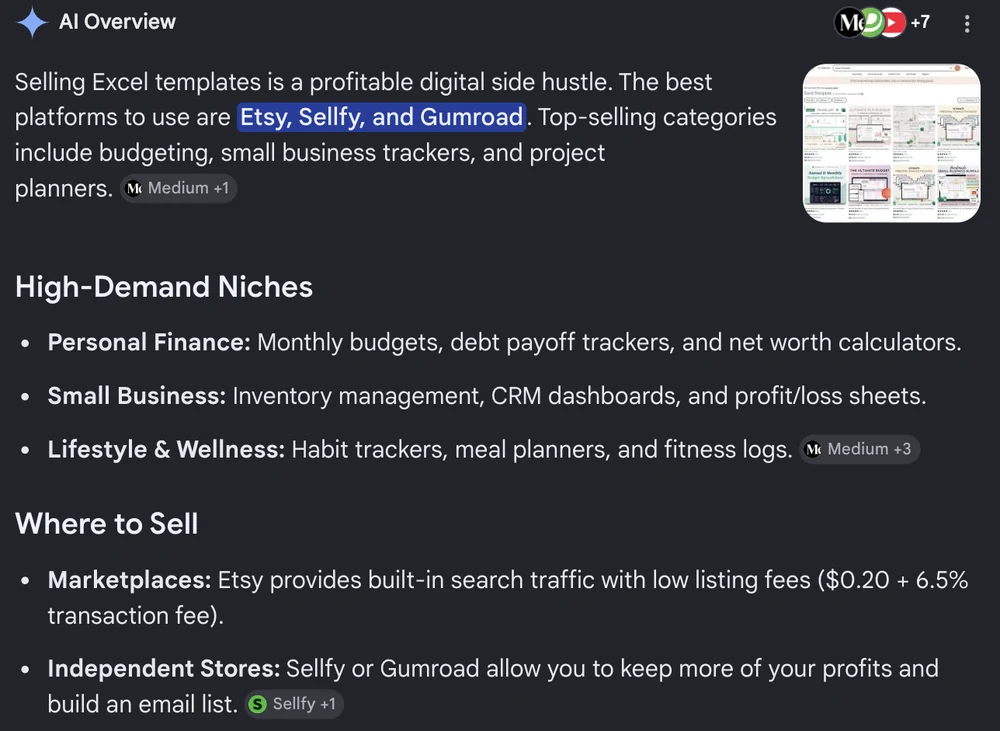
Both halves of that are worth checking, and neither survives it.
The Etsy figure leaves out payment processing. Etsy’s own fees policy lists the $0.20 listing fee and the 6.5% transaction fee, and its payments policy adds 3% + $0.25 for a US bank account on top. That third fee is roughly 43% of what Etsy takes on a $4.70 sale, and the AI Overview does not mention it exists.
The second half is worse, because it points sellers somewhere more expensive. Here is the same $4.70 sale run through 5 options, with each platform’s own fees as of 29 July 2026 plus whatever card processing it passes through, at Stripe’s US rate of 2.9% + 30c.
| Where you sell | Platform cut | Card processing | Total fee | You keep |
|---|---|---|---|---|
| Etsy | $0.51 (6.5% + $0.20 listing) | $0.39 (3% + $0.25) | $0.90 | $3.80 |
| Gumroad | $0.97 (10% + $0.50) | $0.44 (2.9% + $0.30) | $1.41 | $3.29 |
| Payhip free plan | $0.24 (5%) | $0.44 (2.9% + $0.30) | $0.68 | $4.02 |
| Sellfy Starter | $0 per sale, plus $29 a month | $0.44 (2.9% + $0.30) | $0.44 plus the monthly | $4.26 |
| CartMango | $0 per sale, free until October 2026 then from $10 a year | $0.44 (2.9% + $0.30) | $0.44 plus the yearly | $4.26 |
I should be upfront that CartMango is my own platform, built for solo digital sellers who want to keep the margin on small-ticket products like these. Its row is calculated exactly the same way as every other row. The one thing our own pricing page does not spell out in that cell: $10 is the base tier, and the $20 and $30 tiers exist because they include more, so check which one you would actually need.
One thing that table cannot show you: Etsy is the only row there that brings you buyers. The others give you somewhere to take money, and you supply every visitor yourself. Gumroad’s Discover marketplace is the partial exception, and it charges 30% a sale for the privilege.
Gumroad’s pricing page advertises 10% + $0.50 and says there are no hidden fees, which is half the story. Card processing of 2.9% + $0.30 is charged on top, so that $4.70 sale really costs $1.41. We broke the whole thing down in Gumroad’s real per-sale cost. The Discover rate above is the exception: its flat 30% does include processing.
Payhip’s own FAQ is explicit that Stripe and PayPal “will still charge at their standard rates once they complete a transaction”, on every plan. Sellfy’s FAQ says the same.
So Gumroad takes 30% of that $4.70 sale. Etsy takes 19%. Google’s AI Overview has this exactly backwards.
Gumroad also stays more expensive at every price, not just this one. The gap works out to $0.35 plus 3.4% of the price, so at $50 Gumroad costs $2.05 more than Etsy, and at $100 it costs $3.75 more. There is no crossover point.
Sellfy is a different trap. Per sale it genuinely is cheaper than Etsy, by about 46 cents at the median price.
But you are paying $29 a month for that privilege, so you need roughly 64 sales a month before the subscription pays for itself against just staying on Etsy. Below that you are paying for the pleasure of keeping more of very little.
The pattern underneath all of this is simple. Percentage fees scale with your price. Flat fees, monthly fees and fixed processing charges do not. At $4.70 a sale, the fixed costs are the whole game.
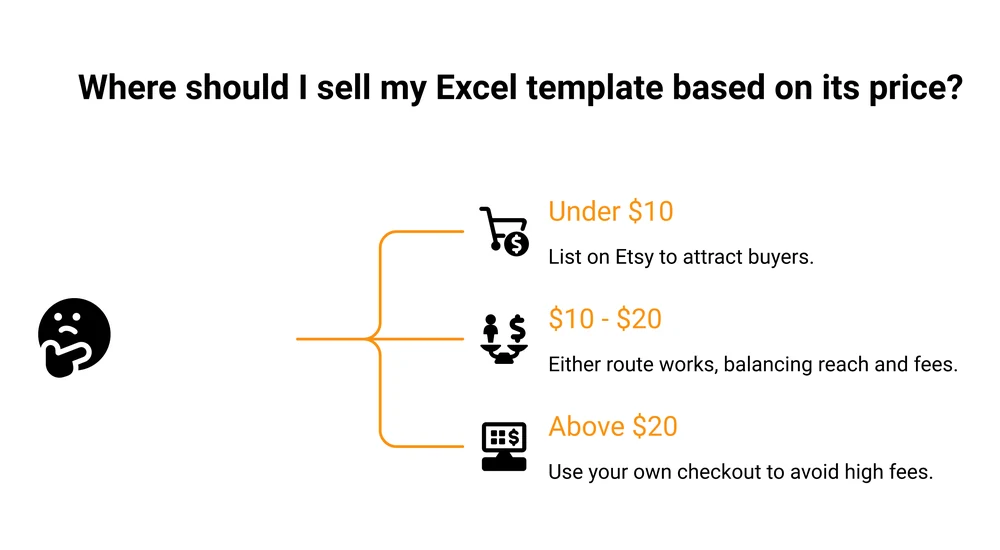
So where should you actually list it
The honest answer changes with your price, which is why nobody selling you a platform gives you a straight one.
Under $10 a template, Etsy usually wins on traffic, not on fees. Its cut is the second-highest on that table, and it is the only option there that brings you buyers.
A checkout tool of any kind gives you a place to take money, not an audience. If you have no traffic, 19% of a sale beats 9% of nothing. What Etsy really keeps from a digital sale is worked through in more detail in our post on selling digital products on Etsy.
Above about $20, own checkout pulls ahead fast, because the percentage fees start to dominate and your own site or a sales page can carry a product this specific.
3 Etsy details worth knowing before you commit, all from their fees policy:
- The $0.20 listing fee is not a one-off. On a multi-quantity listing, which is how digital downloads are normally set up, it renews at $0.20 after each item sells. It is a per-sale cost dressed up as a setup cost.
- Offsite Ads are optional at 15% only while your shop is under $10,000 in sales over 365 days. Cross that line once and you pay 12% on attributed orders for the lifetime of your shop, with no opt-out.
- Etsy now says you may be required to pay a one-time set-up fee to open a shop. The policy does not state the amount.
One more thing. Easy Digital Downloads’ guide, which ranks on page 1 for this search, still points readers at Spreadsheet Nut and quotes its 40% commission.
I checked on 29 July 2026: spreadsheetnut.com is now a parked domain listed for sale on GoDaddy Auctions. The marketplace is gone. Check that a platform still exists before you build a business on it, and see our roundup of Etsy alternatives for the ones that do.
If you would rather skip a storefront entirely, selling without a website covers the setups that work with just a checkout link.
Build a template that earns more than $5
The top-voted answer on the r/excel thread ranking for this search is not encouraging, and it is the most useful thing on that page. The top comment, sitting at 515 upvotes when I checked on 29 July 2026, says 99% of the spreadsheet templates professionals make apply to work-specific and layout-specific situations, and that none of the ones they had built would help anyone outside their own organisation.
They are right, and it explains the $4.70 median. The templates that are easy to build are generic, generic templates all compete on the same crowded page, and the only lever left is price.
So start from a different question. Whose expensive, repeated, annoying job does this template take away?
The bands on that first table map almost exactly onto how specific the buyer is:
- Under $5 goes to anyone: budget planners, habit trackers, to-do lists. Enormous audience, no pricing power.
- $5 to $15 goes to a role: a freelancer’s invoice tracker, a small shop’s stock sheet.
- Above $15 goes to a person with a number in their head: a rental property analyser, a construction bid sheet, a commission calculator for a specific industry.
That last group is where the numbers finally work in your favour. Someone weighing a six-figure rental purchase does not blink at $39 for a sheet that models the cash flow properly.
On my daughter’s birthday a few years back we all went out with my in-laws, and after dinner everyone ordered gelato.
The large was about $1 more than the regular. Every single one of us upsized, and we were already full. I sell online for a living and I still did it, because the jump in price was small and the extra value was obvious.
The lesson transfers narrowly, and narrow is enough: people pay more when the extra value is obvious at the moment they decide. Building a $25 budget system with a dashboard, a debt payoff model and a 12-month forecast takes maybe a weekend more than a $5 budget tracker, and a buyer can see exactly what the extra buys. It also competes with far fewer listings, because most sellers stop at the tracker.
The same reasoning applies across template types. Our guide on selling Notion templates hits the same wall from a different direction.
Make it usable by someone who is not you
A buyer who opens your file and cannot tell where to type assumes it is broken. That is the refund request you want to design out, and it has nothing to do with whether your formulas work.
A few things fix nearly all of it:
- Put a README tab first. What the sheet does, what to fill in, what the colours mean, how to fix the 2 or 3 things that commonly go wrong.
- Colour your input cells. One colour, used only for cells the buyer types into. It removes the biggest source of “where do I start”.
- Lock everything else. Sheet protection on the formula cells stops a buyer breaking your product and blaming you for it.
- Skip macros where you can. A .xlsm file triggers a security warning the moment it opens, will not run in Excel for the web, and does nothing at all in Google Sheets. That is a lot of friction for automation most buyers will not notice.
- Ship both formats. Export an .xlsx and a Google Sheets version. It costs you an hour and removes the “will this work for me” hesitation on every listing.
Record a 2-minute screen walkthrough while you are at it. It shows the sheet working before anyone pays, which a static listing photo cannot do.
Delivering a Google Sheets template
This is where beginners get stuck, and it catches people out on Etsy in particular, because Etsy accepts static files only. You cannot upload a live Google Sheets link as the product.
The workaround is simple once you know it. Make your Google Sheet, then take its normal URL and swap the word edit at the end for copy:
https://docs.google.com/spreadsheets/d/YOUR_SHEET_ID/edit
https://docs.google.com/spreadsheets/d/YOUR_SHEET_ID/copy
Anyone opening the second link is prompted to save a fresh copy into their own Google Drive. Your master file stays untouched.
Put that link inside a 1-page PDF with your branding and a short “how to open your template” note, and upload the PDF as the Etsy download. On your own checkout you can email the link directly.
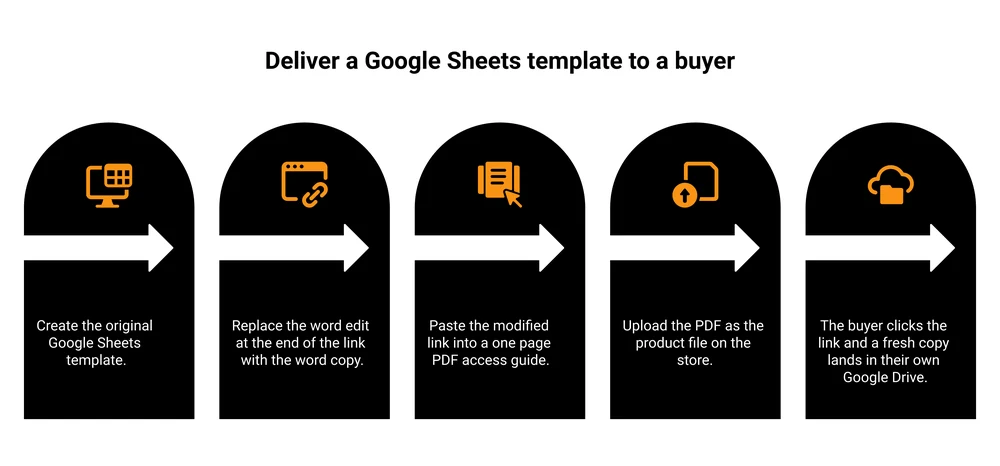
Set your sheet’s sharing to “anyone with the link can view” before you test it, and buy your own product once to check the whole path works. For the sharing side of this, our post on protecting digital downloads covers download limits and unique links.
Check your Excel licence before you sell anything
Not one page ranking for this search mentions this, and it is the kind of thing that is cheap to check and awkward to discover later.
Microsoft’s Software License Terms for Office 2019 Desktop, published by Microsoft, include a section titled “Limited rights versions”. It reads: “You may not use the following versions of the software for commercial, non-profit, or revenue-generating activities.” The list that follows includes Academic or University, Military Appreciation, and Home and Student.
Selling templates is a revenue-generating activity. So if the Excel you are building in is an Office Home and Student edition, you are working outside the terms of that licence.
A Microsoft-badged moderator gave the same answer on a Microsoft support thread in May 2026, to a seller asking about listing PowerPoint files. Commercial permission depends on which licence is actually activated, and Home and Student does not cover it.
Checking takes 10 seconds. Open Excel, click File, then Account, and read the product name under Product Information. Home and Business, Professional, Microsoft 365 Personal and the Microsoft 365 business plans all cover commercial use. Home and Student does not.
2 related things from the same thread, both worth a moment:
- Microsoft’s premium images, icons and stickers can stay inside the file you sell, and inside exports like a PDF. What you cannot do is pull them out and sell them as standalone assets.
- If you built the template on your employer’s time or for a freelance client, they may own it. Get that in writing before you list it.
FAQ
Can you make money selling Excel templates?
Yes, though the honest version is that most listings are small. At the $4.70 median price on Etsy’s first page, you keep about $3.80 per sale after fees, so 100 sales a month is roughly $380. The arithmetic improves fastest by charging more per sale, not by chasing more sales at $4.70.
How much do Excel templates sell for?
On Etsy’s first page of results for “excel template” on 29 July 2026, the median asking price was $4.70 across 69 listings. 55% were under $5 and none were above $30. Higher prices do exist in specialist niches like real estate analysis. They just do not surface on a general search.
Where can I sell my Excel templates?
Etsy, Gumroad, Payhip, Sellfy, Creative Market, or your own checkout. Etsy is the only one of those that brings you buyers, which is why it usually wins under $10 a template. It takes about 19% of a $4.70 sale, and that still beats no sale at all. Above $20, keeping more of each sale on your own checkout matters more than borrowed traffic.
Do people still buy Excel templates?
Yes. Excel and Google Sheets remain the default tools for anyone tracking money, stock or time, and a good template still saves a buyer hours. The bulk of what sells sits in budgeting, small business tracking and project planning, which is what filled the first page of results when I looked.
People sell spreadsheets hoping for passive income. The file needs no more work once it is built. Getting people to find it needs work every week.
Is it legal to sell Excel templates?
Selling templates you built yourself is legal, and you owe Microsoft nothing for the formulas or layout you designed. 2 limits apply. Office Home and Student licences bar revenue-generating use, and templates built for an employer or client may belong to them.
The one decision that changes the maths
If your template is worth $5, the fixed fees will eat a fifth of every sale and no platform switch will save you. If it is worth $25, the fees stop mattering and you get to choose a platform on its merits.
So build for the second one. Pick a buyer with a number in their head, solve the job they are already paying for in time, and price it like it is worth the hour it saves them.
CartMango is the checkout I built for solo digital sellers, and it is built around raising what a single buyer is worth. Order bumps and upsells sit at the checkout, so the person already buying your budget tracker can add the full system on the way out. It is free until October 2026, then plans start at $10 a year.
About the Author

👋 I’m Welly, founder of CartMango (the site you’re on), a checkout platform for digital product sellers. We’ve previously processed $179M+. I also run BirdSend (email marketing tool, 3.1B+ emails sent). On the side I show other non-techie digital sellers how I use AI workflows to automate 50%+ of my operations. Find me on LinkedIn.
Related Reading
- How to sell Notion templates: the same pricing wall in a different template market
- How to price digital products: the method behind moving a product out of the bargain band
- How to make printables to sell: another low-ticket category with the same fee problem
- Gumroad pricing: for readers ready to compare a flat per-sale fee properly