

Clipart sells in 2 places. Marketplaces like Etsy, Creative Fabrica and Creative Market bring you buyers and keep roughly 13% to 50% of each sale. Your own checkout keeps about 95% but brings you nobody. Buyers want matching sets, transparent PNGs and SVGs, and a commercial-use licence they can trust.
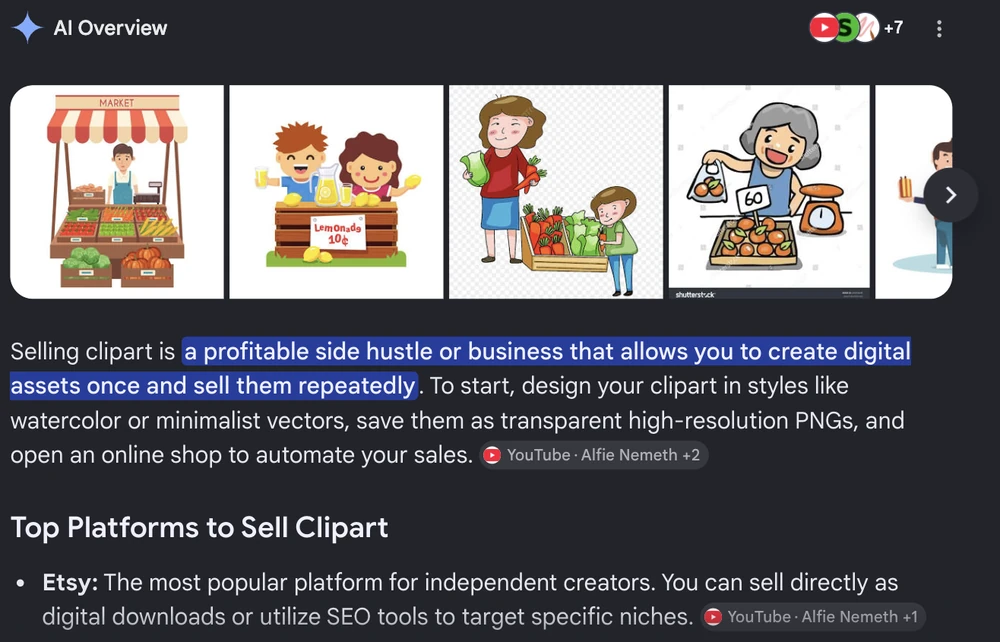
Type “sell clipart” into Google today and the first thing you get is a promise. Google’s own AI summary calls it a profitable side hustle. Under it sit videos titled “$10k/Month Selling Seasonal AI Clipart” and “$400K+ on Etsy”.
None of them mention what happened to the one creator whose numbers somebody outside actually checked.
In 2023 a YouTuber called Patryk Marketer built exactly that business. Midjourney bundles, listed on Etsy, real figures posted every month. 4 months in he published a video called “You Won’t Make Money Selling A.I. Art On Etsy… Let Me Explain.”
That correction is nowhere on page 1. So this guide is the version with the numbers left in: what clipart buyers pay for, what each platform takes out of a sale, whether you can even own an AI-generated set, and which marketplaces now make you declare that you used AI.
Key Takeaways
- Marketplaces cost more than the headline rate. A $5 clipart pack on Etsy loses about $0.93 once you add listing, transaction and US processing fees.
- Creative Market and Creative Fabrica take half. Both pay 50% on sales their own traffic sends you. Creative Fabrica pays 75% only on buyers you bring yourself.
- AI clipart is legal to sell but hard to own. The US Copyright Office says work generated from a prompt alone is not protected by copyright.
- 2 marketplaces already make you declare it. Etsy requires AI disclosure in your listing description. Creative Market puts a visible AI label on the product page.
- Buyers distrust cheap bulk packs. Designers on r/Etsy say they skip thousand-image bundles and pay real money for small, clearly licensed sets.
Before you go further: most first-time sellers lose money to the same handful of avoidable mistakes. The free 5-day Online Selling Mistakes Challenge walks through them, 1 a day, from someone who has processed $179M+ in sales.
What clipart is, and who actually buys it
Clipart is a set of ready-made illustrations sold as files a buyer drops into their own design. A watercolour mushroom. A line-art coffee cup. 20 matching autumn leaves. Nobody hangs clipart on a wall. It goes onto something the buyer is making.
That distinction drives every decision below, so let’s be concrete about who they are.
On a 2025 r/Etsy thread, a UX designer explained they were sourcing illustrations for a notebook with a different image on every page, and that visual consistency mattered more than anything. Other commenters in that thread were buying for junk journals and for merchandise they planned to sell on.
That second group is the one to notice. Once clipart goes onto something the buyer sells, they need a licence that covers merchandise, and a commenter in the thread said exactly that.
Your customer is usually a maker with a deadline. They need 20 images that look like they came from the same hand, and they need to know they are allowed to sell whatever they make with them.
That tells you what to supply:
- Transparent PNGs at 300 DPI. The default. Sits on any background, prints cleanly.
- SVG files. Needed by anyone with a Cricut or Silhouette cutting machine, which is a separate and willing audience.
- A set, not a single image. Nobody buys 1 mushroom. They buy 20 mushrooms that match.
- A licence in writing. More below, because this is where beginner shops fall apart.
If you are weighing clipart against other illustration work, the wider digital art market has routes clipart does not, including print-on-demand and one-off originals.
The AI clipart question page 1 skips
Every guide ranking for this keyword tells you to make clipart. The videos tell you to generate it in bulk with Midjourney. Not one of them answers the question that decides whether you have a business: if a machine made it, is it yours?
What the Copyright Office actually says
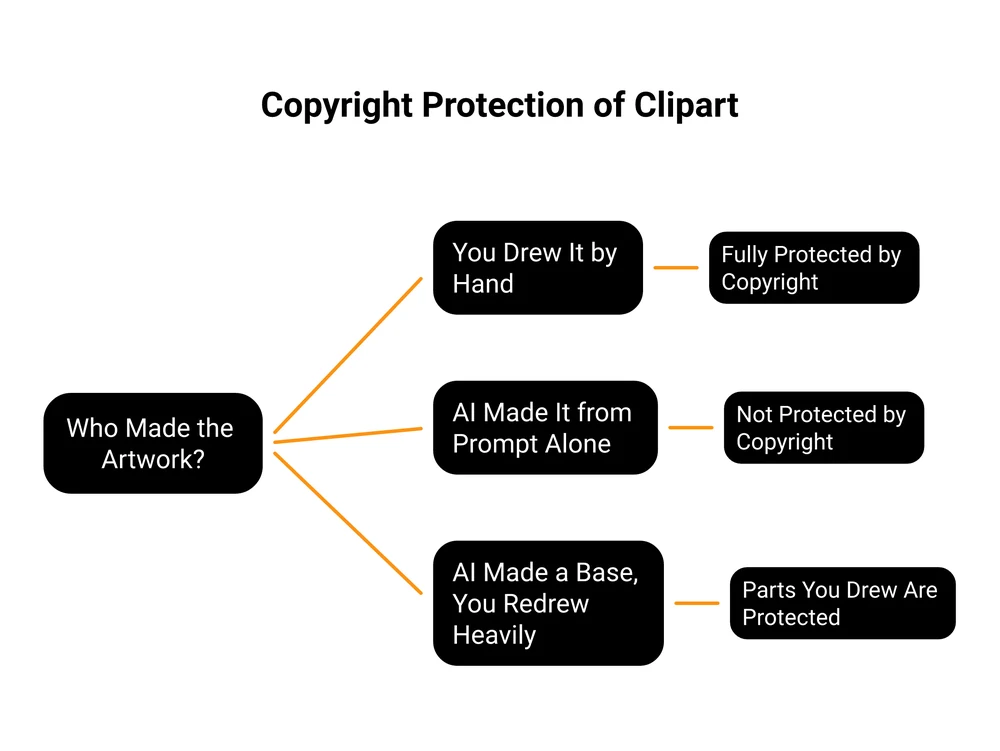
The US Copyright Office published a formal policy statement on this in March 2023 and reaffirmed it in a January 2025 report. Its position is that copyright protects human authorship, and a prompt is not authorship.
The 2023 statement is blunt about image generators. When an AI tool receives only a prompt and produces the image, it says, the traditional elements of authorship are determined and executed by the technology rather than the human user.
Prompts, in its words, work more like instructions to a commissioned artist. You say what you want depicted. The machine decides how.
The January 2025 report reached the same conclusion after more than 10,000 public comments. AI output can be copyrightable where a human used AI as a tool and shaped the expressive elements, it says, but “Prompts alone, however, at this stage are unlikely to satisfy those requirements.”
The practical translation is narrower than the scare headlines.
You can sell AI clipart. No law stops you, and Etsy and Creative Market both allow it outright.
You just cannot stop anyone copying it. Copyright is the thing that lets you send a takedown notice. If your files carry none, the commercial-use licence you sell is a promise about something you do not own, and a competitor who reuploads your entire pack has broken nothing.
Editing changes the answer. The Office is explicit that a human who modifies AI output far enough, or arranges it creatively enough, gets protection for those human parts. Generate a base, then redraw it, recolour it, rebuild it as vectors, and you own the work you did.
The marketplaces are already forcing the issue
This stopped being only a legal question. It now shows up on your product page.
Etsy allows it, with a condition. Its Creativity Standards, updated June 2025, list “Seller-prompted AI creations” as a legitimate category and require that sellers disclose in the listing description when an item is created with AI. The same policy bans “AI prompt bundles” outright.
Creative Market labels you. At upload it asks a yes or no question: was this product or one of its key features primarily created using generative artificial intelligence tools? Answer yes and a visible AI label goes on the listing. Creative Market has said a buyer-facing search filter follows once enough of the catalogue is classified.
Read that last part slowly if you are planning a volume play. A search filter means buyers will be able to exclude you.
The one set of numbers anyone checked
Back to Patryk Marketer, because his is the only case on this topic where an outside journalist went through the figures.
In July 2023, Artnet News reported that he sold clipart in bundles of 20 PNG files made with Midjourney, using an analytics tool to spot what was selling and then generating a variation on it. The result: 216 orders in March from 23 listings, about $490 in revenue, and roughly $207 in profit once Etsy fees and marketing came out.
That $207 came from the month he was posting about as a win, and he said so himself at the time.
His own video titles carry the rest. March: “How I Got 200 Orders in My First Month on Etsy Selling A.I. Art.” May: “My Etsy A.I. Shop Is Failing … What I Am Doing To Fix It.” July: “You Won’t Make Money Selling A.I. Art On Etsy… Let Me Explain.”
He told Artnet that Etsy trends moved faster than he could keep up with, and that generating something saleable was not passive at all. He now pays 2 assistants a few hundred dollars a month each to keep the output flowing.
Credit to him for publishing the failure as loudly as the win, because almost nobody in this niche does. The strange part is that searching “sell clipart” today still fills the page with monthly income figures, and his correction is not on it anywhere.
Where to sell clipart, and what each one takes
There are 2 real models. A marketplace brings you buyers and takes a cut. Your own checkout takes almost nothing and brings you nobody. Plenty of sellers run both.
Every figure below was read from each company’s own pricing or policy page.
| Platform | What it takes per sale | AI clipart rules | Who finds your buyer |
|---|---|---|---|
| Etsy | $0.20 listing + 6.5% transaction + 3% and $0.25 US processing. Offsite Ads adds 15%, dropping to 12% but becoming compulsory for life once you pass $10k in a year | Yes, and you must disclose it in the description | Etsy, mostly |
| Creative Fabrica | 50% on sales it refers, 75% on buyers you refer. Subscriber downloads pay a small recurring royalty | No disclosure rule on its seller page. Check current terms | Creative Fabrica |
| Creative Market | 50% by default, varies by shop. It covers card processing | Yes, and it adds a visible AI label | Creative Market |
| Canva Elements | A royalty each time a user places your graphic in a design, not per sale. Rate is not published | Application and approval needed, every upload reviewed | Canva |
| CartMango | 0% platform commission. You still pay your processor, e.g. Stripe at 2.9% + $0.30 in the US | Your call | You |
I should say it plainly: CartMango is mine, so read that row as a founder showing you the maths rather than a neutral referee. It is free until October 2026 and starts at $10 a year afterwards, which is why the row looks like that. Own-checkout tools vary a lot, and some charge a percentage of every sale on top, so check the number rather than assuming the category is cheap.
The honest catch sits in the last column. 0% of nothing is nothing, and an own-checkout page has no browsing audience attached to it.
1 warning applies to every tool in that bottom category, mine included. A platform advertising 0% transaction fees is describing its own cut, not your total. You still pay Stripe or PayPal.
Sellfy spells this out under its own 0% badge, its pricing FAQ noting that sellers cover processing of typically 2.9% and 30 cents on top of the monthly plan. Compare like with like or the comparison means nothing.
What you keep on a $5 pack
Percentages hide things. Here is the same $5 sale carried all the way through.
| Route | Fees | You keep |
|---|---|---|
| Etsy | $0.93 | $4.07 |
| Etsy with Offsite Ads | $1.68 | $3.32 |
| Creative Market | $2.50 | $2.50 |
| Creative Fabrica, their traffic | $2.50 | $2.50 |
| Creative Fabrica, your traffic | $1.25 | $3.75 |
| Own checkout, Stripe US | $0.45 | $4.55 |
2 things stand out. Etsy is far cheaper per sale than the 50% marketplaces, which is a big part of why it dominates this category. And the gap between Etsy and your own checkout on a single $5 sale is 48 cents, which is not a reason to leave Etsy. It becomes one at volume, on a $30 bundle, or the moment you want the customer’s email address.
The full Etsy fee picture for digital products covers the parts that only bite at scale. And if the own-checkout column appeals but the website part does not, you do not need a site to sell a download any more.
An honest note on Canva. Its Element Creator program pays a royalty every time a Canva user drops your graphic into a design, which sounds wonderful until you notice there is no rate published anywhere on the creator page. You cannot forecast income from a number nobody prints.
Pick the buyer before you pick the style
Most clipart shops die from drawing something lovely for nobody in particular. The artwork is usually fine. The buyer was never chosen.
My first business, long before any of this, was organising motivational seminars with 2 partners. We had speakers, we had a product, we had a plan. We sold it to companies with no training budget.
Zero signups. We had picked the wrong WHO, and everything downstream of that was wasted: the speakers, the pitch, the follow-up calls.
Clipart punishes the same mistake faster, because its buyer is so specific. Your customer is a wedding stationer who needs 24 matching botanical elements in 1 palette. Or a primary school teacher building worksheets, a soap maker who needs label art, a scrapbooker chasing a single decade. “Florals” describes a search term, and nobody with a deadline searches that broadly.
Pick the person, then the theme, then the style, in that order. It solves your keywords for free too, because those people search in their own vocabulary rather than yours.
The licence you are actually selling
Beginners underprice the wrong thing. What the buyer pays for is permission: the right to put your artwork on something and sell it. The picture is just how that permission gets delivered.
On that same r/Etsy thread, a designer wrote that they go out of their way to find real artists, and that a 20-image pack with commercial licensing runs them $100 to $200. Another commenter described sending a DMCA takedown to a shop that had unknowingly bought stolen art inside a cheap clipart bundle. The shop had not meant to infringe. It got flagged anyway.
That is your market telling you exactly what it pays for, and it is proof rather than volume.
So write the licence down and put it inside the download. Short and readable beats a legal wall nobody finishes:
LICENCE: [Your shop name] [Pack name]

You MAY:
- Use these files in your own designs, personal or commercial
- Sell finished physical products made with them, up to [500] units
- Use them in client work, where the client receives the finished design only

You MAY NOT:
- Resell, share or give away the files themselves
- Include them in another clipart, template or bundle product
- Claim the artwork as your own original illustration

Files: [what is in the pack]
Created by: [hand-drawn / vector / AI-assisted and edited]
Questions: [your email]
That last line earns more than it looks like. Stating how the art was made is required on Etsy anyway, and saying it plainly turns a liability into a trust signal. “Hand-drawn, no AI” is a selling point to the exact buyer who will pay $150.
If the files themselves worry you, there are practical ways to protect digital downloads short of watermarking everything into uselessness.
What you really earn when you sell clipart
Clipart is sold to sellers as passive income. Away from the thumbnails, the published figures are small, slow and honest.
Illustrator Liz Kohler Brown documented her first Art Nouveau clipart pack on Creative Market and reported selling 4 sets for $144 in profit over 4 weeks. Carrie Bach wrote about passing 500 sales on her Etsy shop in around 5 months, though that shop mixes clipart with bookmarks and digital papers and she publishes no revenue figure.
A seller writing as The Texture Queen has tracked her Creative Fabrica shop publicly since 2023 and was still approaching her first $1,000 lifetime on the platform 2 years in.
At the other end, Craft Industry Alliance reported in February 2022 that Creative Fabrica seller John Bloodworth was moving over 1,000 SVG cutting files in a good week. The same article notes that subscription downloads pay only cents each, so units and income are very different numbers on that platform.
None of that argues against selling clipart. It argues for pricing to a real buyer instead of chasing volume, and for keeping more of every sale you do make. Which puts the fee table back in focus: at $144 a month, the difference between keeping 50% and keeping 95% is not a rounding error.
Working out what to charge is its own job. Our guide to pricing digital products covers the anchoring maths, and if you are comparing checkout tools seriously, the Payhip alternatives breakdown lines them up side by side.
How to package and sell clipart buyers trust
First, the thing no page-1 guide states plainly: what to draw in. Procreate on an iPad suits hand-drawn styles and exports high-resolution PNGs, but it is a raster tool, so it will not give you SVGs. For those you need a vector program: Adobe Illustrator or Affinity Designer if you are paying, Inkscape if you are not. Plenty of sellers use 2 of them, sketching in one and rebuilding as vectors in the other.
The rest of the making is what every other guide covers, so here is only the part that changes the sale.
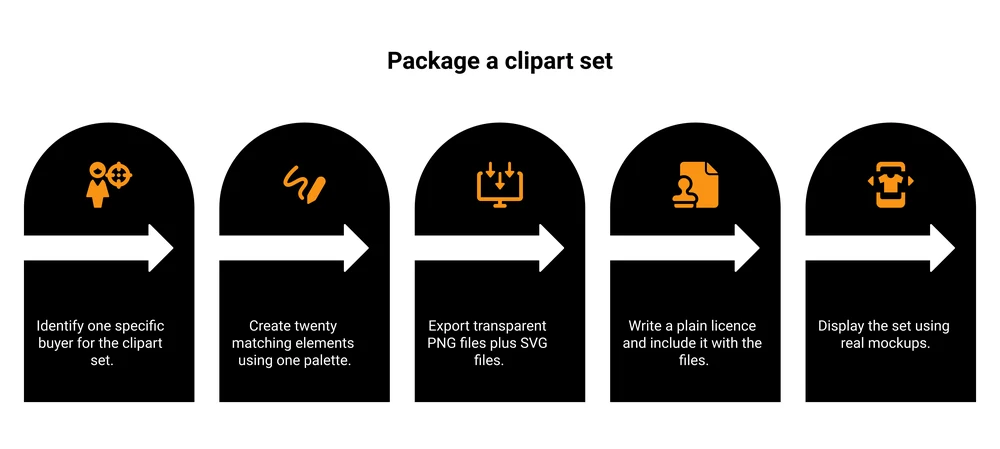
- Build 15 to 30 elements around 1 idea. 1 palette, 1 line weight, 1 mood. Consistency is the product.
- Export transparent PNGs at 300 DPI, plus SVGs if the theme suits cutting machines.
- Zip it with a real folder structure, PNG and SVG separated, licence included as a PDF.
- Make mockups, not a grid. Show it on an invitation, a mug, a worksheet. People buy the outcome.
- Name files properly.
autumn-leaf-01.pngbeatsUntitled-1-final-FINAL.pngand quietly earns better reviews.
Then the part sellers skip. Clipart does not sell itself, on any platform.
Pinterest does the heavy lifting for this category, because your product is already an image and your buyer is already there hunting for exactly this. Pin the mockups, never the file grid. Write listing titles in your buyer’s words rather than design vocabulary.
And start collecting emails from day 1. Every marketplace can suspend you, change its cut, or bury your listing. A list cannot be taken away from you.
FAQ
Can you make money selling clipart?
Yes, though published figures are modest. Real reported results run from $144 profit in a month on 1 Creative Market pack to roughly $207 profit from 216 Etsy orders. Sellers charging $100+ for small, clearly licensed sets appear to do better than sellers competing on volume against thousands of AI bundles.
Where can I sell my clipart?
Etsy is the biggest marketplace by buyer traffic. Creative Fabrica and Creative Market are the specialists, both taking 50% on sales they refer. Canva’s Element Creator program pays royalties on usage rather than on sales.
Your own checkout keeps the most and brings the least traffic. There are also other marketplaces beyond Etsy worth a look.
How do you make clip art to sell?
Pick a specific buyer, then design 15 to 30 matching elements in 1 palette and line style. Procreate suits hand-drawn work, while Illustrator, Affinity Designer or the free Inkscape give you the vectors needed for SVGs. Export transparent PNGs at 300 DPI, write a plain-English commercial licence, zip it with a clear folder structure, and show it in real mockups rather than a grid of files.
Can you sell clipart on Amazon?
Not as a digital download. KDP, Amazon’s self-publishing arm, publishes eBooks, paperbacks, hardcovers, audiobooks and low-content books, while Merch on Demand prints your artwork onto physical products. Neither hands a buyer a graphics file. You can put your own clipart on products you sell there, but Etsy, Creative Fabrica and Creative Market are the routes for selling the files themselves.
How much does clipart cost?
Bulk packs on Etsy go for a few dollars for hundreds of images. At the other end, buyers on r/Etsy report paying $100 to $200 for a 20-image set from a named illustrator with commercial licensing. That spread reflects how much a buyer trusts the licence, which is exactly the gap a careful seller can sell into.
Is the clipart market too saturated now?
Saturated at the bottom, thin at the top. Thousands of AI bundles compete on price, which is why buyers on r/Etsy now treat a 1,000-image pack for $10 as a warning sign. The same buyers report paying $100 to $200 for a 20-image set they can trace to a named illustrator with a clear licence. Competing on volume is crowded. Competing on proof is not.
Do I have to say if my clipart was made with AI?
On Etsy, yes. Its Creativity Standards require sellers to disclose AI use in the listing description, and separately prohibit selling AI prompt bundles. Creative Market asks at upload and adds a visible AI label to your product page. Policies vary elsewhere, so check the rules before you list.
One last thing if you decide to sell clipart from your own checkout. Matching sets are the easiest upsell in digital products, because the person who just bought your autumn pack is the most likely person alive to want the winter one.
CartMango is my checkout platform, built so that second set appears at the moment they are already paying, as an order bump or a one-click upsell. Free until October 2026, then $10 a year.
About the Author

👋 I’m Welly, founder of CartMango (the site you’re on), a checkout platform for digital product sellers. We’ve previously processed $179M+. I also run BirdSend (email marketing tool, 3.1B+ emails sent). On the side I show other non-techie digital sellers how I use AI workflows to automate 50%+ of my operations. Find me on LinkedIn.
Related Reading
- How to sell digital art: the wider illustration market, including print-on-demand and originals
- Etsy for digital products: what Etsy really keeps once every fee is counted
- How to price digital products: a method for setting a number you can defend
- How to sell photos online: the same royalty question, answered for photographers
- Payhip alternatives: for readers ready to compare checkout tools properly