

Under LearnPress pricing, the core plugin costs $0, single add-ons cost $10 to $49 each, the 5-add-on Semi-Pro Bundle costs $149 and the Pro Bundle with all 32 paid add-ons costs $299, each a one-time payment for 1 site with 12 months of updates.
Renewing updates after that first year is optional and costs about 70% of the price: $209.30 a year for the Pro Bundle, $104 for Semi-Pro and $27 for a $39 add-on such as Stripe. The free plugin takes PayPal, card payments on your own checkout need a gateway add-on such as the $39 Stripe one, and hosting is a separate bill.
Your LearnPress bill comes down to which add-ons you pick. A seller who only wants Stripe card payments pays $39 once. One who also wants certificates, subscriptions and drip-fed lessons pays $156, before any renewals.
Those add-ons are separate purchases, each with its own optional yearly renewal. ThimPress, the company behind LearnPress, also prints different prices for some of them on different pages of its own site, so the number you see depends on where you look.
Below is every paid add-on at its checkout price, where each bundle starts saving money, what renewing costs, and the extras outside the plugin: a theme, hosting and a mobile app.
Key Takeaways
- The LearnPress plugin costs $0. Courses, lessons, quizzes, SCORM support and a PayPal checkout are free.
- Paid add-ons cost $10 to $49 each. Stripe, certificates, assignments and subscriptions are $39 each, and coupons with course packages cost $29.
- The $299 Pro Bundle only pays off from 8 add-ons. The 7 priciest cost $293 at today’s store prices, though ThimPress says 6.
- The $149 Semi-Pro Bundle pays off at 4 of its 5 add-ons. It holds Stripe, WooCommerce, certificates, assignments and a gradebook.
- Renewing updates is optional. It costs about 70% of the price each year, and the add-ons keep working on your site if you stop.
LearnPress pricing at a glance
LearnPress pricing comes in 4 options: the free plugin at $0 with PayPal, single add-ons at $10 to $49, the Semi-Pro Bundle at $149 and the Pro Bundle at $299, with updates after year 1 costing $0 to $209.30 a year.
| Option | First payment | What you get | Year 2 updates | Payment options |
|---|---|---|---|---|
| Free plugin | $0 | Core plugin, free add-ons | Free | PayPal, offline |
| Single add-ons | $10 to $49 each | The add-ons you pick | About 70% of each price | Stripe $39, others $10 to $49 |
| Semi-Pro Bundle | $149 | 5 add-ons | $104 | Stripe, WooCommerce |
| Pro Bundle | $299 | All 32 paid add-ons | $209.30 | All 11 payment add-ons |
Whatever you spend here, the course still has to sell. The Online Selling Mistakes Challenge is a free email course on the 5 most common selling mistakes.
Every paid option is a one-time payment for 1 site. ThimPress calls each one a lifetime license, which means you can keep using what you bought on that site for good, with the first 12 months of updates and support included. The LearnPress pricing page shows the free plugin, the Pro Bundle and a build-your-own card, and gives the Semi-Pro Bundle no price card at all.
What the free LearnPress plugin includes
The free LearnPress plugin covers building and teaching a course, plus a checkout that takes PayPal and offline payments.
That means the course builder, lessons and quizzes, plus SCORM support, which ThimPress also sells as a free add-on. SCORM is a standard file format for courses built in other e-learning tools, so you can bring those in at no cost.
The AI tools write course titles, outlines, descriptions and images. They run on an OpenAI account you pay for yourself, and the plugin’s settings ask you to “enter your OpenAI secret key” before the feature switches on.
LearnPress’s pricing table lists only “One Time Payment” and “Offline Payment” as free, but the free plugin ships with a PayPal payment method built in, and its WordPress.org listing names PayPal among the ways to sell.
What the free plugin leaves out are card gateways such as Stripe, certificates, assignments, lessons that open on a schedule (called drip), subscriptions and coupons. Each is a paid add-on.
One seller who launched a first course on the free version wrote in a WordPress.org review that it “does everything I need except for coupon codes, and for this, I will happily purchase the addon.” Coupons sit in the $29 Upsell add-on.
Which LearnPress add-on takes card payments
Taking cards on your own LearnPress checkout, without sending buyers to PayPal, needs a paid gateway add-on, meaning a connector to a payment provider. PayPal is the free plugin’s only online payment method. Stripe costs $39, Authorize.Net and 2Checkout $29 each, and some regional providers less.
- Cards through Stripe: $39, then $27 a year for updates. Its product page lists cards, Apple Pay and Google Pay.
- Cards through Authorize.Net or 2Checkout: $29 each. Both product pages list credit and debit cards.
- WooCommerce: $49. It runs LearnPress checkouts through WooCommerce, WordPress’s store plugin, so you can use any payment method WooCommerce supports, in your own currency.
- Other payment providers: Razorpay and Instamojo at $19, and Klarna, Paystack, QPay, PayU and Paddle at $10.
- Monthly or yearly plans: the Memberships & Subscriptions add-on at $39 sells recurring plans with free trials and bills through PayPal or Stripe. Card subscriptions through Stripe also need the Stripe add-on, since the free plugin has no Stripe payment method.
- Coupons and discounted course packages: the Upsell add-on at $29.
- Paid Memberships Pro: a $39 add-on that connects LearnPress to Paid Memberships Pro, a separate membership plugin with its own Paid Memberships Pro pricing.
LearnPress’s pricing page lists no cut of your sales. Your payment processor still takes its fee, though, and Stripe’s pricing page puts it at 2.9% plus 30 cents per successful domestic card payment, which is $3.11 on a $97 course.
If you have not settled how payments should run on your site, the WordPress payment plugin guide compares the options.
A course with nothing to grade or track may not need an LMS to take money at all. A checkout such as CartMango, which I run, can sell a course as files, with the videos hosted on YouTube or Vimeo, and the last section of this post prices that route against the add-ons above.
Every paid LearnPress add-on and its price
LearnPress sells 32 paid add-ons at $10 to $49 each, and together they cost $854 at the prices on ThimPress’s store.
Payment gateways make up 11 of the 32 paid add-ons at $234 together, teaching tools 9 at $251, site tools 8 at $233 and selling tools 4 at $136.
| Group | Add-ons and prices | Count | Total |
|---|---|---|---|
| Take payments | Stripe $39, WooCommerce $49, 2Checkout $29, Authorize.Net $29, Razorpay $19, Instamojo $19, Klarna $10, Paystack $10, QPay $10, PayU $10, Paddle $10 | 11 | $234 |
| Sell plans and packages | Memberships & Subscriptions $39, Paid Memberships Pro $39, Upsell $29, Commission $29 | 4 | $136 |
| Teach and test | Assignments $39, Gradebook $39, Content Drip $39, H5P $29, Random Quiz $29, Exam $19, Live Course $19, Sorting Choice $19, Interactive Blocks $19 | 9 | $251 |
| Run the site | Certificates $39, Frontend Editor $49, WPML $29, Co-Instructors $29, Announcement $29, myCRED $29, Collections $19, Chat Room $10 | 8 | $233 |
A few names need a word: Commission splits course revenue with other instructors, H5P adds quizzes inside videos, myCRED hands out loyalty points, and Frontend Editor lets instructors build courses from the front of the site rather than the WordPress dashboard. The store also shows a crossed-out higher price on several: Memberships & Subscriptions and Upsell are marked down from $49, Frontend Editor from $60, Exam from $39, Interactive Blocks from $29, and all 6 add-ons at $10 from $19.
ThimPress’s Pro Bundle page lists 34 add-ons. Two of them, Student List and Coming Soon, show $0 in its own table, which leaves the 32 paid ones.
Where ThimPress’s own pages disagree
ThimPress lists Stripe at $39 on its checkout page and $29 in the Pro Bundle page’s table, and Assignments at $39 and $49, so trust the price on each add-on’s own checkout page.
| Add-on | Checkout page | Pricing page | Pro Bundle page |
|---|---|---|---|
| Stripe | $39 | $39 | $29 |
| Assignments | $39 | $39 | $49 |
| Memberships & Subscriptions | $39 | $29 | Not listed |
| Razorpay | $19 | $19 | $29 |
| Exam | $19 | $39 | $39 |
The checkout page is where you actually pay, which is why the add-on prices in this post are the ones on ThimPress’s store and checkout pages.
The Pro Bundle page’s table also lists Instamojo twice, once at $29 and once at $19.
When the Pro Bundle and Semi-Pro Bundle pay off
The $299 LearnPress Pro Bundle can only beat single add-ons once you need 8 or more, and the $149 Semi-Pro Bundle wins once you need 4 of its 5.
Why ThimPress says 6 and the store prices say 8
ThimPress says the Pro Bundle starts winning at 6 add-ons.
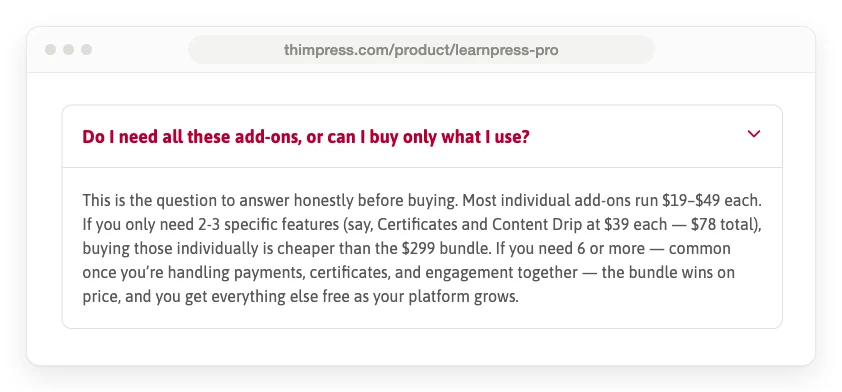
The FAQ on ThimPress’s Pro Bundle page. Read the last 2 lines: 6 add-ons is where it says the bundle starts winning.
ThimPress’s own store prices do not back that up. The 6 priciest add-ons (WooCommerce, Frontend Editor and 4 at $39) cost $254. A 7th makes $293, still under $299. Only the 8th pushes the total past the bundle, to $332.
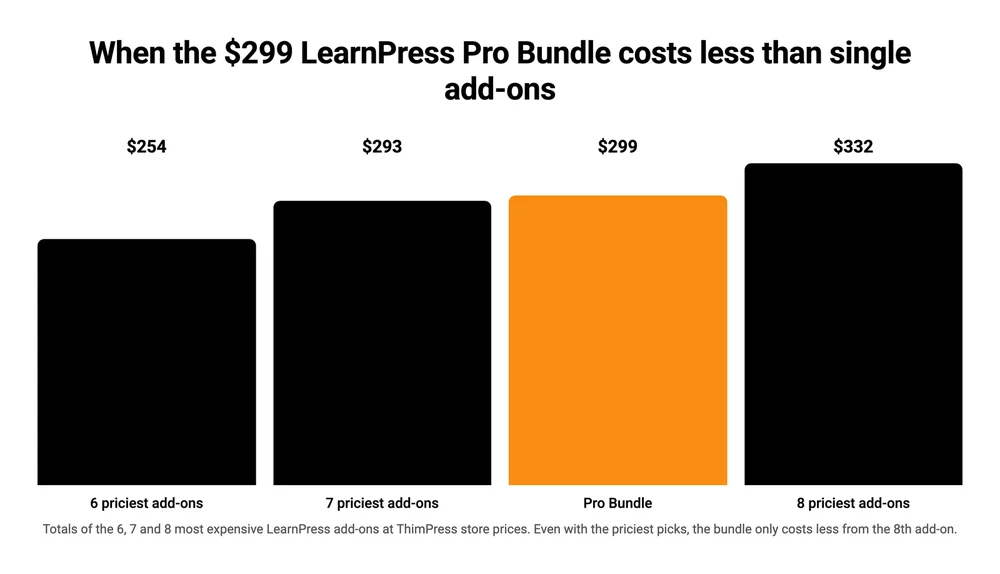
So 8 is the floor, and only when the 8 are mostly $39 and $49 add-ons. Eight cheaper ones can still cost less than the bundle. Take 6 of the $39 add-ons, such as Stripe, subscriptions, certificates, assignments, drip and gradebook, and they come to $234.
Renewals point the same way. Renewing the 7 priciest add-ons one by one costs $203 a year against $209.30 for the bundle, and at 8 the bundle is cheaper, $209.30 against $230. All of this uses the marked-down store prices. If the markdowns end and prices go back to the crossed-out ones, the 7 priciest add-ons come to $324, and the break-even point moves to 7.
ThimPress’s Pro Bundle page also says buying everything separately would cost $710, a saving of $411. The 32 paid add-ons on ThimPress’s store add up to $854, so a seller who really wants all of them saves $555 with the bundle. ThimPress keeps a coupon page too, with codes that change monthly. A code listed on that page took 25% off the Pro Bundle and 19 add-ons, but its list left out Stripe, Certificates, Assignments and Content Drip, so while a code like that runs, the bundle pays off sooner.
When the Semi-Pro Bundle pays off
The Semi-Pro Bundle holds 5 add-ons: Stripe, WooCommerce, Certificates, Assignments and Gradebook, worth $205 bought on their own. At $149 it saves you $56.
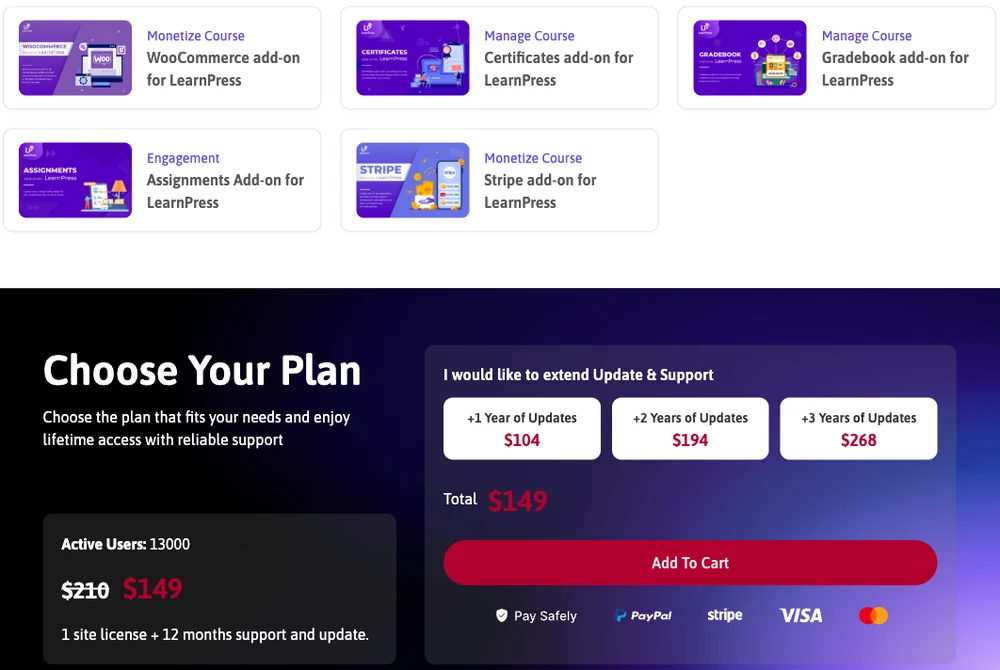
The Semi-Pro Bundle page: 5 add-ons for $149, and 1, 2 or 3 extra years of updates at $104, $194 or $268.
Its own page cannot settle on the saving. It shows a crossed-out $210 and “Save $61”, while the table further down totals the 5 add-ons at $205.
Either way, any 4 of its 5 add-ons cost at least $156 bought singly, so the bundle wins from 4. With only 3, you pay $117 to $127 and the bundle costs more.
Semi-Pro leaves out subscriptions, drip and coupons, which a seller with a monthly plan or a launch discount would add. Adding them ($107) brings Semi-Pro to $256, and at that point the Pro Bundle’s extra $43 buys the other 24 add-ons as well.
You will not find Semi-Pro priced on the main pricing page. That page’s FAQ mentions the bundle, but the bundle shows a price only on its own product page and on the second page of ThimPress’s add-on store. FatLab’s LearnPress review names it, listing “Semi-Pro Bundle: $149/year” and “Pro Bundle: $299/year”. Both are one-time prices, and only the optional renewals ($104 and $209.30) recur each year.
Cloudways’ LearnPress review, last updated in June 2024, is out of date. It still describes a Pro Bundle at $249.99 with “3 site licenses” and “Free support for 6 months”. The bundle sold today is $299 for 1 site with 12 months of updates and support.
What happens when your 12 months of updates run out
When a LearnPress license’s 12 months of updates end, the add-ons keep working, but new versions and support stop until you renew.
ThimPress’s Pro Bundle page says renewing is “optional, not required for the add-ons to keep working.”
Each license covers 1 site. You can move it by deactivating the key on 1 site and activating it on another, but “only one active installation can receive updates and support at a time.”
Renewing costs about 70% of the first price each year, so over 3 years the Stripe add-on totals $93, the Semi-Pro Bundle $357 and the Pro Bundle $717.60, a little less if you prepay the extra years at checkout.
| License | First payment | Each extra year | 3 years, renewed yearly | 3 years, prepaid |
|---|---|---|---|---|
| Stripe add-on | $39 | $27 | $93 | $90 |
| WooCommerce add-on | $49 | $34 | $117 | $113 |
| Semi-Pro Bundle | $149 | $104 | $357 | $343 |
| Pro Bundle | $299 | $209.30 | $717.60 | $688 |
| Eduma theme | $59 | $41 | $141 | $136 |
Should you skip renewals to save money? You can. An LMS full of student logins running on add-ons that no longer get security fixes is the risk you take, and that is my judgment, not something ThimPress says.
Costs outside the plugin: theme, hosting and a mobile app
Outside the plugin, a LearnPress course site still needs hosting, and often a paid theme or a mobile app, and ThimPress sells all 3.
The Eduma theme
Eduma, a ThimPress theme built on LearnPress, sells for $59 on ThimPress’s store, down from $79, then $41 a year for updates.
The listing says “24+ Premium LearnPress Add-ons” come with it but does not name them. It also says both “Buy One Time & get free updates forever” and “12 months update & support”, so ask ThimPress which applies before you count on those add-ons.
Buying Eduma on ThemeForest instead raises a license question for any course site that charges. Envato’s license FAQ says that if “the end users need to pay to see the end product, you need an Extended License,” which costs far more than the theme. My LearnPress vs LearnDash comparison quotes ThimPress support saying the cheaper Regular License is fine, so get the answer in writing first.
Hosting and LearnPress Cloud
LearnPress Cloud, ThimPress’s managed hosting with WordPress and LearnPress already set up, costs $9, $19, $29 or $49 a month, or $91.80 to $499.80 a year billed yearly, after a 7-day free trial. Its pricing page does not say whether premium add-ons are included, so budget for them separately. Any other WordPress host works too.
The mobile app
LearnPress’s mobile app costs $54, marked down from $69, in either a React Native or a Flutter version. The React Native version renews at $38 a year for updates. Its listing says the app connects to your site through the LearnPress API and “comes with all React Native source code”.
None of this covers making the course itself. For that side of the budget, see these course creation costs.
How LearnPress pricing compares with other WordPress LMS plugins
Over 2 years with updates, LearnPress costs $66 with only the Stripe add-on and $508.30 with the Pro Bundle, against $398 for Tutor LMS, $597 for LifterLMS and $798 for LearnDash.
| Plugin | Free version | Entry price | Year 2 | 2-year total |
|---|---|---|---|---|
| LearnPress | Yes | $39 Stripe add-on, or $299 Pro Bundle | $27, or $209.30 | $66, or $508.30 |
| Tutor LMS | Yes | $199 a year (Individual) | $199 | $398 |
| LifterLMS | Yes | $199 first year (Earth bundle) | $398 | $597 |
| LearnDash | No | $399 a year (Pro) | $399 | $798 |
The $66 LearnPress figure buys card payments and nothing else, while the paid plans of the other 3 bundle far more, so the $508.30 figure is the fair one to set against them.
There is no CartMango row because CartMango does not host courses today. Its course hosting is planned for October 2026 and will sit on the $30-a-year plan, and until then, CartMango fits only the sell-the-files route covered at the end of this post.
Tutor LMS also sells its Individual license for $499 once, with lifetime updates. LifterLMS charges $199 for the first year of Earth and renews at full price, and it sells some add-ons on their own as well, which my LifterLMS pricing breakdown prices.
LearnDash’s pricing page now lists 2 plans, Pro at $399 a year and Elite at $599. The $259 Essentials plan that older comparisons still quote no longer appears on it.
For 7 WordPress LMS plugins compared on payments and price, see the WordPress LMS plugin guide.
Which LearnPress option fits your course
Pick the LearnPress option by how many add-ons you need: the free plugin for PayPal only, a gateway add-on for cards, Semi-Pro for 4 of its 5 add-ons and Pro for 8 or more pricey ones.
- Testing an idea, and PayPal is enough: the free plugin, at $0.
- Card payments only: Authorize.Net or 2Checkout at $29, or Stripe at $39 with Apple Pay and Google Pay, plus each provider’s own fees, then about 70% of the add-on price a year if you keep updating.
- Cards, certificates, assignments and a gradebook: the Semi-Pro Bundle at $149, which covers 4 of its 5 add-ons right there.
- 8 or more add-ons, mostly the $39 and $49 ones: the Pro Bundle at $299.
- A full theme as well: price Eduma at $59 next to the add-ons, and check which add-ons it includes before you pay for any of them twice.
If WordPress itself is the part you would rather not run, hosted course platforms bill monthly or yearly instead, and the course platform comparison prices 6 of them.
FAQ
Is LearnPress really free?
Yes, the LearnPress core plugin is free on WordPress.org. It covers courses, lessons, quizzes, SCORM support and a PayPal checkout. Card gateways, certificates, assignments, drip, subscriptions and coupons are paid add-ons at $10 to $49 each, and hosting is a separate bill, as with any WordPress plugin. A seller who needs most of those can take the Pro Bundle at $299 instead, which covers all 32 paid add-ons on 1 site.
How much does the LearnPress Pro Bundle cost after the first year?
After year 1, the LearnPress Pro Bundle costs $209.30 a year if you want updates and support to continue, or $389 for 2 more years and $538 for 3 if you pay for them at checkout. Renewing is optional. The add-ons keep working on your site without it, minus new versions and support.
Is there a monthly LearnPress price?
The LearnPress plugin and its add-ons have no monthly plan, since every license is a one-time payment for 1 site. The monthly price you will see is for LearnPress Cloud, ThimPress’s managed hosting, at $9 to $49 a month, or $91.80 to $499.80 a year when billed yearly. That covers the server, with WordPress and LearnPress set up, and its pricing page does not say whether premium add-ons come with it.
Can I use a LearnPress license on more than 1 site?
No. Each paid LearnPress add-on and bundle is licensed for 1 site. You can move a license by deactivating its key on the old site and activating it on the new one, but only 1 active installation gets updates and support at a time, so 3 sites need 3 licenses.
Is there a free LMS plugin for WordPress?
Yes. LearnPress, Tutor LMS and LifterLMS all have free core plugins, while LearnDash’s pricing page lists only paid plans. Each free version covers building a course and puts different features behind paid upgrades, so check which ones your course needs before you pick. LearnPress’s free plugin also takes PayPal payments without an add-on.
How much does a WordPress course cost?
A course site on WordPress with LearnPress can cost as little as hosting, from $9 a month on LearnPress Cloud, because the plugin itself is free. Add $39 if you want card payments through Stripe, a theme if you want one (Eduma is $59), and Stripe’s 2.9% plus 30 cents on each card sale.
When the only add-ons you need are for selling
If the only LearnPress add-ons on your list are Stripe, subscriptions and coupons, you pay $107 up front and $74 a year to keep them updated, and none of the 3 is about teaching. That can happen with a course that is videos and a workbook with nothing to grade or track, and then most of what you pay in LearnPress pricing goes on checkout features.
CartMango covers those 3 jobs on its $10-a-year plan: Stripe and PayPal, subscriptions and coupons, plus delivery of your files and a hosted sales page, while your videos stay on YouTube, Vimeo or wherever you host them now. CartMango is free right now, and its paid plans start in November 2026. Unlike LearnPress renewals, which are optional, that yearly fee is not.
About the Author

👋 I’m Welly, founder of CartMango (the site you’re on), a checkout platform for digital product sellers. We’ve previously processed $179M+. I also run BirdSend (email marketing tool, 3.1B+ emails sent). On the side I show other non-techie digital sellers how I use AI workflows to automate 50%+ of my operations. Find me on LinkedIn.
Related Reading
- LearnPress vs LearnDash: a 6-add-on LearnPress setup priced over 3 years, and what stops when you stop paying
- LifterLMS pricing: the $199 first year and the full-price renewal after it
- The best WordPress LMS plugin: 7 plugins compared on price and payments
- Paid Memberships Pro pricing: what the membership plugin behind the $39 add-on costs
- The best course platform: hosted platforms and what each keeps per sale