

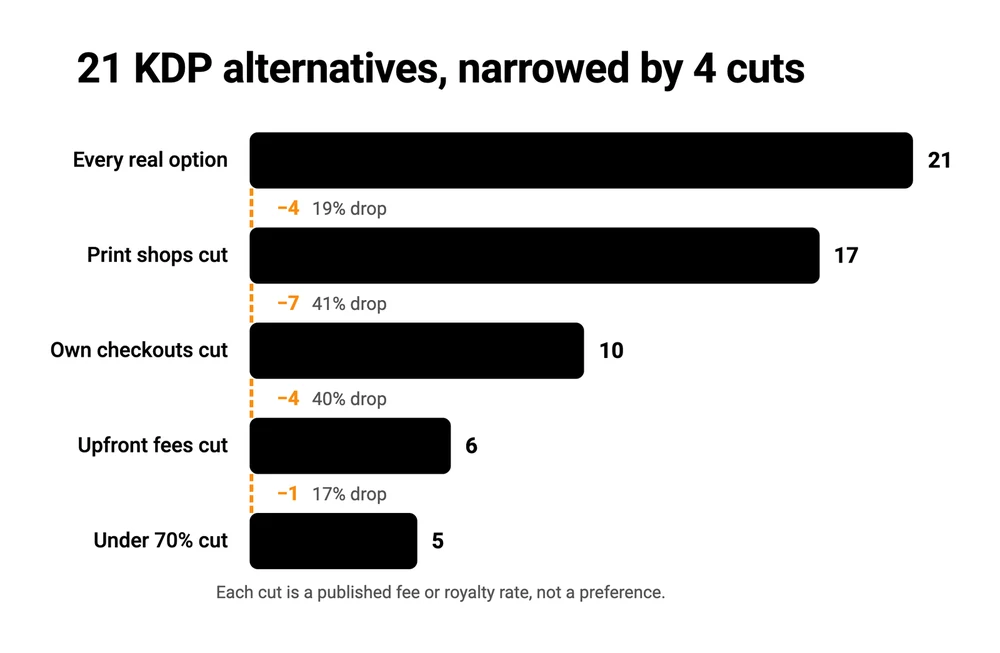
There are 21 real KDP alternatives, and 5 survive every test that matters: at least 70% of the price the reader pays, nothing to pay before your first sale, and a store readers already browse. Those 5 are Apple Books, Kobo Writing Life, Barnes & Noble Press, Google Play Books and Kotobee Books.
All 5 are free to join and hold 70% at prices where Amazon has already dropped you to 35%. The catch is the same on all 5: the shop keeps the buyer, so you get a sales figure rather than a reader you can email. If you already have readers, selling direct to them keeps the 30% the shops take.
3 of the 5 guides on page 1 for this search are published by a platform that appears on its own list.
That is normal for this corner of the internet, and it explains something odd I kept running into. The 2 guides on page 1 that put real numbers next to IngramSpark disagree with each other, and both of them disagree with IngramSpark.
So I opened the pricing pages instead. Every figure below came off the platform’s own page, not off another list. Several have moved recently, in both directions, and that movement is where most of the money is hiding.
By the end you will have a shortlist of 5, and an honest reason to throw the whole shortlist out.
Key Takeaways
- 21 platforms will sell your book without Amazon. 4 evidence-based cuts narrow them to 5 you can act on today.
- IngramSpark is free to upload and has been since 2023. Draft2Digital now charges $20 up front plus $12 a year under $100 of sales.
- Amazon pays 70% only between $2.99 and $12.99. Apple, Kobo, Google Play and Barnes & Noble pay 70% with no upper limit.
- On all 5 the sale happens in the shop’s own account, so the reader stays their customer. If you already have readers, that changes your shortlist.
Start here: the 21 real KDP alternatives
The whole honest field of alternatives to Amazon’s Kindle Direct Publishing, sorted by what each platform is. Nothing is rounded up to a nicer number.
Bookstores you upload to directly (5). Apple Books, Kobo Writing Life, Barnes & Noble Press, Google Play Books, Kotobee Books. Your book sits on their shelf and they pay you a share of each sale.
Aggregators, 1 upload sent to many shops (5). Draft2Digital, Smashwords (run by Draft2Digital since 2022), IngramSpark, PublishDrive, BookBaby. You upload once, they push your file to the retailers above and dozens more.
Print-on-demand (4). Lulu, Blurb, Bookvault, Books.by. A paperback is printed when somebody orders.
Your own checkout (7). Payhip, Gumroad, Sellfy, SendOwl, Shopify, Podia, CartMango. A payment page that sells your file to whoever you send it.
Fees are the normal way this goes wrong. The Online Selling Mistakes Challenge is a free 5-day email course on the pricing and platform mistakes that quietly eat into what solo sellers keep.
A quick word on what this post is not. I am not a novelist. Ask me how many books I read last month and the honest answer is 0, same as the month before that.
What I do know is the money side: what a platform takes, when it pays you, and who ends up owning the buyer. Every cut below is made of that, and none of it is about writing craft.
Cut 1: drop the platforms that are really print shops
4 of the 21 are built around printing paper. That is a fine business, and it is not what somebody leaving KDP usually means, because the Kindle store is an ebook store first.
Lulu, Blurb and Bookvault all lead with print-on-demand on their own pages. Bookvault is the clearest case: it is a printer that sits behind a checkout you already run somewhere else.
Books.by belongs here too, and it takes a closer look to see why. Its plan page lists Core at $99 a year with “Paperback Publishing”, and puts “eBook & Paperback Publishing” on Pro at $299 a year. So the $99 figure that Books.by quotes for itself in its own KDP-alternatives comparison buys you paperbacks. An ebook costs 3 times that.
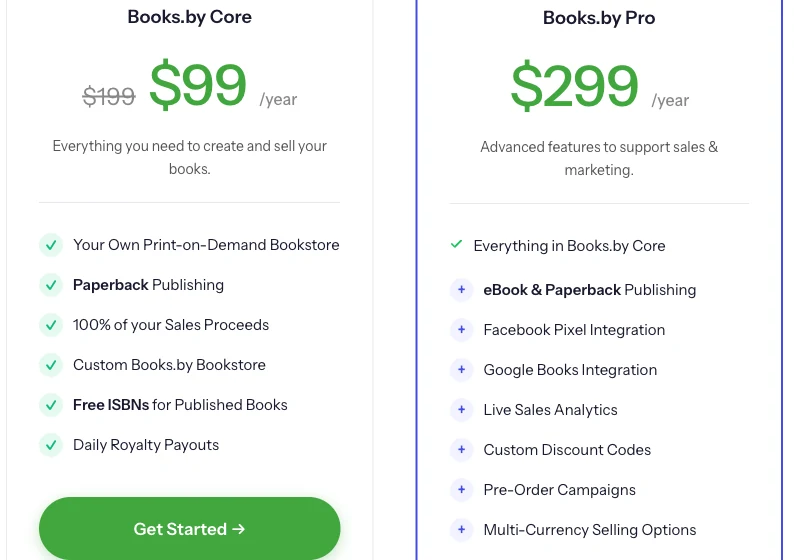
There is one more wrinkle in that $99. The page shows it struck through from $199, under a countdown timer labelled a September Welcome Offer. The number in the comparison table is the promotion, not the plan.
Killed by cut 1: Lulu, Blurb, Bookvault, Books.by. That leaves 17.
Lulu and Bookvault come back at the end, so do not cross them off for good.
Cut 2: drop anything that only sells to readers you already have
7 of the remaining 17 are checkouts, not shops. Payhip, Gumroad, Sellfy, SendOwl, Shopify, Podia and CartMango all do the same job: they take money from somebody you sent there. Nobody browses them looking for a novel.
The main thing Amazon gives an unknown author is a crowd of strangers who are already shopping for books. A checkout gives you a lot of things, and it does not give you that.
Gumroad is the one that needs a footnote. It runs a marketplace called Discover, so it genuinely does put products in front of new buyers, and its own pricing page charges 30% per transaction on Discover sales, against 10% plus $0.50 on your own traffic. Discover is a general digital-products marketplace though. Somebody hunting for a fantasy novel is not browsing it.
Killed by cut 2: Payhip, Gumroad, Sellfy, SendOwl, Shopify, Podia, CartMango. That leaves 10.
This is the cut I would argue with hardest, and the last section of this post is me arguing with it.
Cut 3: drop anything that bills you before your first sale
Cut 3 is where the published advice falls apart.
Ask the internet which of these platforms charges an upfront fee and you get a consistent answer. IngramSpark charges per title. Draft2Digital is the free one.
The comparison table on the page ranking at the top puts IngramSpark at $49 a title and Draft2Digital at Free. A second page-1 guide puts IngramSpark at “Setup fee (~$25/title)” and tells readers they can “pay as little as $25 per published title”. Google’s AI Overview for this search repeats it, saying IngramSpark “has a setup fee per title”.
Both of those numbers describe a fee that no longer exists, and they do not even match each other.
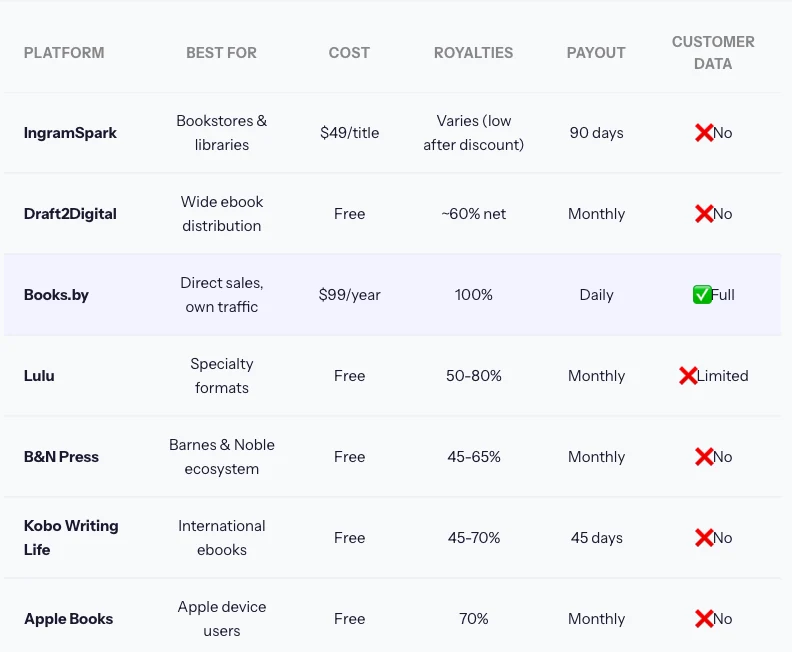
Here is what the 2 companies say on their own pages.
IngramSpark’s pricing page opens with the word FREE and the sentence “It costs you nothing to sign up for an IngramSpark account and to upload your print or ebook.” The setup fee went away around May 2023, when its own blog ran a note from the director titled “No More Book Setup Fees”. That is over 3 years of guides quoting a dead number.
Draft2Digital’s FAQ answers the question “What does it cost to use Draft2Digital?” like this: “there is a non-refundable, one-time activation fee of $20 (USD) for new accounts and an annual maintenance fee of $12 (USD) for accounts that earn less than one-hundred dollars a year in book sales.” The escape route is on the same page, and it is blunt: “If you do not want to pay your annual account maintenance fee, you may unpublish your books to delist them from distribution.”
Somebody in an r/selfpublish thread on leaving Amazon described the same charges from the seller’s side and added the part that explains the guides: “This account charge is a recent change and there will be people extremely upset about it.”
The other 2 aggregators want money up front too, openly. BookBaby sells ebook distribution as a $299 package and takes zero commission after that. PublishDrive’s free tier covers 1 book and 3 stores, and its next plan up is $13.99 a month billed annually for 3 books, rising to $83.99 a month for 48. Smashwords runs on a Draft2Digital account, so it inherits the same fees.
So the cut lands the opposite way round from the advice.
Killed by cut 3: Draft2Digital, Smashwords, PublishDrive, BookBaby. That leaves 6.
IngramSpark walks through it untouched, which is the exact reverse of what page 1 predicts.
Cut 4: drop anything that pays under 70% of what the reader pays
6 platforms left, and only 1 of them fails this.
IngramSpark’s own pricing page is precise about the base: “You earn 85% of the net revenue received by IngramSpark with each sale, regardless of retailer.” Net revenue received is what lands at IngramSpark after the shop has taken its share.
Work that through with a 30% retailer share and 70% of the list price reaches IngramSpark, then 85% of that reaches you, which is about 59% of what the reader paid. IngramSpark’s pricing page does not state the retailer share, and it varies by shop, so treat 59% as a worked example, not a figure IngramSpark stands behind. To reach 70% of list, a retailer would have to pass IngramSpark at least 82.4% of the price.
85% and 70% look like the 85% wins. They are percentages of 2 different numbers. A percentage with no base attached tells you nothing, and the base is the thing these pages are quietest about.
Killed by cut 4: IngramSpark. That leaves 5.
The 5 left standing
All 5 pay 70% or more of the price the reader pays, cost nothing to join, and list your book in a store with its own shoppers. Kotobee publishes the highest rate of the 5 at 100%, Google Play states 60 or more countries, and all 5 hold their rate at prices where Amazon has already dropped you to 35%.
| Platform | Pays | To join | Price limit | The catch |
|---|---|---|---|---|
| Apple Books | 70% of list, any price | Free | None published | Its store is Apple devices |
| Kobo Writing Life | 70% of list at $2.99 and up | Free | No upper limit | Drops to 45% under $2.99 |
| Barnes & Noble Press | Flat 70% of list | Free | None published | Barnes & Noble only |
| Google Play Books | 70% in 60+ countries | Free | None published | 70% stated for its country list |
| Kotobee Books | 100% of the sale | Free | None published | Paid books read in its own app |
Those numbers come off each company’s own page. Apple’s page for authors states “70% royalties on every ebook, regardless of price” and “No file delivery fees”. Google Play Books states “You’ll earn 70% revenue split for sales in 60+ countries, regardless of price”.
Kobo’s Writing Life terms say Kobo “will pay you 70% of the SRP for each eBook sold” once the price is $2.99 or more, and 45% below that. Kobo also requires the ebook to sit at least 20% under any print edition, and to match your lowest price anywhere else.
Barnes & Noble Press is the clearest of the 5 on both halves. Its royalty terms say “You will be paid a 70% author royalty off the List Price”, and the same page sets out when the money moves: payment goes out “when you have accrued a minimum of $25” and “30 days after the end of the calendar month in which the sale occurs”. It sets price conditions of its own: the list price must be “no greater than the eBook’s List Price at any other retailer” and “no greater than the eBook’s print edition”. Kobo goes further on the print half and wants the ebook at least 20% under it.
Kotobee’s 100% needs a caveat, because the company says 2 different things in 2 places. Its live product page reads “Publish for free and earn 100% royalties” and “There are no fees required for publishing on Kotobee Books”, with no time limit anywhere on it.
The Kotobee blog post that ranks for this search, and that puts Kotobee Books at number 1 in its own list of 10, adds that the 100% royalty “is for a limited time”. Both pages belong to the same company. Kotobee also publishes nothing about how many readers browse its store, so read the 100% as a statement about fees and not about sales.
The $12.99 ceiling on Amazon’s 70% rate
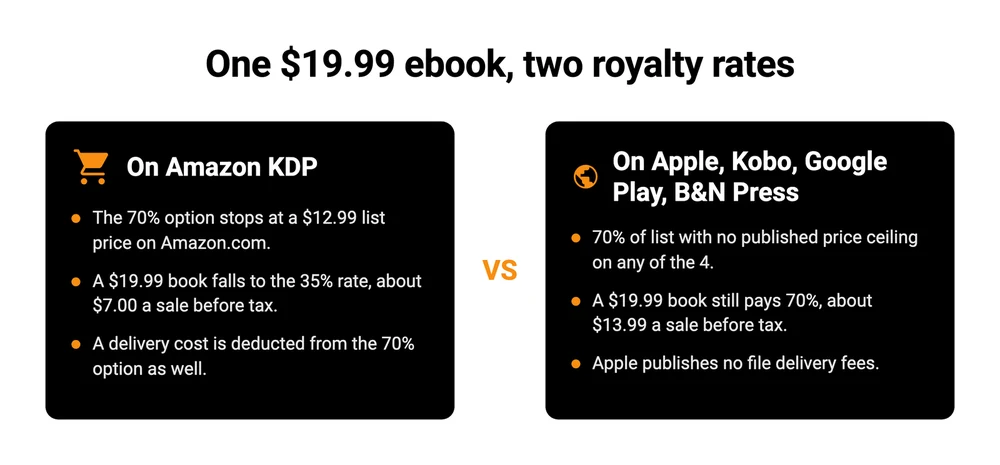
Amazon’s own eBook List Price Requirements page sets the 70% band at $2.99 to $12.99, and the change that widened it is recent: “Effective July 7, 2026, the 70% royalty option price band is $2.99-$12.99 on Amazon.com, expanding from the previous range of $2.99-$9.99.” Below or above that band, Amazon’s Digital Book Pricing page puts you on the 35% option instead.
None of the 5 publishes a ceiling like that. Price a niche technical book at $19.99 and Amazon pays 35%, which is about $7. Apple, Kobo, Google Play and Barnes & Noble still pay 70%, which is about $14 before tax. Same book, same price, double the money, and it turns on a line in a help page.
There is a second deduction that only applies to Amazon. On the 70% option the formula is the royalty rate times list price minus VAT minus delivery costs, and Amazon confirmed on the same FAQ that the July change did not touch it: “Delivery costs still apply to the 70% royalty option.” Apple publishes “No file delivery fees” against exactly that.
If you want the deeper version of how these rates compare across the wider market, our guide to platforms to sell ebooks walks through the shops themselves rather than the fee mechanics, and making and selling an ebook covers the steps before any of this matters.
The cut most authors get wrong
Look down that survivors table one more time, at the last column.
All 5 share the same hole, and I did not put it there to be clever. Apple, Kobo, Barnes & Noble, Google Play and Kotobee each sell through their own shop or app, so the reader is their customer and what reaches you is a sales figure.
Kotobee is the plainest case, because its own FAQ says a paid ebook can only be read “using the Kotobee Books library application”. You are the supplier. The shop keeps the customer.
That is the whole reason cut 2 was the wrong cut for a lot of people, and the platforms know it. Lulu, which I cut in the first round for being a printer, says it plainly on its own page about selling direct: “Because your readers use your checkout, you’ll have access to their customer data to build your marketing list.” Lulu sells printing, not checkouts, so it has no reason to make that argument on my behalf.
So here is the honest version of the whole exercise. If nobody has heard of you, the 5 survivors are right and you want the shelf space. If you already have a list, a newsletter, a following, anything at all, then handing those readers to a bookstore means paying 30% to be introduced to people you already knew.
The direct route is the one that keeps them. It also gives you no discovery whatsoever, so it works alongside the shops and never instead of them.
Here is what the direct routes cost on a $14.99 ebook, the sort of price Amazon has already dropped you to 35% for, before your payment processor’s own fee. Lulu Direct and CartMango take nothing per sale, Payhip’s free plan takes about $0.75, and Gumroad takes $2.
| Route | Platform cut | Fixed cost | Keeps the buyer | The catch |
|---|---|---|---|---|
| Lulu Direct | 0% on your own sales | Free | Yes | Built for print, you bring the store |
| Payhip | 5% on the free plan | $0, or $29 a month for 2% | Yes | The percentage never reaches 0 on free |
| Gumroad | 10% plus $0.50 | $0 | Yes | Gumroad becomes the legal seller, not you |
| CartMango | 0% | Free until October 2026, then $10 a year | Yes | 10 products and 2 GB on the $10 plan |
CartMango is the one I built, so treat that last row the way you would treat any founder’s own row. It earns its place here on 1 number, the 0% cut. It loses on the thing the row above it does: Gumroad is your merchant of record since January 2025, so it files your international sales tax, and CartMango leaves that with you.
A few practical notes if you go this way. You will need to get the file to the buyer without it leaking, which is what digital delivery systems and protecting an ebook from sharing are about. Your payment processor still takes its own cut on top of every number in that table, and what PayPal charges is the usual starting point for working that out. And pricing direct is a different exercise from pricing on a shelf, which how to price digital products covers properly.
The strongest answer is usually both. Keep Amazon for the strangers. Sell direct to the people who already know you.
FAQ
Is Amazon KDP still profitable?
Yes, and the honest catch is what the 70% headline hides. Amazon pays 70% only between $2.99 and $12.99 and deducts a delivery cost from it. Outside that band the rate is 35%. For comparison, Barnes & Noble Press publishes a flat 70% off list price with no band at all, and pays 30 days after the end of the month the sale happened in.
Which is better, Lulu or KDP?
They are aimed at different jobs. Lulu is print-on-demand and its strongest route is Lulu Direct, where you sell from your own site, keep 100% of the profit after print cost, and keep the buyer’s details. KDP is a bookstore with a large audience that keeps the buyer. Lulu Direct suits somebody who already has readers to send. Starting cold, you need a shop that brings its own.
Can I publish on Amazon KDP and an alternative at the same time?
Yes, unless you enrol that specific ebook in KDP Select. Select requires 90-day digital exclusivity in exchange for Kindle Unlimited. Plain KDP, with Select switched off, does not stop you publishing anywhere else. Note that Amazon’s own pricing page says KDP Select enrolment is also what unlocks the 70% rate in Brazil, Japan, Mexico and India.
What is the best platform to publish a book?
There is no single answer, which is why this post narrows rather than picks. For reach with no upfront cost, the 5 survivors above. For paperbacks in shops and libraries, IngramSpark, now that it is free to upload. For keeping the reader, a checkout of your own, and most authors end up running 2 of those 3 at once.
What is the catch with a 100% royalty platform?
Discovery. A platform paying 100% is almost always one that brings you no readers, so 100% of nothing is still nothing. Kotobee Books, Lulu Direct and the own-checkout options all have that same gap. A 100% rate tells you what the platform charges. It tells you nothing about how many people will find your book.
Are KDP alternatives for low-content books different?
The economics are, because planners, journals and notebooks are print products rather than ebooks. That pushes you back toward the print shops this post cut in round 1: Lulu for specialty formats and sizes, Bookvault for selling print behind your own checkout, and IngramSpark for getting into shops and libraries.
Do I still get a free ISBN away from Amazon?
Yes, and the free ones come with a leash, so read the conditions before you take one. Amazon’s own ISBN help page says “eBooks and low-content books are the only formats where an ISBN is optional”, that a free KDP ISBN covers “paperback and hardcover books only”, and that those free ISBNs “can only be used on KDP. They cannot be used to publish outside of KDP”.
IngramSpark’s free ISBNs for US customers carry their own catch, and IngramSpark states it plainly: “your publisher imprint will not be associated with your book”, the book holds IngramSpark’s own imprint instead, and it “may also limit where you can print and distribute your book”. Buying your own ISBN is the version nobody can withdraw, and the only one where the publisher on record is you.
What you still own after the sale
Run the 4 cuts and you get a clean answer to the question you typed. Apple Books, Kobo Writing Life, Barnes & Noble Press, Google Play Books and Kotobee Books are the KDP alternatives that pay well, cost nothing, and put your book somewhere strangers can find it. IngramSpark joins them the moment paperbacks in shops and libraries matter to you, and it costs nothing to upload now whatever the roundups say.
Those shops send you a sales figure and keep the person attached to it. That is a fair trade when the shop found the reader. It is a strange trade when you did.
So the sensible setup is usually 2 lanes. Leave the book on the shelves for the strangers, and run your own checkout for the readers you already brought. CartMango is the one I built for that second lane: no cut of any sale, the buyer’s details land with you, and it is free until October 2026, then $10 a year. None of the KDP alternatives above will do that second job for you, and that is the point of running both.
About the Author

👋 I’m Welly, founder of CartMango (the site you’re on), a checkout platform for digital product sellers. We’ve previously processed $179M+. I also run BirdSend (email marketing tool, 3.1B+ emails sent). On the side I show other non-techie digital sellers how I use AI workflows to automate 50%+ of my operations. Find me on LinkedIn.