

Worksheets, checklists, workbooks, templates and guides are the PDFs that sell most, usually priced between $5 and $49. You can sell PDFs on a marketplace like Etsy, through a link in bio, or from your own checkout such as Payhip, Gumroad or CartMango. On a $27 sale you keep about $19 to $26, depending on the route.
I went looking for what the internet tells you about selling PDFs. It was worse than I expected.
Two of the pages Google ranks on page 1 recommend a platform that no longer exists. One still quotes a monthly price for it, in a post updated this year. A third points you at Amazon KDP, which cannot hand your buyer a PDF at all.
Google’s own AI summary of this exact search says Gumroad charges a flat 10%. That is not what Gumroad’s own help pages say.
So this post skips the platform rankings. You get the kinds of PDFs people pay for, what they really sell for (I counted), what you keep after fees, and how to stop the file walking off to everyone who did not pay for it.
Key Takeaways
- Pick the buyer before the file type. Worksheets, checklists, templates and workbooks all sell. Who it is for decides whether it sells at all.
- Marketplace prices are brutally low. Across 92 Etsy listings I checked, median prices were $2.63 and $3.96, and 79% were already discounted.
- Flat fees eat cheap PDFs. At $2.63, fees take 26.6% of the sale. At $27 they take 11.2%. Same platform, same percentages.
- Gumroad’s “10%” is really 15.9% on a $27 direct sale, because card processing stacks on top of the platform cut.
- Locking the file is the small half. Delivery is what protects a paid PDF, and almost nobody explains it.
What kinds of PDFs sell, and who buys them
People search for “what PDFs sell the most” hoping for a format. Pick the right file type, the thinking goes, and sales follow.
The format is the least important part. A checklist and a 90-page guide can both do well or both flop, and the thing that decides it sits somewhere else.
Here is the honest version of what moves, and roughly what each one goes for.
| PDF type | Typical price | Who buys it | Why it sells |
|---|---|---|---|
| Checklist or cheat sheet | $5 to $15 | Beginners mid-task | Removes the fear of missing a step |
| Worksheet or workbook pack | $12 to $29 | People already doing the work | Turns advice into something you fill in |
| Template or swipe file | $15 to $39 | Time-poor professionals | Skips the blank page |
| Printable planner set | $9 to $25 | Planner and stationery buyers | Reprint forever, no shipping |
| Niche guide or playbook | $27 to $97 | People with an expensive problem | Cheaper than getting it wrong |
| Resource or vendor list | $9 to $29 | People who dread the research | Sells the hours you already spent |
Notice what the right column has in common. Every reason there describes a person in a specific situation, stuck partway through a job.
So the order that matters runs: who, then the offer, then traffic, then copy. Most people run it backwards, starting with the file they want to make and hunting for a buyer afterwards.
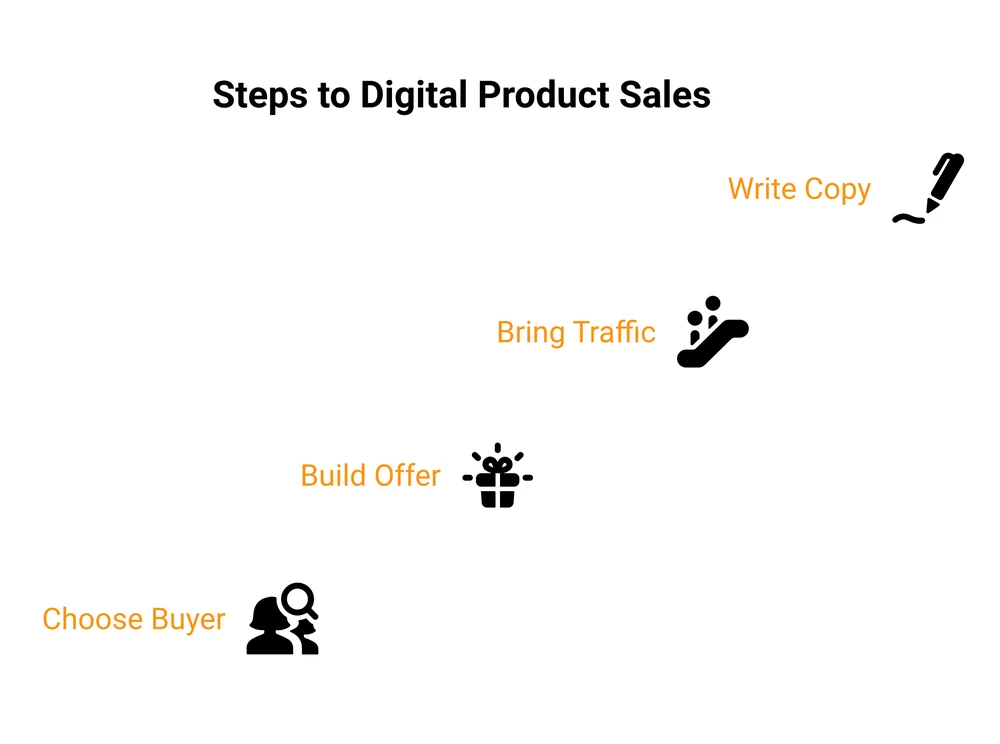
A worksheet aimed at a real person with a real deadline beats a beautiful 90-page guide aimed at nobody in particular. If you are still deciding what to make, 100 digital product ideas beats staring at a blank Canva file, and creating digital downloads covers building it once you have picked.
New to selling your own work? My free 5-day Online Selling Mistakes Challenge walks through the 5 profit leaks I see most often, one short email a day.
How much can you sell a PDF for?
Every guide answers this with a shrug and a range. So I went and counted instead.
I pulled the first page of Etsy results for 2 typical PDF products, forcing US dollars and US locale. Here is what 92 listings that showed a price actually charged.
| What I searched | Listings counted | Median price | Middle 50% | Showing a discount |
|---|---|---|---|---|
| budget planner printable pdf | 48 | $2.63 | $1.75 to $5.99 | 39 of 48 |
| workout plan pdf | 44 | $3.96 | $2.99 to $6.00 | 34 of 44 |
That is 1 page of results on 1 day, not a census of Etsy. Still, 2 things in it are hard to unsee.
The going rate on a marketplace is a few dollars, well under the $9 to $49 the roundups quote. Roughly 4 in 5 listings also showed a struck-through original price, so permanent discounting is just how the category operates.
Worth noting too: 46 of the 138 cards on those 2 pages, a third of what you scroll past, were paid ads.
A $2.63 price is worse than it looks, because Etsy’s fees are not only percentages. There is a $0.20 listing fee that recharges every time an auto-renewing listing sells, and payment processing adds a flat $0.25 on top of its 3%.
Those 2 flat charges alone are 17.1% of a $2.63 sale. Add the percentages and 26.6% of that sale is gone.
Price the same file at $27 and fees take 11.2%. Identical platform, identical rates, less than half the bite.
So the cheap-file strategy fails twice. You earn less per sale and you lose a bigger share of it.
The other end of the range is where this gets interesting. Back in November 2013, Nathan Barry published the numbers from launching The App Design Handbook: 548 copies and $36,297 in gross revenue in 24 hours, selling to his own email list. The book alone was $29, a complete package was $199.
His breakdown is the part worth stealing. The $29 book was 48% of copies sold but just 19% of revenue, while the $199 package was 31% of copies and 61% of revenue. Offering tiers, he reckoned, raised revenue 2.8 times against selling the book alone.
That is a 2013 launch, so treat the numbers as a pattern rather than today’s market. The pattern still holds: the same category of file goes for $2.63 to strangers browsing a marketplace and $29 to $199 to an audience that already knows you.
Same file, 10 times the price. The audience did that.
3 rules that keep pricing sane:
- Price the outcome. A 4-page pricing calculator that stops a freelancer underquoting is worth more than a 60-page motivational read.
- Avoid the sub-$5 trap. Flat fees make cheap files structurally bad, and the price signals low value before anyone opens it.
- Go up, not down, when it stalls. A $9 file nobody buys rarely becomes popular at $5. More often the buyer was never well defined.
Digital product pricing goes deeper on landing on a number you can defend.
Can you actually make money selling PDFs?
Yes, and the honest answer has a large asterisk.
The top-voted reply on the Reddit thread that ranks number 1 for this search is flatly sceptical. The commenter calls it “the latest dropshipping craze” and adds, “I know no one that has bought such a PDF or even recommended one.” Their argument is that most people making money from selling PDFs are selling a course about selling PDFs.
That is a fair point, and it describes a real slice of this market.
I have been on the buying end of it. Years ago, broke and just starting out, I paid for a course promising 0 to 10k in a month. Naive, and frankly a bit dumb.
So when someone says most of the money in selling PDFs is being made by people selling courses about selling PDFs, I am not going to argue very hard.
The counterweight came from a commenter in the same thread posting under SendOwl’s name, who describes themselves as “the GM of a company that helps people sell and deliver digital files”. They conceded the hard part anyway: plenty of people do make real money, and “there is a long tail of people who aren’t succeeding at it”. Another commenter, with nothing to sell, put it plainly: “Getting sales is not as easy as many influencers/youtubers say it is.”
So, the realistic picture. A PDF is a genuine product when it saves someone time or money and comes from something you know well. It is a lottery ticket when it is a generic file assembled quickly because the format looked easy.
The second kind does not repeat. Someone might buy once. They will not buy from you again, and repeat buyers are where a small catalogue turns into an income.
How to make and sell an ebook covers the fuller path from file to product.
Where to sell PDFs: 3 routes, not 10 platforms
Almost every article on this keyword is a platform ranking. I am not writing another one, partly because we already published the platforms to sell ebooks and all of it applies to a PDF.
Mostly though, “which platform” is the easiest decision in this job, and it is the one the internet spends all its time on. There are 3 routes, and they differ on 1 thing that matters: who owns the buyer.
Here is what a single $27 PDF sale pays out. Every fee below was read from each company’s own pricing or help pages, and every net figure includes card processing, because leaving it out is exactly the mistake this post is about.
| Route | Platform cut | Card processing | You keep on $27 | Owns the buyer? |
|---|---|---|---|---|
| Etsy (US seller) | 6.5% + $0.20 listing | 3% + $0.25 | $23.99 | No, Etsy does |
| Etsy, sold via an Offsite Ad | + 15% ad fee | 3% + $0.25 | $19.94 | No |
| Gumroad, your own link | 10% + $0.50 | 2.9% + $0.30 | $22.72 | Partly |
| Gumroad Discover marketplace | Flat 30%, all in | included | $18.90 | No |
| Payhip free plan | 5% | 2.9% + $0.30 | $24.57 | Partly |
| SendOwl Launch ($39/mo) | 0% | 2.9% + $0.30 | $25.92 | Yes |
| CartMango (free until Oct 2026, then $10/yr) | 0% | 2.9% + $0.30 | $25.92 | Yes |
I should say plainly that CartMango is mine, so read that row with that in mind. It sits last because that is where I put it, and on per-sale cost it ties with SendOwl rather than beating it. The whole difference between those 2 rows is the fixed cost, $468 a year against $10.
3 things in that table surprised me, and 2 of them cut against my own side.
Etsy is cheaper than Gumroad’s own direct link. Etsy takes 11.2% of a $27 sale, Gumroad’s direct link takes 15.9%. Everyone assumes the marketplace is the expensive option, and on a single mid-priced file it simply is not. What Etsy costs you is the customer, since the buyer belongs to Etsy. Selling digital products on Etsy has the fee math by price point.
A monthly plan needs real volume before it wins. SendOwl’s Launch plan costs $468 a year and saves $3.20 a sale against Gumroad, so it needs 147 sales a year just to draw level. Its plan also caps you at $10,000 in sales a year, which at $27 a file is 370 sales, and past that you move to the $87 a month tier. There is a real window where it makes sense and it is narrower than the pricing page suggests. Our SendOwl pricing breakdown has the full tier math.
Payhip is upfront about the part Gumroad buries. Payhip’s pricing page states plainly that Stripe and PayPal still charge standard rates on every plan. That honesty matters, and the next section is about what happens when a platform is less forthcoming.
One more thing on Etsy, since it is the route most PDF sellers start with. Once your shop passes $10,000 in a 365-day period, Etsy’s Offsite Ads stop being optional.
Its fee policy says you will be “required to participate and will be charged a 12% advertising fee on Attributed Orders for the lifetime of your shop”, and you cannot pick which listings get advertised. Doing well permanently raises your fee floor.
And if you go the direct route, a hosted sales page removes the need for your own website, but it does not hand you an audience. Payhip and Gumroad host product pages too. Whichever you pick, every visitor is one you brought. Selling without a website covers that path properly.
What the top results get wrong about selling PDFs
This is the part that made me want to write the post.
Two ranking pages recommend a platform that shut down 4 years ago. Amazon bought Selz in February 2021 and killed it the year after. GeekWire reported the shutdown in May 2022, quoting an Amazon spokesperson saying they would “no longer provide Selz offering as a standalone service”, with 60 days’ notice to merchants. Amazon shut Selz down in 2022, and today selz.com does not even resolve.
HelpRange’s “Top 10 Platforms for Selling PDFs” still lists it at number 5. FlipLink’s “Best Tools to Sell PDFs Online”, updated in February 2026, ranks it 6th of 7, gives it a current price of “$22/mo” and a full row in its comparison table.
One of them sends you to a platform that cannot deliver a PDF. HelpRange’s list also recommends Amazon KDP. KDP will happily accept a PDF upload, but Amazon’s help pages on Print Replica ebooks say “Kindle Create converts your PDF files into Print Replica eBooks”, which readers can only open on certain Kindle devices and apps.
Your buyer never receives a PDF. They receive a Kindle file. For a printable planner or a worksheet, that removes the entire point of the product.
Google’s AI summary gets the headline fee wrong. Search this term and the AI Overview tells you Gumroad is “free to start with a flat 10% transaction fee”.
Gumroad’s own help centre says otherwise. Its fees page states the 10% + $0.50 “does not include” credit card processing of 2.9% + $0.30. Its public pricing page, meanwhile, shows “10% + $0.50” alongside the line “No hidden fees, no monthly charges”.
So on a $27 direct sale the real cost is $4.28, or 15.9%. A flat 10% would have been $2.70, so the summary understates it by $1.58 a sale. Even against Gumroad’s own advertised 10% + $0.50, the true cost is $1.08 higher. Our Gumroad pricing breakdown works through it.
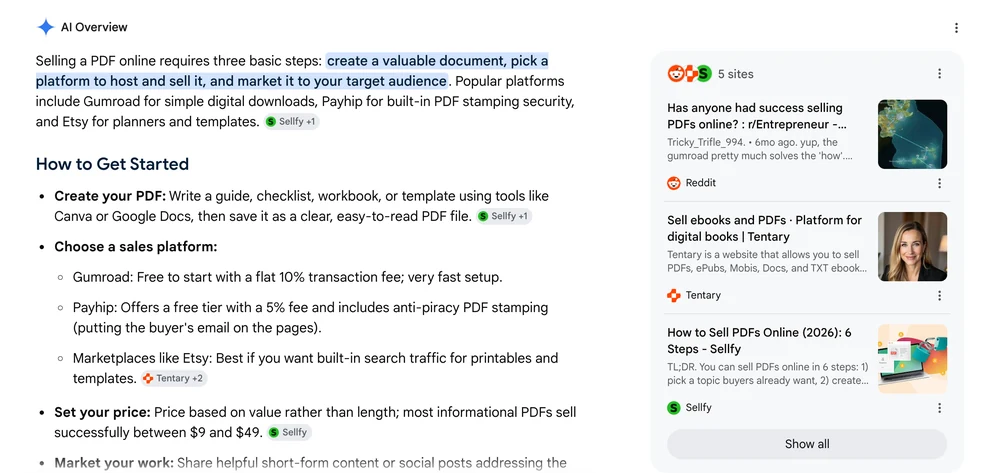
And look at who is answering the question. The number 1 result for this search is a Reddit thread.
Read the replies and you find an account posting under SendOwl’s name, a Sellfy employee, and a commenter who writes “I cofounded SamCart”. 3 of the longest answers come from companies that sell the tools.
They are not lying, and 2 of them are genuinely useful. The Sellfy rep gives the best advice in the entire thread, and it argues against their own category: “instead of starting with platforms, start with the content you already have and ask: who is this for”.
Worth holding onto, though. When you search this question, a lot of what you read is written by the people selling the tools it recommends.
What locking a PDF does and does not stop
Now the worry that brings most people to this topic. You sell a file, someone forwards it to 40 people, and you never find out.
You cannot make a PDF impossible to copy. Anything a buyer can open, they can screenshot. What you can do is raise the effort until casual sharing is not worth it.
I have written the locking methods up separately, so here is only what each one buys you. For the step-by-step, how to make a PDF non-editable ranks all 5 by strength.
| Method | What it stops | What it does not stop | Strength |
|---|---|---|---|
| Permissions password | Casual editing in most readers | Free tools strip it in seconds | Low |
| Flattening | Form fields, signatures, layers | Editing the visible text | Medium |
| Image-based PDF | Selecting, copying, retyping text | Screenshots, resharing the file | High |
| Per-buyer watermark | Nothing technically | Nothing, but sharing becomes traceable | Deterrent |
The pattern is hard to miss. Every technical lock protects the file’s contents, and not 1 of them stops the file itself being passed around.
Which is why the watermark row, technically the weakest, is the one that changes behaviour on a paid product. A friend’s email printed on every page makes forwarding feel like something you did to a person.
Delivery is the half nobody covers
Locking is where the guides stop. Delivery is where the money leaks.
If you sell a PDF by emailing the same attachment to every buyer, or by sharing 1 Google Drive link, you have built something with no controls at all. One forward and the file is public, permanently, and you will never know it happened.
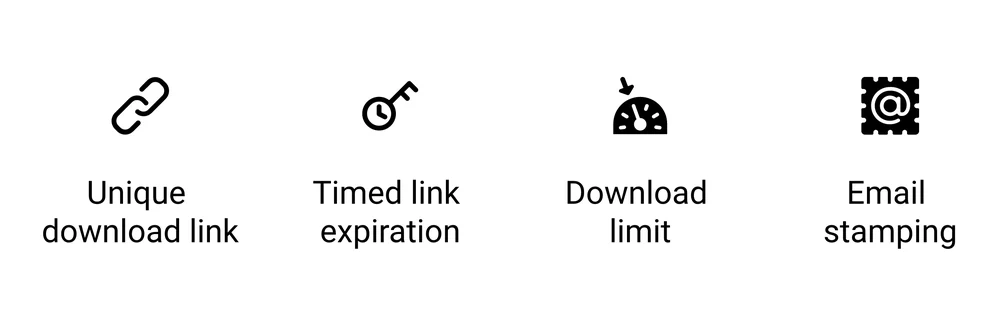
4 controls do the real work:
- A unique link per buyer. Each purchase gets its own download URL, so a shared link implicates 1 account instead of opening the gates.
- An expiring link. The URL dies after a set window. Long enough for a real buyer, short enough that a link pasted into a group chat next month is already dead.
- A download limit. Capping downloads stops 1 purchase becoming unlimited access. Payhip defaults to 5, which is a sensible starting point. Set it too low and you will spend your week resetting links for people whose laptop died.
- Stamping. The file is generated per buyer with their details on the pages. Payhip stamps the buyer’s email and purchase date on the top left of every page, and SendOwl includes stamping on every plan.
One catch on stamping that nobody in the search results mentions. Payhip’s help pages state the feature “only works for PDF files that are in portrait mode at this time”, and only for files under 250MB.
Anything wider than it is tall gets no stamp. That covers most digital planners, slide decks and Canva-built workbooks, so a large share of real products go out unstamped and nothing tells the seller.
None of this needs custom work, and that is the real argument for using a checkout built for digital products rather than emailing files by hand. Digital delivery systems compares the setups, and 8 ways to protect digital downloads is the fuller anti-theft playbook.
One caution on all 4 controls. Each trades buyer convenience for protection, and it is easy to overshoot. A customer who cannot open the thing they paid for costs you more, in refunds and goodwill, than the pirate you stopped.
Your first week, in order
- Pick the buyer before the format. Name the person and the deadline they are up against.
- Make the smallest useful version. A 6-page worksheet that works beats a 60-page guide that never ships.
- Price it above $9. Below that, flat fees and low perceived value work against you at the same time.
- Set up delivery properly. Unique link, sensible download limit, stamping if your file is portrait.
- Sell to people who already know you first. Marketplace browsing is the hardest way to sell PDFs, not the easiest.
Then look at your first 10 sales and ask what those buyers have in common. That answer is worth more than any platform comparison.
FAQ
Can I make money selling PDFs?
Yes, though not automatically. A PDF sells when it solves a specific problem for a specific person, and it usually fails when it is a generic file made because the format looked cheap to produce. Sellers with an existing audience or a clear niche do best. Treat it as a real product with a real buyer, not a passive income switch.
What is the best place to sell PDFs?
Both routes work, and each costs you something different. Marketplaces like Etsy bring their own browsers but keep the customer and charge around 11% on a $27 file. Your own checkout costs less per sale and gives you the buyer’s email, but every visitor is one you bring yourself. Plenty of sellers eventually run both.
How much can I sell a PDF for?
On Etsy, less than most guides admit. Counting 92 listings, budget planner PDFs had a median price of $2.63 and workout plans $3.96. Sold to your own audience, the same kind of file supports $27 to $97. Price against the result the buyer gets, and avoid going under $9, where flat fees take a painful share.
What PDFs sell the most?
Worksheets, checklists, templates, printable planners and niche guides move most consistently. They share a trait: each shortens a task the buyer is already trying to finish. The format matters far less than the match between the file and a person with a deadline. Pick the buyer first and the format tends to pick itself.
Can I sell PDFs on Amazon?
Not as PDFs. Amazon KDP accepts a PDF upload, but its own documentation says Kindle Create converts it into a Print Replica ebook, readable only on certain Kindle devices and apps. Your buyer gets a Kindle file, not a file they can print or open anywhere. For printables and worksheets, that defeats the purpose.
If the PDF you are selling is something you want protected and paid for properly, that is the job I built CartMango for. It hands every buyer their own secure download, builds the sales page for you if you do not have a site, and takes 0% of your sale on top of your own Stripe or PayPal.
About the Author

👋 I’m Welly, founder of CartMango (the site you’re on), a checkout platform for digital product sellers. We’ve previously processed $179M+. I also run BirdSend (email marketing tool, 3.1B+ emails sent). On the side I show other non-techie digital sellers how I use AI workflows to automate 50%+ of my operations. Find me on LinkedIn.
Related Reading
- How to make a PDF non-editable: all 5 locking methods, ranked by how much they really stop
- Top 9 platforms to sell ebooks: the full platform comparison, if you do want one
- 8 ways to protect digital downloads: the deeper anti-piracy playbook for files you sell
- Digital product pricing: how to land on a number you can defend
- Selling digital products on Etsy: honest fee math and when the marketplace is worth it