

Framer ecommerce means adding an outside checkout to a Framer site, since Framer has none. Even for its own template marketplace, Framer’s help center says it “does not process payments or handle transactions.” Physical stores usually connect Shopify through the Framer Commerce plugin. Digital sellers usually add a buy button that opens a checkout.
The Shopify route costs about $41 a month on yearly billing: Framer Basic at $10, Framer Commerce Essential at $12 and Shopify Basic at $19. The button route costs less up front. Stripe Payment Links charge 2.9% + 30¢ per US card sale, Gumroad takes 10% + $0.50 plus card processing, and CartMango adds no per-sale fee on top of Stripe or PayPal.
You built the site in Framer. It looks finished, and now you want to sell something from it. Then you hunt for the checkout block and find nothing.
Most of what ranks for this search is about plugging Shopify into Framer. That works for a clothing brand with a big catalog. It is a heavy fix if you sell 1 template, an ebook or a course.
Selling from Framer is really 4 separate jobs: showing the product, taking the money, handling tax and getting the thing to the buyer. Below you will see which tool covers each job, what the full setup costs, and the job most guides skip.
Key Takeaways
- Framer has no checkout of its own. It takes no payments, even in its own template marketplace, so every Framer store uses an outside tool.
- Physical stores usually add Shopify. The Framer Commerce plugin syncs Shopify products into Framer for about $41 a month on yearly billing.
- Digital sellers can skip the store. A buy button that opens a checkout from Stripe, Gumroad or CartMango is enough for a handful of downloads.
- Delivery is the job most guides skip. A Stripe Payment Link ends at a thank-you message or a redirect, so file delivery stays with you.
- Tax depends on who counts as the seller. Gumroad handles sales tax as merchant of record. With Stripe or CartMango, you stay the seller.
Can you do ecommerce with Framer?
Framer can show products beautifully, but it cannot take a payment. Framer builds and hosts the website, and the sale itself has to run through a checkout from another company. That makes the checkout the first real decision a Framer seller faces, though it is rarely where the money leaks. A handful of beginner mistakes usually are, and the free Online Selling Mistakes Challenge walks through the top 5 by email over 5 days.
Framer does not even take payments in its own template marketplace. Its help article on marketplace payments says so in the first paragraph:
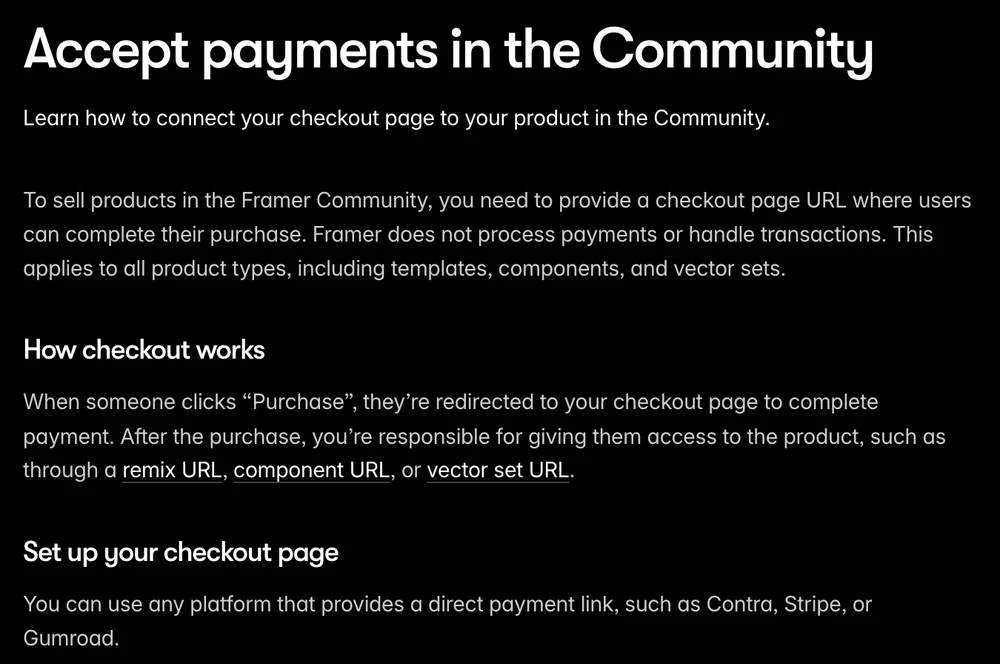
So a designer selling a template in the Framer Marketplace pastes in a checkout link from somewhere else. Framer names Contra, Stripe and Gumroad as examples. After the sale, the same article says the creator is “responsible for delivering the product to the buyer.”
A small trap to know about. Framer’s ecommerce template category describes itself to Google as templates with “checkout built in.” A template can include a nicely designed cart page. The payment behind it still has to come from an outside tool, because Framer does not process one.
That is why Framer’s ecommerce plugin directory lists more than 20 plugins, from Shopify connectors like Framer Commerce and ShopifyConnect to Stripe-based ones like Checkout Page and StripeKit. Each one fills the same gap. The same gap exists on most website builders, which is why our guide to adding a shopping cart sorts the options by what you sell rather than by builder.
Job 1: putting the product and a buy button on your Framer page
Putting a product on a Framer page takes either a full store or a single buy button, and that one choice sets the monthly bill.
Option A: a Shopify store inside Framer
Shopify connector plugins pull your Shopify products into Framer, so product pages, variants, stock counts and a cart all live on your Framer design. The payment step itself is Shopify’s checkout. Take Framer Commerce as the example. Its own pricing page lists 4 plans:
- Free: up to 25 products, publishes to Framer domains only, shows a Framer Commerce badge.
- Essential: $16 a month, or $12 on yearly billing. Adds your own domain and removes the badge, still capped at 25 products.
- Elite: $32 a month, or $24 yearly. Up to 100 products and the ability to sell subscriptions.
- Diamond: $52 a month, or $40 yearly. Unlimited products.
You still pay Shopify and Framer on top. Framer Commerce’s own pricing page lists Shopify’s Starter plan as the minimum it works with, and recommends Shopify Basic or higher.
This route makes sense when you sell physical products with sizes, colours and shipping, and you want shoppers to browse a catalog without leaving your design.
Option B: a button that opens a checkout
The lighter route is a normal Framer button whose link points to a hosted checkout page. The buyer clicks, pays on the checkout company’s page, and gets the product from there. Framer’s marketplace runs on this exact model for its own templates.
Checkout pages you can link from a Framer button include a Stripe Payment Link, a Gumroad product page, a Checkout Page plugin link and CartMango, the checkout I built for digital products. Where CartMango is weaker than some of these: its checkout opens on its own page. An embedded checkout that sits inside your Framer page is on CartMango’s planned list, and it is not live.
A button works on any Framer plan, including the free one. It fits best when you sell a few digital products and do not need a browsable catalog. If you want the product page itself hosted somewhere other than Framer, our walkthrough on building a sales page covers the 7 blocks a page needs.
Job 2: taking the money
Taking the money on a Framer site costs either a fixed monthly bill or a cut of each sale.
On yearly billing, the Shopify route costs $41 a month in fixed fees, the button routes need Framer Basic at $10 a month, and on a $29 product Stripe’s fee is $1.14 while Gumroad’s own fee is $3.40 before card processing.
| Route | Fixed cost per month | Fee per sale | Money goes to |
|---|---|---|---|
| Framer Commerce + Shopify | $41 (Framer $10, plugin $12, Shopify $19) | Shopify’s card processing | Shopify, then your bank |
| Stripe Payment Links | $10 (Framer Basic) | 2.9% + 30¢ on US cards | Your Stripe account |
| Gumroad | $10 (Framer Basic) | 10% + $0.50 plus card processing, 30% on Discover sales | Gumroad, after a 7-day hold |
| CartMango | $10 (Framer Basic), plus CartMango: free until October 2026, then $10 a year | Only Stripe’s or PayPal’s own fee | Your Stripe or PayPal, instantly |
Every monthly figure above is on yearly billing, because that is the rate Framer’s pricing page shows by default. Framer Basic is only there to give you your own domain. On Framer’s free plan, the Stripe and Gumroad routes have no monthly cost at all, and CartMango’s is $10 a year once its free period ends in October 2026.
CartMango adds nothing per sale, and the money lands in your own Stripe or PayPal account the moment the buyer pays.
The $29 math, spelled out. Stripe’s standard rate on its pricing page is 2.9% + 30¢ per successful US card payment, which is $1.14. International cards add 1.5% and currency conversion adds 1%. Gumroad’s own fee is 10% + $0.50, which is $3.40 on the same sale, with card processing charged on top. It rises to 30% if the buyer found you through Gumroad’s Discover marketplace.
Card processing is charged on every route, so the real difference is what sits on top of it. The Shopify route adds $31 a month on top of the $10 Framer plan, whatever you sell. Gumroad adds a cut instead: $34 on 10 sales a month of a $29 product, and $340 on 100 sales. CartMango and a bare Stripe Payment Link add nothing per sale. If you want to compare more checkout tools than these 4, our guide to shopping cart software prices 6 of them.
Job 3: sales tax and VAT, and who files it
Who handles tax depends on who legally counts as the seller. Framer never does.
Gumroad is the one route here that takes tax off your plate. Its pricing page says that since January 1, 2025, Gumroad handles “sales tax collection and remittance worldwide” as your merchant of record. That service is part of what its 10% + $0.50 pays for.
With Stripe Payment Links or CartMango, you stay the seller. The payment goes to your own account, so registering, collecting and filing tax stays with you. On the Shopify route, tax is set up inside your Shopify store.
Digital products are where this bites first. The EU’s business portal says electronic services “are always taxed in the customer’s country” when sold to consumers, with a EUR 10,000 threshold for sellers based in the EU. The European Commission’s list of electronically supplied services includes “the digitised content of books and other electronic publications”, so an ebook counts.
None of this is a reason to pick a route on tax alone.
Filing tax takes time, and that time never shows up in a fee table. If many of your buyers live in other countries, count it before you compare cuts.
Job 4: getting the file to the buyer, and only the buyer
Delivery is the job most Framer ecommerce guides skip.
For a digital product, it decides whether 1 payment means 1 buyer, or 1 buyer plus everyone they forward the link to. Framer’s help center puts it on you directly: payments happen outside Framer, so “you’re responsible for delivering the product to the buyer.”
For physical products, the Shopify route handles this the normal way, with orders, shipping and stock inside Shopify.
For digital products, the routes split hard:
- Stripe Payment Links end at one of 2 things, according to Stripe’s own docs: a thank-you message, or a redirect to a web address you choose. Anything past that goes through a tool like Zapier or your own webhook code. If the redirect page holds your download link, anyone who has that address can open it.
- Shopify needs an extra app for files, because it cannot deliver a digital file on its own. Our Shopify digital products guide covers the apps.
- Gumroad hosts the file and delivers it after payment.
- CartMango delivers the file after payment and locks the download link, so only paying buyers can open it. Access is removed automatically if a buyer is refunded or a subscription is cancelled.
Shared download links are not a Framer-only problem. Our guide on how to protect digital downloads covers 8 ways to stop a paid file from being passed around, and the digital delivery systems roundup compares tools built for exactly this job.
Framer template sellers face a version of this too. Before CartMango, I ran a web design service, and I closed it to start a company that built WordPress plugins. It was a move from selling hours to selling a product, and a Framer template is that same move for today’s designers.
Framer lists your template and sends buyers to your checkout, and from there the remix link, the delivery and the refund policy are all yours to run. Framer’s rules say your checkout must go straight to payment with no login, show the product and price, and include a refund policy, so check those against whatever checkout you pick before pasting the link in.
Which Framer ecommerce tool covers which job
Of the 5 rows below, only Gumroad and CartMango deliver a digital file without extra tools, and only Gumroad also files your sales tax.
| Tool | Buy button | Takes payment | Sales tax | Digital delivery |
|---|---|---|---|---|
| Framer on its own | Designs the page | No | No | No |
| Framer Commerce + Shopify | Cart on the page | Yes, Shopify checkout | Set up in Shopify | Needs a Shopify app |
| Stripe Payment Links | Button to Stripe’s page | Yes | You stay the seller | Message or redirect only |
| Gumroad | Button to Gumroad | Yes, 10% + $0.50 plus card fees | Handled for you | Yes |
| CartMango | Button to CartMango’s page | Yes, 0% added | You stay the seller | Yes, locked links |
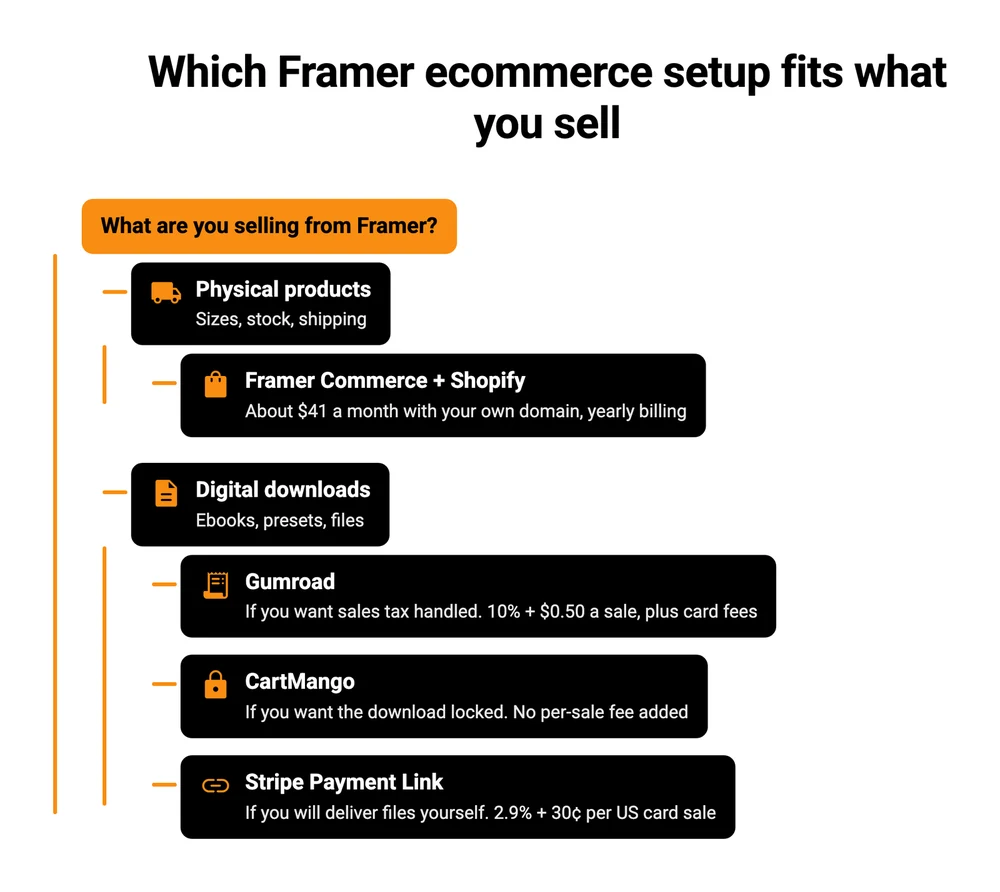
A quick way to read it. If you sell physical products, the Framer Commerce row is the one built for you, and the $41 a month buys a proper catalog. If you sell a few digital products, the last 3 rows are the real choice. Gumroad does the most for you, tax included, and takes the biggest cut of the 3. CartMango costs the same per sale as a bare Stripe Payment Link, because both leave you paying only the card processor. The difference is delivery. A Stripe Payment Link leaves the file to you, while CartMango delivers and locks it and leaves the tax filing with you.
FAQ
Can I use Framer for Shopify?
Yes. Shopify connector plugins such as Framer Commerce sync your Shopify products into a Framer site, cart included, and the payment runs through Shopify’s checkout. You pay for Framer, Shopify and the plugin separately. Framer Commerce’s own pricing page recommends Shopify Basic or higher and Framer Basic or higher.
Can I sell digital products on Framer?
Yes, through a button that links to a checkout from another company. Framer shows the product page but does not take the payment or deliver the file. Pick a checkout that also hosts and delivers the file, or plan to handle delivery yourself. A Stripe Payment Link, for example, stops at a thank-you message or a redirect, so the download itself needs a separate tool or your own code.
Does Framer take a cut of template sales?
No. Framer’s help center says creators keep 100% of the revenue from paid templates sold in its marketplace. That is because Framer does not process the payment at all. Whatever checkout you link to charges its own fee.
Do I need a paid Framer plan to sell?
Not to add a buy button. A button link works on Framer’s free plan, which publishes to a Framer domain. To use your own domain, Framer’s pricing page lists Basic at $10 a month on yearly billing. Framer Commerce’s free plan also publishes to Framer domains only.
Can the checkout sit inside my Framer page?
Partly. Shopify plugins put the product pages and cart on your Framer site, and the payment step runs on Shopify’s checkout. Stripe Payment Links, Gumroad and CartMango open their own checkout page when the buyer clicks. CartMango lists an embeddable checkout as planned, not live.
Framer does the page, the checkout is your call
Framer gets the page right and stops there. The checkout, the tax question and the delivery are yours to choose, and for a digital product the delivery is where a cheap setup leaks money.
If you sell ebooks, presets or other downloads from a Framer site, CartMango is the checkout I built for that half of Framer ecommerce. A Framer button opens it, buyers pay without making an account, the money goes straight to your Stripe or PayPal, and only paying buyers can open the file. CartMango is free until October 2026, then $10 a year.
About the Author

👋 I’m Welly, founder of CartMango (the site you’re on), a checkout platform for digital product sellers. We’ve previously processed $179M+. I also run BirdSend (email marketing tool, 3.1B+ emails sent). On the side I show other non-techie digital sellers how I use AI workflows to automate 50%+ of my operations. Find me on LinkedIn.
Related Reading
- How to add a shopping cart to a website: 4 methods, matched to what you sell
- Online store for digital products: the 3 store types and real fees on a $10 sale
- Selling digital products on Shopify: why Shopify needs an app to deliver a file
- How to sell digital products without a website: for when you have not picked a builder yet