

ThriveCart suits digital sellers who want a hosted checkout with an order bump, 1-click upsells and subscriptions included, at $444 a year, $47 month to month or $495 once for a lifetime license. WooCommerce suits a WordPress store that ships physical stock: the plugin is free, and each extra selling feature is a paid extension.
On yearly billing, WooCommerce Subscriptions ($279) plus a funnel plugin such as CartFlows Pro ($299) costs $578 before hosting, so the ThriveCart vs WooCommerce bill tips toward ThriveCart for a digital seller. CartMango is a hosted checkout for digital products and services: free right now, from $10 a year once paid plans start in November.
If you sell digital products from a WordPress site, the real choice is where the checkout lives: inside WordPress, or on someone else’s servers. Before moving to SaaS, I ran a company that built WordPress plugins, so I have shipped software both ways.
Most review pages still price ThriveCart at $495 once and WooCommerce at $0. WooCommerce reaches $578 a year once you add subscriptions, bumps and upsells, and ThriveCart’s own site now leads with a $444 yearly plan those pages leave out.
Below are current prices on the same yearly basis, whether the 2 can run together, and 6 jobs a digital seller needs done, ending with a job review pages barely touch: what happens to your subscribers if you switch later.
Key Takeaways
- ThriveCart’s own plans are subscriptions now. Standard is $444 a year or $47 a month, and the $495 lifetime license is still on sale.
- Review pages leave the new plans out. Every top search result I could read that names a ThriveCart price lists it as a one-time fee, its own comparison post included.
- WooCommerce’s extras add up. Subscriptions cost $279 a year, and CartFlows Pro or FunnelKit Plus, for bumps and upsells, each list at $299 a year.
- They do not connect directly. ThriveCart’s help center suggests a WooCommerce product button that sends buyers to the ThriveCart checkout.
- CartMango, the checkout I run, is a third option. Bumps come on every plan, upsells from $20 a year, and it is free right now.
ThriveCart vs WooCommerce pricing on the same yearly basis
On yearly billing, ThriveCart Standard costs $444 and Pro+ costs $804, while WooCommerce costs nothing until you add extensions: $578 a year for subscriptions, bumps and upsells. ThriveCart also sells Standard at $47 a month and Pro+ at $87 a month, each with a 30-day free trial, and its checkout still sells a $495 lifetime license with a $295 a year Pro+ upgrade.
Neither bill matters much if the offer itself is losing sales before buyers reach the checkout. The Online Selling Mistakes Challenge walks through 5 mistakes that cost solo sellers money, 1 email a day.
WooCommerce also needs a host. Bluehost, 1 of the hosts on WooCommerce’s own hosting page, lists its eCommerce Essentials plan at $14.99 a month on a 36-month term, renewing at $21.99 a month.
On yearly billing, subscriptions, bumps and upsells cost $444 a year on ThriveCart Standard, $578 a year plus hosting on WooCommerce and $20 a year on CartMango’s Gold plan, about $37, $48 and $1.67 a month.
| Setup | Entry plan | Subs, bumps, upsells | Plus affiliates | Cut per sale |
|---|---|---|---|---|
| ThriveCart subscription | $444/year (Standard) | $444/year, 1 bump | $804/year (Pro+) | 0% of a basic sale |
| ThriveCart lifetime | $495 once | $495 once, 1 bump | $495 once plus $295 a year | 0% of a basic sale |
| WooCommerce | $0 plus hosting | $578/year plus hosting | $677/year plus hosting | 0% |
| CartMango | $10/year (Silver) | $20/year (Gold) | $30/year (Platinum) | 0% |
CartMango is the checkout I run, so read its row with that in mind. CartMango caps products by plan, which ThriveCart and WooCommerce do not: 10 on the $10/year plan, 25 on the $20/year plan and unlimited on the $30/year plan, with 2 GB, 10 GB and 50 GB of file storage.
What the ranking pages still say about ThriveCart pricing
Every top search result I could read that names a ThriveCart price describes it as a one-time purchase. That includes the top result, ThriveCart’s own comparison post, whose pricing table lists Standard as a “$495 One-time payment” and a $195 Learn+ course add-on.
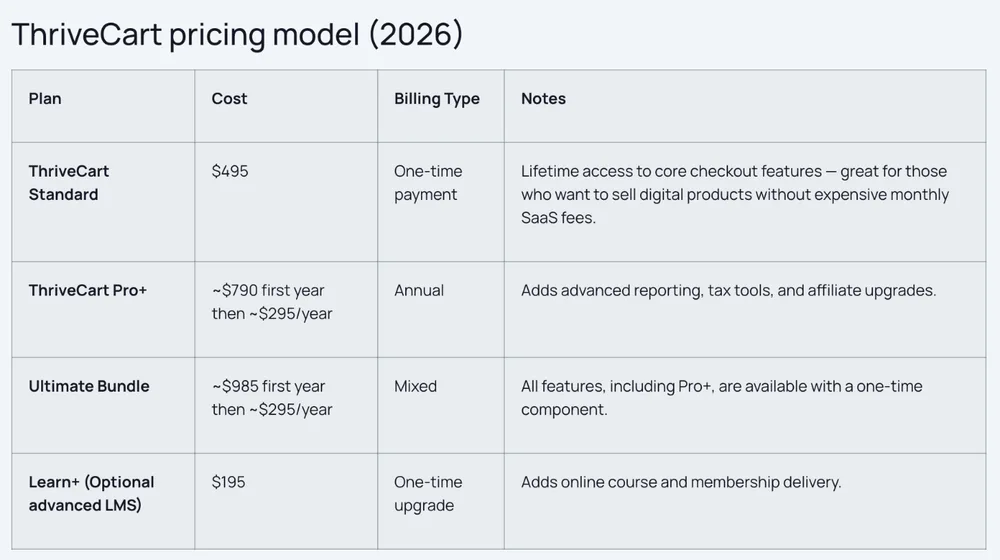
The pricing table on ThriveCart’s own ThriveCart vs WooCommerce post. Compare the Standard row with the $444 a year and $47 a month plans on ThriveCart’s homepage.
TrustRadius lists a Standard plan at $495 and a Pro plan at $690, both one-time. TodayTesting says $495 buys a lifetime account with access to all ThriveCart’s features, which leaves out the $295 a year Pro+ upgrade that affiliates and multiple bumps need. Inkpot Creative and Blog Marketing Academy describe the lifetime license only, and Google’s AI Overview calls the $495 lifetime fee ThriveCart’s primary pricing.
The lifetime license is real, and for some sellers it is the better buy, since $495 once costs less than 2 years of Standard at $444. There are 2 catches, both on ThriveCart’s own pages. Lifetime accounts pay higher automation fees, covered next, and ThriveCart’s homepage ties its Academy course and community plan to the subscription licenses.
The fees on top of the plan
ThriveCart takes 0% of a basic sale on a Stripe Connect+ connection. Its fee page then lists add-ons that do take a percentage, starting with sales tax collection at 0.5% per eligible transaction on Standard and 0.35% on Pro+. Subscription bumps cost 0.10% on a Standard subscription and 0.25% on a lifetime account, and a retention offer takes a share of the payment it saves, covered under Job 4.
WooCommerce takes no cut through the free plugin. If you use its own payment option, the WooPayments fee schedule lists US cards at 2.90% plus $0.30, the same as Stripe’s standard rate. CartMango takes 0% a sale too, and the money goes straight to your own Stripe or PayPal account at their normal rates.
Can you use ThriveCart with WooCommerce?
Yes, ThriveCart can work alongside WooCommerce, but the 2 do not connect directly. ThriveCart’s help center says it plainly: “In short, they don’t directly integrate.” It offers 2 workarounds.
The first keeps your WooCommerce product pages and sends buyers to ThriveCart to pay. You switch a product’s type from Simple to External/Affiliate, paste your ThriveCart checkout link into the Product URL field, and set the button text to something like “Buy now.” The price you type into WooCommerce is display only and, as ThriveCart’s help article warns, does not sync, so a price change means editing both places. The trick works with any checkout link, since WooCommerce just sends the click to the URL you paste.
The second sends ThriveCart buyers back into WooCommerce through Zapier, so their orders show up in your WooCommerce dashboard. That route needs WooCommerce’s own Zapier extension at $129 a year, on top of a Zapier plan.
Job 1: where the checkout lives and who looks after it
ThriveCart hosts the checkout for you, while WooCommerce runs it on your own WordPress site. ThriveCart Standard includes unlimited checkout, sales and upsell pages built in its own editor, native file and video hosting, checkout in 100+ countries and 100+ direct integrations, so there is no server to look after. WooCommerce puts every choice in your hands: the host, the theme, the checkout plugin and the extensions, and you keep all of them updated. In return, the checkout knows who your WordPress users are.
The WordPress login is why David Risley moved his Blog Marketing Academy membership site from ThriveCart to WooCommerce, in a 2021 post that ranks for this search. ThriveCart, he wrote then, “doesn’t create or manage customer profiles,” so members already logged in to WordPress had to type their details again at checkout. If your buyers already have accounts on your site, that alone is a good reason to keep the checkout inside WordPress.
CartMango hosts the checkout too, and adds Mini Pages, a simple sales page editor, so you can sell without a website of your own. ThriveCart hosts sales pages as well, so both remove the website step. CartMango’s native integrations cover Stripe, PayPal, Kit, ActiveCampaign, beehiiv and BirdSend, and its Make.com connection reaches 3,000+ other apps.
Job 2: getting more from each order
ThriveCart Standard includes 1 bump offer, 1-click upsells and downsells, A/B split testing and abandoned cart recovery. Multiple order bumps on the same checkout need Pro+ at $804 a year.
WooCommerce core has no order bump or post-purchase 1-click upsell. Its built-in “up-sells” are product suggestions shown on a product page before purchase, not a 1-click offer after payment. 2 of the funnel plugins the top results name, CartFlows and FunnelKit, both leave the job out of their entry tier:
- CartFlows. Its pricing page marks order bumps and 1-click upsells as not included on Starter. They start on CartFlows Pro, which renews at $299 a year for up to 3 sites.
- FunnelKit. Basic does not include them. 1-click upsells and order bumps arrive on the Plus plan, normally $299 a year for 2 sites.
Both run sales that cut the first year, so budget from the renewal line. A free route exists too: One Click Upsell Funnel for WooCommerce by WP Swings offers order bumps and post-purchase upsells in its free version. Its FAQ limits that version to Cash on Delivery and the Payment Plugins for Stripe WooCommerce gateway, and subscription products need the premium version.
A seller described the move in a WordPress.org plugin review about replacing ThriveCart. The reviewer was leaving a hosted cart for WordPress, WooCommerce and WooFunnels, the plugin now sold as FunnelKit, and wrote that the funnel builder was what sold them on the move, and that the Pro version they had already paid for was well worth it.
Abandoned carts follow the same pattern. ThriveCart Standard includes recovery, WooCommerce sells AutomateWoo for it at $159 a year among other options, and CartMango includes cart abandonment on its $20/year plan, sending the recovery emails through the email tool you connect. CartMango also puts order bumps on every plan, including the $10/year one, and upsells and downsells on that same $20/year plan.
Job 3: getting the file or course to the buyer
WooCommerce delivers files in its free core plugin: you tick Virtual and Downloadable on a product, upload the file, and WooCommerce emails a download link after payment, with an optional download limit and expiry. Courses and memberships need another plugin on top.
ThriveCart hosts files, audio and video natively, and each subscription license includes a ThriveCart Academy plan. On Standard that is the Starter plan, with unlimited courses and students, up to 2,000 community members and 100 GB of video storage.
CartMango delivers files through protected download links on every plan, and online courses come on the $30/year Platinum plan, with lessons built from text, images, audio, files and a pasted video link. CartMango does not host video files, so videos stay on a host like YouTube or Vimeo, and CartMango courses have no quizzes or certificates. CartMango’s community feature is still being built and is not live yet.
Job 4: charging the same buyer every month
ThriveCart Standard bills subscriptions with trials, setup fees and payment plans. ThriveCart’s help center says it sets each subscription up directly with your payment processor, which then handles the rebilling, so on Stripe a failed renewal follows the retry settings in your Stripe dashboard. ThriveCart’s own Failed Payment Recovery feature, which adds automated retries and reminders, is available on Pro+.
Retention offers carry a ThriveCart fee. When a subscriber goes to cancel and accepts a retention offer, ThriveCart takes 5% of the first payment it saves on a Standard subscription, 8% on a lifetime account and 0% on a Pro+ subscription.
WooCommerce needs the WooCommerce Subscriptions extension, $279 a year, whose product page reports $1.6B+ in renewals over the last 12 months and 8M+ active subscriptions. WooCommerce Subscriptions retries a failed renewal automatically and emails the customer to update their card, so the reminders that need Pro+ on ThriveCart come with the $279 extension.
CartMango includes one-time and subscription selling on every plan, the $10/year one too. Our guide to selling subscriptions online compares more tools on recurring fees.
Job 5: letting other people sell for you
ThriveCart’s Affiliate Center, with automated payouts, is a Pro+ feature: $804 a year on a subscription, or the $295 a year Pro+ upgrade on a lifetime license. Google’s AI Overview lists a built-in affiliate center next to the $495 price without that condition. WooCommerce adds affiliates with an extension. Affiliate for WooCommerce lists at $99 a year on the WooCommerce Marketplace, which brings the WooCommerce version of ThriveCart Pro+, with subscriptions, bumps, upsells and affiliates, to $677 a year before hosting, against $804. CartMango’s affiliate system is on its $30/year Platinum plan, for up to 250 affiliates.
Job 6: switching later, and what happens to your subscribers
ThriveCart and CartMango subscriptions keep billing if you leave, while WooCommerce renewals depend on the Subscriptions extension staying active on your site. ThriveCart sets subscriptions up directly with your payment processor, so the processor keeps rebilling. CartMango keeps them running too: if you leave, every subscription you created keeps paying you.
On WooCommerce, the renewals run inside the extension. WooCommerce’s guide to deactivating Subscriptions lists “missed scheduled renewal payments, including automatic retries” as a risk, because the extension powers the store’s recurring billing. Moving active subscribers off WooCommerce means planning a migration with your next tool, so the renewals carry on without a gap.
Review pages barely cover this. ThriveCart’s own post, Inkpot Creative and TodayTesting never mention subscribers, renewals or migration. The only page that comes close is David Risley’s switching story, where he notes near the end that some subscriptions were still billing through ThriveCart after his move.
6 jobs, 3 tools: who covers what
ThriveCart covers all 6 jobs on Pro+ ($804 a year) and 5 on Standard, WooCommerce covers checkout and files in its free core and needs paid extensions for subscriptions, bumps, upsells and affiliates, and CartMango covers all 6 on its $30/year plan.
| Job | ThriveCart Standard | WooCommerce | CartMango |
|---|---|---|---|
| Checkout | Hosted by ThriveCart | Your WordPress host | Hosted, plus Mini Pages |
| Bumps and upsells | 1 bump, upsells included | CartFlows or FunnelKit, $299 a year | Bumps from $10/year, upsells from $20/year |
| Files and courses | Files plus Academy Starter | Files free, courses need a plugin | Files on every plan, courses on $30/year (video hosted elsewhere) |
| Subscriptions | Included, dunning on Pro+ | $279 a year, retries and emails included | Every plan |
| Affiliates | Pro+, $804 a year | $99 a year extension | $30/year plan, 250 affiliates |
| Switching later | You keep recurring payments | Renewals live in the extension | You keep recurring payments |
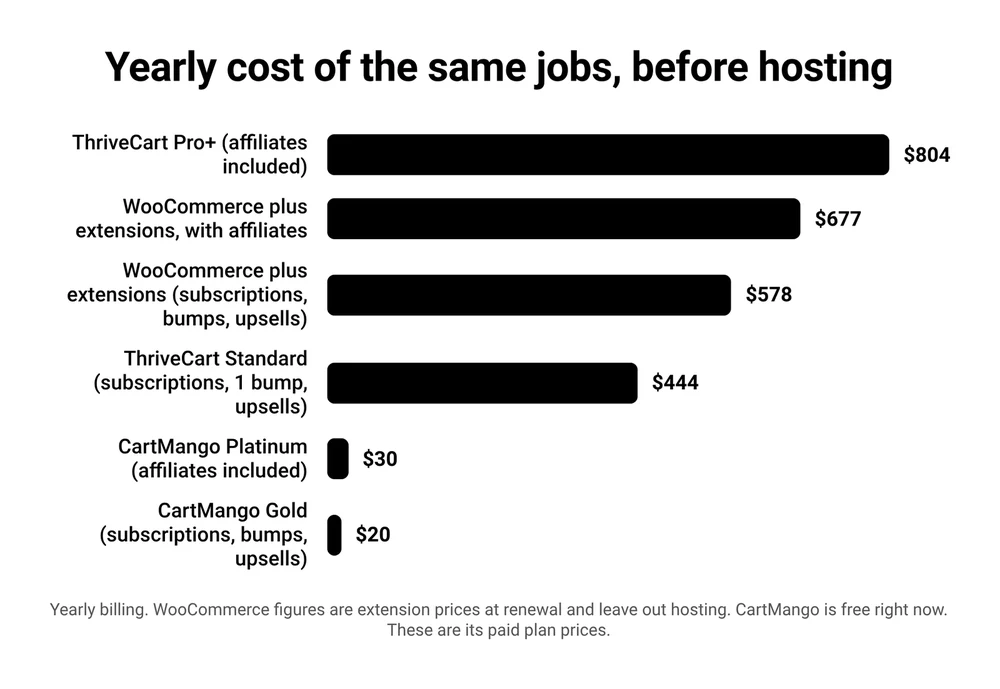
Yearly billing, before hosting. The WooCommerce bars are extension prices at renewal.
If your setup is a large physical catalog, WooCommerce’s stock and shipping tools are the reason to pick it. CartMango sells digital products and services only.
FAQ
Is ThriveCart legit?
Yes. ThriveCart is an established hosted checkout, and its homepage says it is used by 75,000+ solopreneurs, coursemakers and community builders and has processed $8B+ in revenue. What trips buyers up is the price they read elsewhere. Most review pages still describe only the lifetime license, while the homepage leads with $47 a month or $444 a year, so check the plan cards on thrivecart.com before you budget.
How much is ThriveCart per month?
ThriveCart Standard costs $47 a month on monthly billing, or $444 a year, which works out to about $37 a month. Pro+ costs $87 a month, or $804 a year, about $67 a month. Both come with a 30-day free trial, and the $495 lifetime license is a separate one-time option.
Is the ThriveCart lifetime deal still available?
Yes. ThriveCart’s checkout sells the lifetime account at $495 once, and offers the Pro+ upgrade on it for $295 a year.
Lifetime accounts pay higher automation fees on retention offers and subscription bumps than the Standard subscription, and ThriveCart’s homepage ties the Academy course plan to its subscription licenses. Our ThriveCart coupon code check covers which discounts are real.
Do you need WordPress to use WooCommerce?
Yes. WooCommerce is a WordPress plugin, so it needs a WordPress site on a host you pay for. ThriveCart and CartMango need no website at all, since both host the checkout and a sales page for you.
What are the alternatives to ThriveCart and WooCommerce?
They fall into 2 groups. Hosted checkouts like ThriveCart and CartMango run the checkout for you, while WordPress plugins like WooCommerce, SureCart and Easy Digital Downloads run on your own site. For a physical store without WordPress, Shopify is a hosted option built for that.
For other hosted rivals to ThriveCart, see our breakdowns of ThriveCart vs Systeme.io and ThriveCart vs Stan Store.
If you sell files and courses, not boxes
For a seller who sells only digital products and has no WordPress membership site to protect, ThriveCart vs WooCommerce is close to settled. ThriveCart Standard does in a single $444 a year plan what costs $578 a year in WooCommerce extensions before hosting, and you keep those recurring payments if you go. WooCommerce earns its place when the site is already WordPress, the buyers already log in, or the catalog ships physical stock.
CartMango, the checkout I run, is built for that same digital seller. The jobs this post priced at $444 and $578 a year (subscriptions, order bumps and upsells) all come on CartMango’s $20/year Gold plan, with courses and affiliates on the $30/year plan. CartMango is free right now, and paid plans start in November, from $10 a year.
About the Author

👋 I’m Welly, founder of CartMango (the site you’re on), a checkout platform for digital product sellers. We’ve previously processed $179M+. I also run BirdSend (email marketing tool, 3.1B+ emails sent). On the side I show other non-techie digital sellers how I use AI workflows to automate 50%+ of my operations. Find me on LinkedIn.
Related Reading
- ThriveCart vs Systeme.io for 2027: $170 With Email or $444 Without: when email belongs in the same bill
- ThriveCart vs Stan Store for 2027: Stan Costs More Once You Add an Upsell: a link-in-bio store against a full checkout
- ThriveCart vs Leadpages in 2026: Checkout, Page Builder, or Both?: for readers weighing a page builder instead
- How to Sell Subscriptions Online in 2026 (and Keep Them If You Switch Tools): recurring fees and switching, across more tools