

At $8 to $40 a month and 0% of each sale, E-junkie is a cheap, steady cart for selling one-time downloads through buttons on your own website. Buyers pay you directly through PayPal, Stripe or another processor you connect. E-junkie’s own help page says it cannot run subscriptions, and it has no built-in upsells.
E-junkie review scores look strong, 4.6 from 28 on Trustpilot, but only 1 came in the last year, and 16 of the 23 rated 5 stars arrived through E-junkie’s own link. Carts that bill renewals include CartMango (free right now, from $10 a year once paid plans start in November, 0% per sale), which I run, and Gumroad (10% + $0.50 per sale).
E-junkie’s own history page says it started in 2003 as a script its founder wrote to stop waking up at night to email out a $4 software app. People still run ebook and software stores on it today, some since 2009.
Long-time users write most of its praise. 12 of the 23 people who gave it 5 stars on Trustpilot say they have used it for years, which says more about how it still serves them than about a new store.
This review is built from E-junkie’s own pricing and help pages, all 28 Trustpilot reviews, 7 on G2 and a Reddit thread. You’ll see whether it suits a new store today, through 5 situations with the real cost of each.
Key Takeaways
- Cheap and flat. E-junkie charges $8 to $40 a month based on product count and file storage, and takes 0% of each sale.
- No renewals. E-junkie’s own help page says its system has no way of handling subscriptions or installment plans, so monthly products need another tool.
- No built-in upsells. Add-on offers mean hand-editing thank-you pages or cart code, following a workaround guide E-junkie publishes itself.
- Read the 4.6 with care. Trustpilot shows 1 review in the last 12 months, and 16 of the 23 rated 5 stars came through E-junkie’s own link.
- Paying E-junkie needs PayPal. Your plan bills as a PayPal subscription with a card linked, even if buyers pay by Stripe. Only sellers without PayPal can prepay a year.
How E-junkie works, and what each plan costs
E-junkie works by giving you buy-now and cart buttons to paste into your own website, then sending the file once your buyer has paid you through your own payment processor.
Choosing a cart is only 1 place a sale can leak. If you suspect your pricing or your sales page is the bigger problem, the Online Selling Mistakes Challenge walks through 5 common selling mistakes solo creators make, and how to fix them, over 5 days.
E-junkie’s help pages describe the process in 3 steps:
- You add a product in the dashboard and copy its button code onto your site.
- A buyer clicks the button and pays you directly through PayPal, Stripe, Braintree, Authorize.net or another processor you connected.
- E-junkie checks the payment, shows the buyer a download page and emails them a link.
Beyond files, E-junkie’s feature page lists codes and generated license keys, physical goods with UPS and USPS shipping rates, pay-what-you-want pricing, bundles, discount codes, gift cards and an affiliate program. If your site already runs Google Analytics or a Facebook pixel, its cart reports each sale to them as a conversion.
What each plan costs
E-junkie’s cheapest plan is $8 a month for 10 products and 200 MB of files, the top plan is $40 a month for unlimited products and storage, and no plan takes a cut of your sales.
| Monthly price | Products | File storage | Remote files | 12 months |
|---|---|---|---|---|
| $8 | 10 | 200 MB | No | $96 |
| $10 | 40 | 2 GB | No | $120 |
| $20 | 150 | 8 GB | Yes | $240 |
| $40 | Unlimited | Unlimited | Yes | $480 |
The 12-month column is simply 12 payments at the monthly price, because E-junkie publishes no yearly plan. Its billing help page offers a prepaid, non-refundable year only to sellers who cannot pay through PayPal. “Remote files” means delivering a file you host yourself, such as on Amazon S3, which E-junkie’s help pages limit to plans of $20 a month and up.
Every plan includes a storefront, unlimited sales and unlimited downloads. You get a 14-day free trial with no credit card, and you can set up products before you pick a plan.
Paying E-junkie itself has a quirk. Your plan runs as a monthly PayPal subscription to Sine Info Ventures Pvt. Ltd., the parent company named on E-junkie’s billing page. PayPal asks for a card linked to that account, even if every one of your buyers pays through Stripe.
Some of the E-junkie reviews ranking on Google get the price list wrong. Software Advice’s E-junkie profile says “Starting at $5.00 per month” and shows a “Free Version” label, and 3Dsellers names the plans Starter, Professional, Business and Enterprise. E-junkie’s own pricing page shows 4 prices from $8, no free plan and no plan names at all.
What 28 E-junkie reviews on Trustpilot show
The 28 E-junkie reviews on Trustpilot show long-time sellers who love the support, a review count that has nearly stopped growing, and a score where most 5-star reviews came through E-junkie’s own link. E-junkie’s Trustpilot page gives it a TrustScore of 4.6, with 82% of reviews at 5 stars, 18% at 1 star and nothing in between.
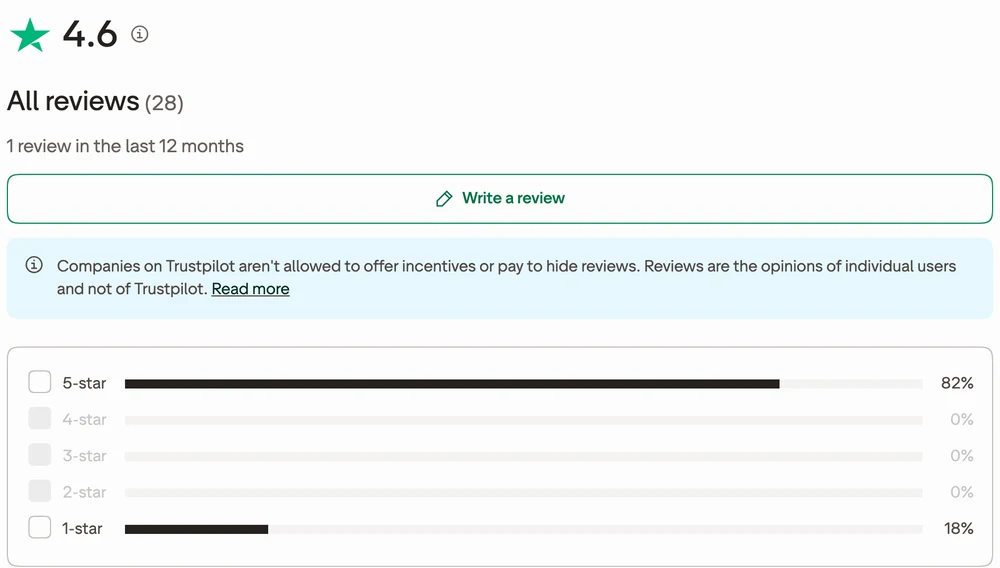
All 28 reviews can be read, though Trustpilot tucks 1 behind a reviewer’s “See 1 more review” link. 23 are rated 5 stars and 5 are rated 1 star. 16 of the 23 rated 5 stars carry Trustpilot’s “Redirected” label, and none of the 5 rated 1 star do.
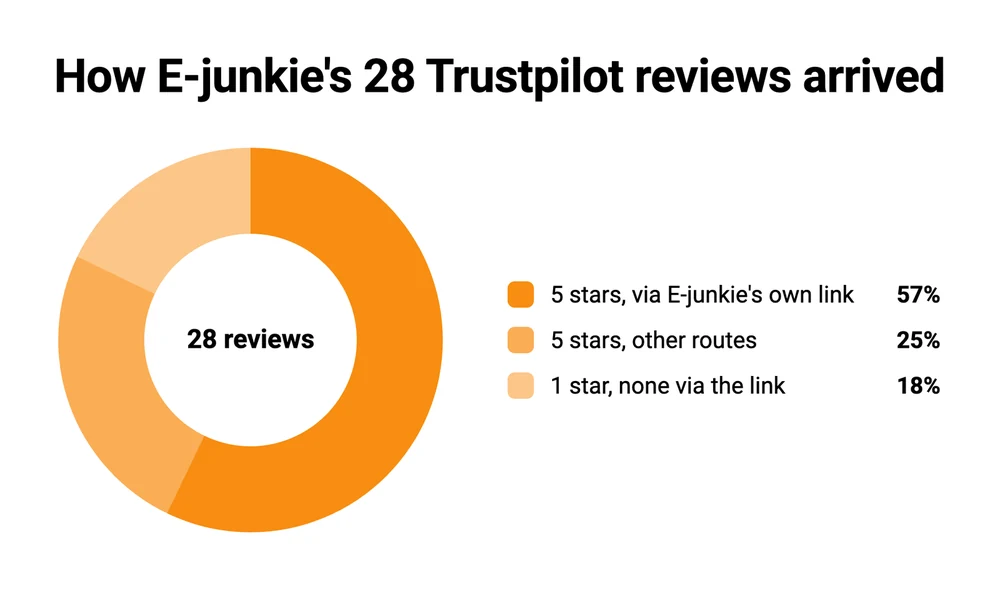
Trustpilot’s label guide says “Redirected” means the business put a link on its own website leading to its Trustpilot page, and the review was written through it. On E-junkie’s site, that link sits on a reviews page which asks customers who “enjoyed using E-junkie” to “leave a kind review”, and asks anyone with a problem to “contact us first”. Trustpilot treats such links as a normal way to collect reviews, but they are a different label from “Verified”, and the invitation likely tilts who shows up on the page.
The praise itself is consistent. Reviewers name the support staff who fixed a broken shop button or a PayPal notification problem, 1 says replies come “typically within 5 to 10 minutes”, and the longest-serving have been there a very long time:
- 1 seller has used it since 2009 and calls it “16 years and counting”.
- Another ran sales on it for 15 years.
- A third has been on it for close to 20 years, with a short break at Paddle.
5 of the 23 reviews rated 5 stars were written as the seller stopped using E-junkie, including 3 of the 5 most recent. 2 of those sellers moved to a different store as their business grew, 1 moved to a WordPress site that delivers files itself, and 1 had to close their websites but plans to use E-junkie again.
The 5th is the only review from the last 12 months. Posted in January 2026, it thanks E-junkie and adds: “I no longer require a shopping cart”.
The 5 reviews rated 1 star date from 2017 to 2024:
- 2017: outages the reviewer says came “every couple of weeks”.
- 2018: code emails that never reached buyers with Gmail addresses.
- 2019: a payment of £17 with nothing provided.
- 2022: a 1-line claim of being scammed out of $300, with no detail.
- 2024: the reviewer says E-junkie stopped linking to their files on Amazon storage, so every download link had to be rebuilt. E-junkie’s help pages still offer your own Amazon S3 storage on plans of $20 a month and up.
G2’s E-junkie reviews add 7 more, averaging 4.1. The 2 lowest, both scored 2.5 out of 5, date from 2018 and 2019, and one is titled “Great price, complex to use, less professional looking, and good starting place”.
A 2020 r/selfpublish thread adds a practical detail. A self-publisher who had sold PDFs on E-junkie for years wrote: “every 12 sales or so, I get an email from someone who wasn’t able to download the PDF in the five attempts I allow”. Those 5 attempts are E-junkie’s recommended default, inside a 120-hour window, and you can set anywhere from 1 to 9.
What decides whether E-junkie fits you
Whether E-junkie fits comes down to 3 questions about what you sell. Does anything renew every month? Do you want to offer an add-on at checkout or right after it? And where do your buttons and files live?
The 5 situations below give a pick and a real cost for each kind of seller. CartMango, the checkout I built and run, appears where it is one of the options, with its price next to the others.
If your buy buttons already sit on a site you built yourself
E-junkie was built for exactly this seller: you already have a website, you like how it looks, and you want a button on it that takes money and sends a file. Pick E-junkie. Its cart opens as a layer over your own sales page, so buyers add items and check their cart without leaving your site. The payment itself then happens on PayPal’s page or a checkout page E-junkie generates.
On 10 products, it costs $8 a month, or $96 over 12 months, with 0% taken from each sale. For 40 products it is $10 a month. You also pay your PayPal or Stripe fees, as you would on any cart.
What you give up:
- Looks. 1 G2 reviewer, in 2019, called it “complex to use” and “less professional looking”.
- Hands-off downloads. With the default of 5 tries in 120 hours, the occasional buyer emails you for the file. You can raise it to 9.
- Paying without PayPal. E-junkie bills through a PayPal subscription. A prepaid year is offered only to sellers who cannot pay through PayPal.
Against CartMango, E-junkie wins this one. CartMango gives each product a link to its own hosted checkout page, with no cart layer on your site, and paying inside your own page is still on its “What we plan to add” list. If a cart that sits on your own pages matters most, E-junkie does that today.
If you sell PDFs that you worry will be passed around
For ebook and workbook sellers, E-junkie has PDF stamping. It writes the buyer’s name, email and transaction ID onto every page of their copy, which makes a shared file easy to trace. Gumroad and Payhip stamp PDFs too: Gumroad’s help page says its stamp is the buyer’s email and Gumroad’s logo on the first page only, and Payhip’s puts the buyer’s email and purchase date on every page.
Pick E-junkie if you want that stamp at a flat monthly price. On 10 to 40 products it costs $8 to $10 a month, while Gumroad takes 10% + $0.50 of each sale and Payhip takes 5% on its free plan or 2% on its $29 a month plan. On a $10 ebook, Gumroad’s cut passes $8 from the 6th sale each month. The $8 plan’s 200 MB holds plenty of text PDFs, though a few image-heavy workbooks can fill it fast.
What you give up: stamping only works on a PDF uploaded as it is. E-junkie’s ebook help page says it does not work on PDFs inside a ZIP file or a bundle. A stamped link also stops working a year after it was first sent.
If anything you sell renews every month
Skip E-junkie for this. Its own help page answers the question directly: “Our system has no way of handling recurring payments such as a periodic subscription or installment plan.” The suggested workaround is PayPal’s own subscription buttons, run next to E-junkie, plus a separate membership tool to control who gets access.
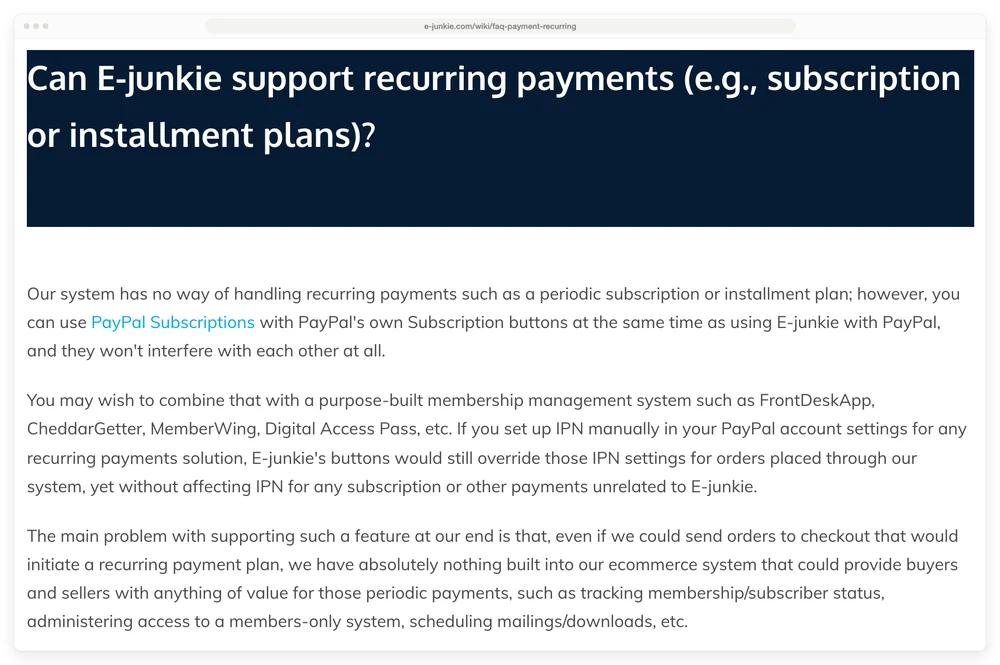
That means running 2 or 3 separate tools for 1 product. For a monthly template club, a paid newsletter or a payment plan on a course, pick a cart that bills renewals itself.
CartMango includes subscription selling on every plan. CartMango is free right now, then $10 a year on its Silver plan once paid plans start in November. That works out to about $0.83 a month billed yearly, against E-junkie’s $8 a month, which has no published yearly plan. If you ever leave CartMango, the subscriptions you set up keep paying you.
What you give up: CartMango has no live chat, and its founder-led support replies in 2 hours or more on average. E-junkie runs live chat 7 days a week, 10am to 6pm MST.
Gumroad also bills subscriptions, with no monthly fee and 10% + $0.50 of each sale. The difference from CartMango shows when you leave: recurring payments stop if you leave Gumroad, so every subscriber would have to sign up again somewhere else. The E-junkie alternatives roundup compares more carts that bill renewals.
If you want to offer an add-on before or after checkout
Add-on offers are where E-junkie stops: its own upsell help page says “we don’t have a dedicated upsell feature built-in”. The page describes 4 workarounds instead: a link or button pasted into your thank-you page, a “Yes please / No thanks” page you build yourself, redirecting your checkout button to an upsell page, or a snippet of cart code that shows an add-on line in the cart. Each one is something you set up and test by hand.
Pick a cart with these built in. CartMango includes order bumps, the tick-box add-on on the checkout page, on every plan from $10 a year. Upsells and downsells, the 1-click offers shown after payment, start on CartMango’s Gold plan at $20 a year, which is about $1.67 a month billed yearly. Gumroad has order bumps and upsells too, for 10% + $0.50 of each sale. Payhip has order bumps but no upsells.
What you give up with CartMango: upsells need the Gold plan, and there is no cart layer on your own pages like the one E-junkie has.
If your files are big, or stored on your own cloud
Large catalogues are where E-junkie’s $40 plan earns its price: it buys unlimited products and unlimited file storage, which suits video, sample packs or software installers with files measured in gigabytes.
The other plans are tighter: 200 MB at $8, 2 GB at $10 and 8 GB at $20. From the $20 plan up, E-junkie’s help pages say it can pull files from your own server or Amazon S3 instead of storing them. Each file needs a public, direct address, because E-junkie’s servers fetch it without going through a download page.
Pick E-junkie if your files outgrow 50 GB, or if you sell video as a file download: $20 a month plus your own storage bill, or $40 for unlimited storage on E-junkie. What you give up: that fixed $20 or $40 lands every month however little you sell, which is $240 or $480 over 12 months.
For other files under 50 GB, CartMango’s Gold plan holds 10 GB and Platinum holds 50 GB, at about $1.67 and $2.50 a month billed yearly. CartMango’s storage covers images, PDFs, audio and downloadable files, and video files need hosting outside CartMango, such as YouTube or Vimeo.
Which of the 5 is you: the pick and the catch
E-junkie is the pick in 3 of these 5 situations: buttons on your own site, a PDF stamp at a flat price, and video or files over 50 GB. Subscriptions and add-on offers go to a cart with those features built in. E-junkie has no published yearly plan, so its prices are monthly. CartMango bills only yearly, so it is shown per month.
| Your situation | Pick | Cost | The catch |
|---|---|---|---|
| Buttons on a site you built | E-junkie | $8 a month for 10 products | You pay E-junkie through PayPal |
| PDFs you want stamped | E-junkie | $8 to $10 a month | No stamping inside ZIP files or bundles |
| Anything renews monthly | CartMango | Free now, then about $0.83 a month billed yearly | No live chat |
| Add-on offers at checkout | CartMango | Order bumps about $0.83, upsells about $1.67 a month, billed yearly | Upsells need the Gold plan |
| Video, or files over 50 GB | E-junkie | $20 a month plus your own storage, or $40 unlimited | A fixed fee even in a slow month |
FAQ
Is E-junkie legit and safe?
E-junkie began as a script in 2003 and never holds your money: buyers pay into your own PayPal or Stripe account, and E-junkie checks the payment and sends the file. 2 of the 5 reviews rated 1 star report paying and getting nothing, £17 in 2019 and a $300 scam claim in 2022 with no detail. The other 3 are about outages in 2017, undelivered emails in 2018 and files kept on Amazon in 2024.
Does E-junkie have a free plan?
No. Every plan is paid, starting at $8 a month for 10 products. There is a 14-day free trial with no credit card, and you can set products up before choosing a plan. Nothing needs installing either: E-junkie’s help pages say it “does not require you to install and configure any software on your own server”.
Do you need PayPal to use E-junkie?
Only to pay E-junkie itself. Your plan runs as a PayPal subscription, and PayPal wants a card linked to the account. Without PayPal, you can ask E-junkie to arrange a prepaid, non-refundable year. Your buyers can pay you through Stripe, Braintree, Authorize.net or 2Checkout instead of PayPal.
Does E-junkie have an affiliate program?
Yes. E-junkie lets you recruit affiliates who earn a commission on each sale they refer, and you can pre-screen them or open the program to anyone, including through E-junkie’s marketplace. Buyers still pay into your own account, and each referred sale is credited to the affiliate who sent it.
Can E-junkie deliver codes for eBay sales?
Yes. Once your eBay account is connected, E-junkie checks it for new sales every 5 minutes and emails the buyer their link or code, so delivery can take up to 5 minutes. Avoid eBay’s Local Pickup option, because it does not pass the buyer’s email to E-junkie. E-junkie’s eBay help page also warns that many sales made after 9pm MST only show up at midnight.
How does E-junkie compare with Gumroad and Payhip?
E-junkie charges a flat monthly fee, while Gumroad takes 10% + $0.50 of each sale and Payhip’s free plan takes 5%. On a $10 product, Gumroad keeps $1.50 a sale, so from 6 sales a month it costs more than E-junkie’s $8 plan, before card fees you pay on all 3. CartMango takes 0% per sale and costs from $10 a year once paid plans start in November. The full breakdowns are in E-junkie vs Gumroad and E-junkie vs Payhip.
When renewals start to matter more than buttons
The praise in this E-junkie review points to 1 job done well. The job is simple: paste a button, take a one-time payment, send the file. The sellers praising it have done that for years, some for 15 to 20. What it cannot do is written in its own help pages: no subscriptions and no built-in upsells.
If you are adding a paid newsletter or a monthly template club, CartMango bills subscriptions on every plan. Its order bumps for add-on offers come on every plan too. CartMango is free right now, from $10 a year once paid plans start in November, with 0% taken from each sale.
About the Author

👋 I’m Welly, founder of CartMango (the site you’re on), a checkout platform for digital product sellers. We’ve previously processed $179M+. I also run BirdSend (email marketing tool, 3.1B+ emails sent). On the side I show other non-techie digital sellers how I use AI workflows to automate 50%+ of my operations. Find me on LinkedIn.
Related Reading
- 8 E-junkie alternatives: where to look after this E-junkie review if you need subscriptions or upsells
- E-junkie vs SendOwl: 2 download carts, 1 with a flat fee and 1 capped by revenue
- Payhip review: what 553 Trustpilot reviews say about Payhip, and the closed-store complaints
- Gumroad review: payouts, the $100 minimum and what sellers report on Trustpilot
- Sellfy review: sales caps, the trial with no live checkout and 71 Trustpilot reviews sorted