

This LearnWorlds review finds a strong course platform for a seller who needs graded quizzes, certificates and interactive video, starting on Pro Trainer at $79 a month billed yearly. Starter is the weak spot: it rose to $44 a month billed yearly, or $49 monthly, plus $5 per enrollment, with no certificates or interactive video.
Trustpilot shows 4.8 out of 5 across 423 reviews, and 125 of the newest 200 5-star reviews mention support. The 43 reviews at 1 to 3 stars point most often at plan limits, bugs and outages. Leaving needs a plan too, because LearnWorlds can’t export a whole course as 1 file and cancelling your plan leaves student subscriptions running.
You’re close to putting your course, your students and maybe your monthly income on 1 platform. Moving later is slow, so you want current facts before you pay, and most review pages missed a change LearnWorlds made in late October.
So I compared the live pricing page against an archived copy and pulled 256 Trustpilot reviews, sorting the 43 lowest by hand. Then I read LearnWorlds’ help docs and terms on cancelling and leaving.
By the end you’ll know which plan fits, what the bill looks like, and what to set up on day 1, before you ever need to move.
Key Takeaways
- Starter costs more now. It rose from $29 to $49 a month, or $24 to $44 billed yearly, plus $5 per enrollment.
- Pro Trainer is the practical entry plan. At $79 a month billed yearly it adds certificates, interactive video, subscriptions and no enrollment fee.
- The break-even moved. Pro Trainer now matches Starter at 10 enrollments a month on monthly billing, or 7 on yearly billing.
- Email comes in parts. Mass emails start on Pro Trainer with 2,000 credits a month, and automations wait until Learning Center.
- The 4.8 leans on support. 125 of the newest 200 5-star reviews mention support, while plan limits and bugs lead the 43 lowest.
- Plan your exit early. A whole course can’t be exported as 1 file, and changing Stripe accounts cuts off payments from existing buyers.
LearnWorlds review verdict: who should pay for it
LearnWorlds suits a course seller who cares what happens inside a lesson: quizzes in the middle of a video, graded tests, certificates and SCORM files. That seller should start on Pro Trainer. A seller with 1 simple video course gets less from it, and Starter’s new price makes that harder to justify. If you haven’t tested your idea yet, start with the Online Selling Mistakes Challenge before you pay for any platform.
- Pay for Pro Trainer if you teach skills people get tested on, sell subscriptions or issue certificates.
- Move up to Learning Center only for white-labeling, automations or more than 5 admins. It keeps the same 2,000-learner limit.
- Take Starter only for 1 or 2 paid courses at low volume, with no certificates and no subscriptions.
- Skip LearnWorlds if you sell PDFs or templates. A checkout such as CartMango, which I run (free right now, from $10 a year once paid plans start in November, 0% per sale), or Payhip (free plan, 5% per sale) fits that better.
Starter now costs $44 a month billed yearly plus $5 per enrollment, Pro Trainer costs $79 with no enrollment fee, and Learning Center costs $249 with the same 2,000-learner limit as Pro Trainer.
| Plan | Monthly | Billed yearly | Per enrollment | Active learners | Admins |
|---|---|---|---|---|---|
| Starter | $49 | $44 a month | $5 | 1,000 a month | 1 |
| Pro Trainer | $99 | $79 a month | None | 2,000 a month | 5 |
| Learning Center | $299 | $249 a month | None | 2,000 a month | 25 |
| Corporate | Custom | Custom | None | Custom | Custom |
Those figures come from the LearnWorlds pricing page, and all of them exclude VAT and whatever Stripe or PayPal charges per sale. A 30-day free trial comes first, and there’s no free plan after it ends.
The $29 price that page 1 still shows
LearnWorlds raised Starter in late October, with no feature added to justify it. An archived copy from October 22 shows $24 billed yearly and $29 monthly, and the live page shows $44 and $49. The page’s own code says it last changed on October 29. I compared those 2 copies line by line: the prices moved, “per paid enrollment” became “per course enrollment”, and the feature table stayed exactly the same.
Starter buyers now pay $20 more a month on monthly billing for the same plan. That’s a 69% rise on monthly billing and 83% on yearly billing.
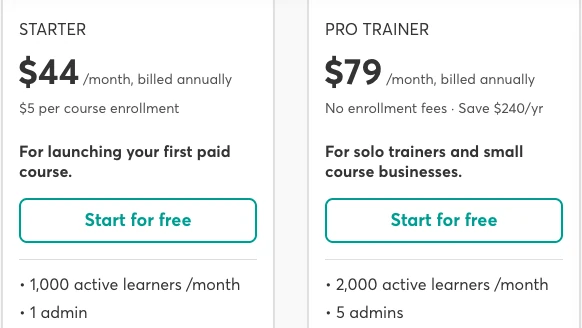
LearnWorlds’ pricing page after the rise. Read the Starter card: $44 billed yearly, then the $5 per course enrollment line under it.
Reviews haven’t caught up. Of the 7 review pages I checked that name a Starter price, only Blogging Wizard shows the new one. The AI answer at the top of Google carries the old price too, plus a break-even built on it.
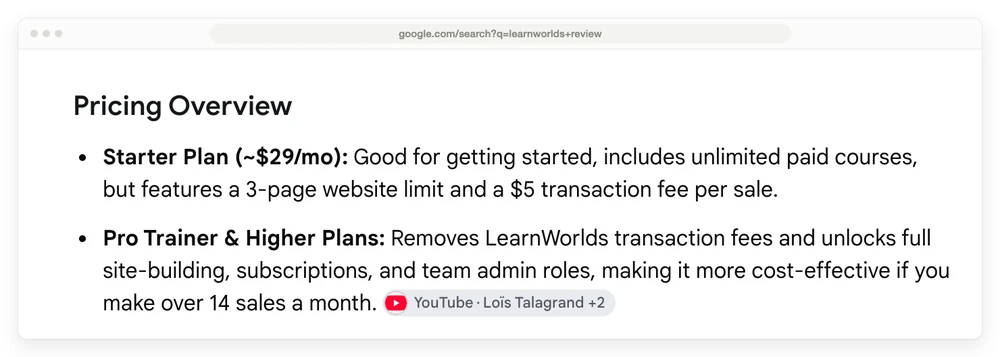
Google’s AI answer for this search, with the old Starter price and a 14-sales break-even.
Already on Starter? LearnWorlds’ terms say a price change doesn’t touch a subscription you’ve paid for, though it may apply at renewal, with at least 30 days’ notice.
Job 1: teaching people, beyond hosting videos
LearnWorlds is strongest inside the lesson. Interactive video, graded assessments, certificates, SCORM packages and an ebook builder set it apart from a simpler course host, and video hosting is unlimited on every plan.
A moderator of r/onlinecourses who says they’ve used both platforms extensively put it this way in a thread on LearnWorlds: “LW is bad on the marketing/sales feature side but great on the learning features side, whereas a platform like Kajabi is the exact opposite”.
Starter has no interactive video, certificates, SCORM, learning paths, free courses or Zoom classes, and Pro Trainer at $79 a month billed yearly has all 6.
| Teaching tool | Starter | Pro Trainer | Learning Center |
|---|---|---|---|
| Interactive video | No | Basic | Advanced |
| Certificates | No | Yes | Yes |
| Question types | Limited set | All | All |
| SCORM and HTML5 | No | 20 packages | Unlimited |
| Learning paths | No | Yes | Yes |
| Free courses | No | Yes | Yes |
| Zoom, Meet or Teams classes | No | 1 account | Multiple accounts |
A 2025 Trustpilot reviewer was blunter: “The Starter plan you could barely teach a checkers class.” That same reviewer said the trial gives you “all the bells and whistles”, and the lower plans take them away. So during your 30 days, test only what your plan will keep. Starter can still take 1:1 and group bookings through Calendly.
Getting the school built
The builder splits opinion. Starter gives you 3 customizable pages (home, course catalog and after-login) and no landing pages. Landing pages, a blog and 15 page funnels start on Pro Trainer.
Beyond those limits, the complaints are about how it feels to use, and 6 of the 43 lowest Trustpilot reviews are mainly about this. “The end product may look nice for students, but for educators, this is a mess,” wrote a trial user in 2024. A Reddit user comparing the 2 platforms said Thinkific “just feels easier to use, less confusing, and more reliable overall.” Google’s top G2 snippet says the opposite, calling LearnWorlds “easy and intuitive to use”, so try it yourself before you trust either side.
If you’ve got hundreds of videos, read the January 2026 review about the video library: “No folders, no sorting by date, name”, and no search box. That reviewer had 400 videos to attach to quiz questions by hand.
Community comes with every plan, and it drew repeat complaints in 2023 reviews about how it looks and who can create groups.
The branded mobile app is a paid add-on from Pro Trainer, and its price only shows at checkout. Add $99 a year for an Apple Developer account, $25 once for Google Play, and up to 30 days to get the D-U-N-S number LearnWorlds says you need to publish. LearnWorlds’ own app guide also warns of store commissions on in-app sales: 15% at Google up to $1M, and up to 30% at Apple.
Job 2: charging for it at the new prices
LearnWorlds takes $5 on every Starter enrollment and nothing on higher plans, and Stripe or PayPal charges its own fee on top. You connect your own Stripe, PayPal or Shopify account, so the money goes to you. The pricing page FAQ says “There are no hidden or extra fees” and names only the payment processors, though the $5 is right there on the plan card.
The rise moved the point where Pro Trainer pays for itself. On monthly billing Starter costs $49 plus $5 per enrollment and Pro Trainer costs $99, so they match at 10 enrollments a month. On yearly billing they match at 7.
Under the old prices those numbers were 14 and 11, which is why that AI answer still says 14.
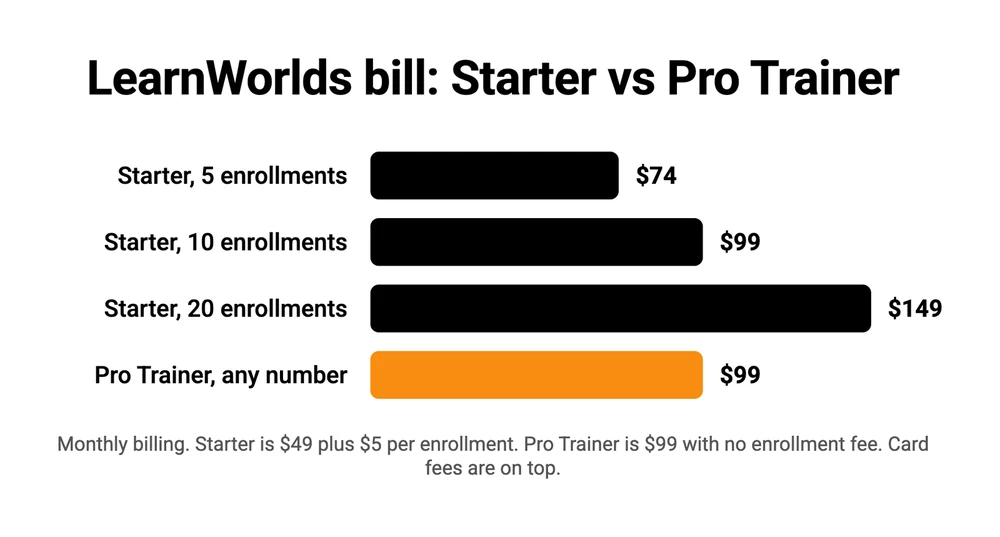
The rise also cost Starter its spot as the cheap way in. Podia Mover is $42 a month billed yearly and takes 5% of each sale, so on a $97 course it costs $2 less a month and takes $4.85 against LearnWorlds’ $5. Teachable Starter is $29 a month billed yearly and takes 7.5%, or $7.28 on that course, so it stays cheaper overall up to 6 sales a month. For downloads rather than a course, the cheap way in is a checkout such as CartMango or Payhip, both priced in the verdict above.
Plan access decides what you can sell:
- Every plan: coupons, discounts and order bumps. BloggingX’s review still says you can’t create order bumps.
- Pro Trainer and up: subscriptions, memberships, installments, bundles, free courses and affiliates (basic on Pro Trainer, advanced above it).
- Learning Center and up: checkout recommendations and sales analytics.
Tax on your own sales stays your job on every plan. You connect Quaderno or Stripe Tax to calculate it.
The learner limit
Starter stops at 1,000 monthly active learners, and Pro Trainer and Learning Center both stop at 2,000. So going from $79 to $249 a month billed yearly buys more admins and more tools, and the same limit. Past 2,000 you’re into Corporate, which has no public price.
A 2024 reviewer gave this a whole 1-star review after finding the cap on a plan they say was advertised with unlimited learners. If you run a membership with lots of regular logins, check this number first.
Job 3: emailing buyers after they pay
LearnWorlds includes mass email from Pro Trainer up, with 2,000 credits a month, 5,000 on Learning Center and 10,000 on Corporate. The plan table shows none on Starter, though a help page says every plan gets credits, so ask before you count on any. Google’s AI answer (“No Built-In Email Marketing”) is out of date for the higher plans.
2,000 credits covers about 2 sends to a 1,000-person list. Past that, LearnWorlds’ help center lists an add-on of 50,000 extra credits a month, at $1,200 a year on yearly billing, and unused credits don’t roll over.
Automations are the bigger gap. Workflows with triggers, delays and branches sit on Learning Center at $249 a month billed yearly. On Pro Trainer you get broadcasts and the built-in notification emails, so a multi-step sales sequence needs an outside tool.
Mailchimp, ActiveCampaign, Kit, AWeber, GetResponse, MailerLite and Constant Contact connect on every plan, and Zapier joins from Pro Trainer. Keep your list in your own email tool from day 1, and it stays yours if you ever leave.
Job 4: reaching a human when the site breaks
Reaching a human at LearnWorlds usually goes well, going by Trustpilot, where support is what most of its praise is about. The page shows a TrustScore of 4.8 from 423 ratings: 367 at 5 stars, 13 at 4 stars and 43 at 1 to 3 stars. A TrustScore isn’t a plain average, and the plain average of those ratings is 4.63.
I pulled all 56 reviews under 5 stars plus the newest 200 5-star reviews, the most Trustpilot shows without a login. 125 of those 200 mention support, and many are short thank-yous titled things like “Superior Customer Service”. Only 25 mention ease of use.
Price and plan limits lead the 43 reviews at 1 to 3 stars with 10, ahead of bugs and outages with 9, and only 6 are mainly about support.
| Main complaint, sorted by hand | Reviews | Example |
|---|---|---|
| Price or plan limits | 10 | Pushed toward the $299 plan |
| Bugs, outages, failed checkouts | 9 | Sites down for days in July 2025 |
| Hard to use | 6 | Clunky editor, confusing setup |
| Support | 6 | 3 weeks with no fix for an enrollment issue |
| Missing features | 6 | Weak assessment tools, no video search |
| Leaving, lost work, moving data | 5 | Subscribers stuck on the old Stripe account |
| No detail given | 1 | A single line with no reason |
Trustpilot says businesses can invite customers through a basic review link, and it labels those reviews “Unprompted” like the rest. The page’s data does separate them, though. From June 2025 on, the window where I have every rating, 183 of the 214 reviews came through that link, and all 183 gave 4 or 5 stars. Of the other 31, 12 gave 1 to 3 stars.
Nothing on the page says who shares that link, and Trustpilot’s company activity page says it has no recent record of LearnWorlds asking customers for reviews. So I can only report the split.
Treat the 4.8 as a score for the support team. For plan limits and reliability, the low reviews tell you more.
Watch uptime too. In July 2025, 3 low reviews within 3 days reported sites down or crawling, each blaming a Cloudflare problem. “They didn’t tell me for 2 days that my site was down,” a UK reviewer wrote.
LearnWorlds publishes a 99.90% uptime guarantee on self-serve plans. Email support runs 24/5 on Starter and 24/7 above it, and phone support is Corporate only.
Job 5: leaving with your students still paying
Leaving LearnWorlds takes planning, and it’s the job review sites skip. Of the 8 I read, the 7 from the pricing section plus CourseCREEK, only Learning Revolution mentions cancelling, and only to say you can cancel before your next billing term. None covers exporting a course, student subscriptions or the Stripe rule below.
Your records can leave, and your built courses can’t leave in 1 piece. The export help page says: “Entire courses cannot be exported as a single file.”
| What you want out | Can you get it? | How |
|---|---|---|
| Student list | Yes | CSV or XLS from All Users |
| Sales records | Yes | CSV or XLS from Reports Center |
| Student progress | Pro Trainer and up | Reports Center, or API on Learning Center |
| Quiz answers and certificates | Yes | Separate export |
| Whole course | No | Rebuild it, so keep your master files |
| Student subscriptions | They stay on your Stripe account | Stop them yourself |
Student subscriptions keep running
LearnWorlds’ cancel guide says: “Canceling your LearnWorlds subscription does not automatically cancel active learner subscriptions within your school.” You have to unenroll people or cancel them in Stripe yourself. Skip that step and students can keep paying for a school you’ve closed.
Your Stripe account is close to permanent
LearnWorlds’ Stripe help page says that once you’ve connected an account and created products, “you should not connect a different Stripe account”, or you won’t receive payments from people who bought under the original one. A 5-year customer hit this when selling their business, and wrote in December 2025 that a new Stripe account wasn’t feasible: they’d have to cancel every student subscription and ask each student to sign up again. “This effectively killed the value of our business,” they wrote.
So connect a Stripe account you’d be happy to keep for years.
Refunds and your data
You can switch off a yearly plan at any time, and LearnWorlds’ terms say “no refunds can be provided” for the months left. A 2025 reviewer learned that after paying: “there is no option to cancel an annual subscription early”. The same terms do give you 1 window. If you bought by mistake or let a yearly plan renew by accident, contact support within 30 days of a new subscription or 15 days of a renewal.
The terms also say LearnWorlds has “no obligation to retain your Content” when a subscription ends. They say LearnWorlds will try to give notice and a chance to copy your content if it suspends or closes your account itself. A 2025 reviewer who thought their account was only paused wrote “now it seems we’ve lost all the data”. Export before your last paid day.
LearnWorlds will move you in, though. It offers a done-for-you move that brings in courses, learners, certificates and subscriptions from Kajabi, Thinkific, Teachable and others. I found no matching service for moving out.
LearnWorlds pros and cons
The pros, taken from what reviewers and the plan pages agree on:
- Deep teaching tools from Pro Trainer up: interactive video, assessments, certificates and SCORM.
- Unlimited video hosting and a community on every plan.
- No enrollment fee from Pro Trainer up.
- Support that earns most of its Trustpilot praise.
The cons:
- Starter’s new price, with no certificates or subscriptions.
- The same 2,000-learner limit on both mid plans.
- No automations below Learning Center.
- A builder some reviewers find confusing.
- A hard exit: no course export, and a Stripe account you can’t swap.
How LearnWorlds compares, job by job
Pro Trainer at $79 a month billed yearly costs less than Thinkific Start at $82, Podia Shaker at $84 and Kajabi Basic at $143, and each of those trades away something different.
| Tool and plan | Price yearly | Cut per sale | List email | Main limit |
|---|---|---|---|---|
| LearnWorlds Starter | $44 a month | $5 per enrollment | None in the plan table | 1,000 active learners, no certificates |
| LearnWorlds Pro Trainer | $79 a month | None | 2,000 credits a month | 2,000 active learners, no automations |
| Thinkific Start | $82 a month | None on Thinkific Payments, 2% on your own Stripe | From Grow at $164 | Thinkific branding stays until Grow |
| Podia Shaker | $84 a month | None | 500 subscribers included | 150 products |
| Kajabi Basic | $143 a month | None on Kajabi Payments, 2% on your own Stripe | Unlimited sends, 2,500 contacts | 5 products |
| CartMango Silver | About $0.83 a month ($10 a year) | None | Connects to Kit, ActiveCampaign, beehiiv or BirdSend | Hosts no courses yet, 10 products |
All prices are per month on yearly billing. CartMango is free right now, with paid plans starting in November. Card fees sit on top of every row.
Pick by the job that matters most to you:
- Teaching depth: LearnWorlds.
- A simpler start: Thinkific, which a Reddit user above found easier, or Podia if you want built-in email at a similar price.
- Sales pages and email on 1 bill: Kajabi, which costs more and does more.
- Certificates on a simple host: Teachable at $139 a month billed yearly, its first plan with them.
- A school on your own WordPress site: LearnDash.
CartMango is a checkout, so it isn’t a course host for now. Its course tools and community aren’t live yet, and both will arrive on the $30 a year plan.
FAQ
How much is LearnWorlds per month?
LearnWorlds costs $49 a month for Starter, $99 for Pro Trainer and $299 for Learning Center on monthly billing, or $44, $79 and $249 a month billed yearly. Starter also takes $5 per enrollment. Corporate pricing is by quote. Payment processing and any VAT come on top.
Which is better, Thinkific or LearnWorlds?
LearnWorlds is better for teaching depth, with interactive video and SCORM on Pro Trainer at $79 a month billed yearly. Thinkific looks like the simpler start going by a Reddit thread, though reviewers split on ease of use. Thinkific Start costs $82 a month billed yearly, includes certificates and adds 2% per sale if you use your own Stripe account.
What is LearnWorlds and what does it do?
LearnWorlds is an online course platform. It hosts your videos, runs quizzes and certificates, builds your school’s website, takes payment through your own Stripe or PayPal account, and gives students a place to talk. Companies also use it for staff and customer training.
Which is the best learning platform?
No platform wins every job. On yearly billing, LearnWorlds Pro Trainer ($79 a month) suits teaching depth, Thinkific (from $82) suits a simpler start, Podia (from $42) suits small creators, and Kajabi (from $143) suits sellers who want email and funnels on 1 bill. CartMango (free right now, from $10 a year once paid plans start in November) only fits sellers who need a checkout, since it hosts no courses yet.
Does LearnWorlds have a free plan?
No. LearnWorlds offers a 30-day free trial, and the “Start for free” buttons lead to that trial. If you don’t activate a paid plan, the trial school is scheduled for deletion, so export anything you want to keep.
Is LearnWorlds good for beginners?
LearnWorlds has a learning curve. Some reviewers call it easy, others call the builder confusing, and the Starter plan aimed at first courses lacks certificates, subscriptions and landing pages. If you have 1 video course and no team, run a Thinkific or Podia trial alongside it.
If a whole school is more than you need
Do you need a whole school, or just a way to get paid for something smaller?
If you sell PDFs, templates, audio or a paid subscription, CartMango handles the checkout with no cut of each sale, and buyers pay straight into your own Stripe or PayPal account. It’s free right now, and paid plans start in November from $10 a year. Your subscriptions keep paying you if you ever leave CartMango. It won’t host your videos and its course tools aren’t live yet, so if you need a full video course, use this LearnWorlds review to pick a course platform instead.
About the Author

👋 I’m Welly, founder of CartMango (the site you’re on), a checkout platform for digital product sellers. We’ve previously processed $179M+. I also run BirdSend (email marketing tool, 3.1B+ emails sent). On the side I show other non-techie digital sellers how I use AI workflows to automate 50%+ of my operations. Find me on LinkedIn.
Related Reading
- Thinkific review: the plan changes, the own-Stripe fee and who it suits
- Teachable review: what its plans cost once students and fees are counted
- Podia review: where Mover falls short and Shaker earns its price
- Kajabi review: when the all-in-one bill is worth paying
- LearnDash review: running your school on your own WordPress site