

Inbox zero is an email method coined by Merlin Mann in 2006. The name points at the mental energy your inbox costs you, which you drive toward zero by giving every message one decision: delete it, delegate it, respond if it takes under 2 minutes, or defer the rest. Clearing the screen is a side effect of that habit.
Most people hear “inbox zero” and picture a screen with no emails on it. Then they spend a frantic hour hitting archive, feel great for a day, and watch it fill right back up by Thursday.
That is the trap. Chasing an empty screen is a losing game, because more email always comes.
The version that actually works is quieter. It is a repeatable way to decide what each message needs, so nothing sits there nagging you.
Here is what you will get in this guide: what inbox zero really means, the 5-step method to reach it, how to organize a Gmail inbox so it mostly sorts itself, the email habits that stick, and the newer AI approach that does most of the triage for you.
Key Takeaways
- Inbox zero measures attention, not message count. The “zero” Merlin Mann meant is the time your brain spends on email, which you want as close to none as possible.
- One decision per email. Delete, delegate, respond in under 2 minutes, or defer. Touch each message once instead of re-reading it 5 times.
- Gmail can sort most of it for you. Filters, labels, and a priority inbox do the organizing so you are not starting from a wall of unread mail.
- Batch your email, do not live in it. Checking 2 to 3 times a day beats a constant trickle of interruptions.
- AI now handles the boring part. An AI email assistant can read, sort, and draft replies, so you approve instead of process.
- Literal zero is not the goal. A processed inbox and fewer check-ins beat an empty one you have to guard all day.
Want the shortcut before the how-to? I put the AI workflow I use to clear my own Gmail every morning up as a free download: the Email chief of staff AI workflow. Read the manual method first, then I will show exactly how the AI version works.
What Is Inbox Zero (and What “Zero” Really Means)
Inbox zero started with Merlin Mann, a productivity writer who laid it out on his 43 Folders blog in 2006 and then in a 2007 Google Tech Talk. His point got lost almost immediately.
The “zero” points at your attention. Mann built the whole method around one idea: a full inbox costs you headspace while you are trying to do real work, and that headspace is the thing you want to drive down. The pile of messages is just the visible symptom.
The real win is a quiet mind. You can hit zero unread and still feel buried, because you keep reopening the same threads and deferring the same calls. You can also sit at 40 messages and feel fine, as long as every one is already handled or scheduled.
That reframe changes the whole job. The work becomes a habit you run: turn each new email into a quick decision, then get it out of your face.
If you would rather not do this by hand, there is now an AI way to handle most of it, which I break down near the end.
Why Inbox Zero Matters (the Real Cost of a Messy Inbox)
A messy inbox does real damage. It taxes your focus every time you look at it.
The scale is real. Microsoft’s 2025 Work Trend Index found the average worker gets 117 emails a day, most skimmed in under a minute, with some kind of interruption landing every 2 minutes of the workday. A long-cited McKinsey estimate puts the cost even higher: the average knowledge worker spends about 28% of the workweek just managing email.
The switching is what costs you. Every time a new message pulls your eyes away, your brain has to drop what it was doing and pick it back up afterward. Do that 40 times a day and your most focused hours are gone.
There is also the low-grade dread. An inbox with 3,000 unread messages is a to-do list you never agreed to, sitting there implying you are behind. Getting to a processed inbox clears that stress, which is the real payoff.
Mostly it means you stop carrying email around in your head all day. A basic productivity plan for creators works the same way: fewer open loops, more focus.
How to Get to Inbox Zero: the 5-Step Method
The classic method is a decision tree you run on every message. Process from the top, one email at a time, and make a call before you move on. No skipping, no “I will deal with it later” pile.
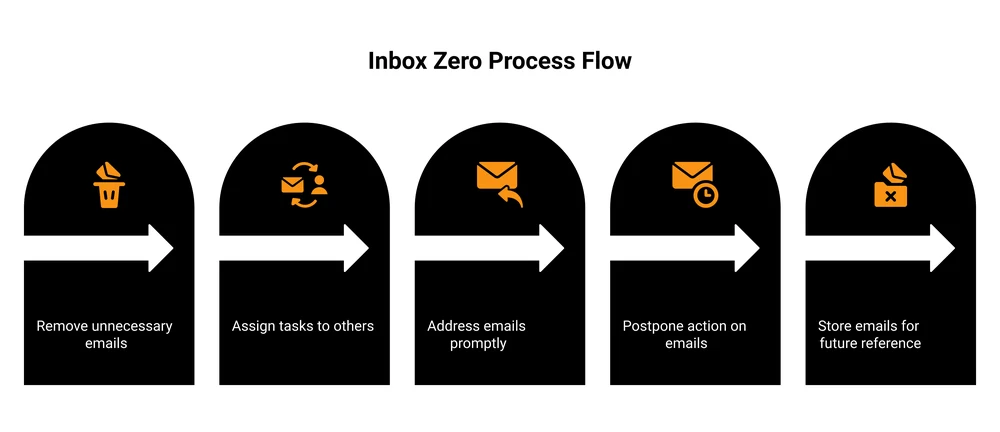
Here are the 5 moves:
- Delete or archive. Junk, receipts, newsletters you skimmed, anything you will not act on. Get it out of the main view. Archive keeps it searchable without leaving it in your face.
- Delegate. If you are not the right person, forward it now and note who owns it. Do not sit on an email that belongs to someone else.
- Respond (the 2-minute rule). If a reply takes under 2 minutes, do it right there. Waiting costs more than the reply does, because you will have to re-read the thread later.
- Defer. Longer tasks get scheduled, not left floating. Snooze the email to the day you will handle it, or drop it on your task list and archive the message.
- Do it once. The rule under all of this is touch it once. Re-opening the same email 5 times is where hours quietly disappear.
Run this top to bottom and your inbox drains fast. The trick is refusing to leave any message un-decided. Speed comes second.
How to Organize Your Gmail Inbox (the Concrete Setup)
Most guides stop at “make some folders.” That is not enough. If you use Gmail, it has real tools that do the sorting so you are not starting from a wall of mixed mail every morning. Here is how to organize a Gmail inbox so it mostly runs itself.
Turn on category tabs. Settings, then Inbox, then enable the Promotions and Social tabs. That alone pulls marketing and notification noise out of your Primary tab, so what is left is closer to real mail.
Build filters that label and skip. This is the big one. In the search bar, click the filter icon, set a rule (say, everything from notifications@), and tell Gmail to apply a label and skip the inbox. Now those emails file themselves and never interrupt you. You can see how Google sets this up in the Gmail filters help doc.
Use labels instead of folders. A message can carry several labels (Clients, Receipts, Waiting-on), which is more flexible than one folder per email. Color-code the few you check often.
Switch on the priority inbox or multiple inboxes. Priority inbox floats important mail to the top. Multiple inboxes lets you pin a “starred” or “to-reply” panel next to your main list, so your action items sit in one place.
Master snooze. Snooze is the defer button from the 5-step method, built in. It removes an email now and brings it back on the day you can deal with it. This is how you keep the inbox clear without losing track of anything.
Set this up once and Gmail does a chunk of the triage for you. You open the app to a filtered, labeled inbox instead of chaos.
Email Management Tips That Actually Stick
Systems fail when they lean on willpower. The tips below survive a busy week because they cut the volume of email you handle, which matters more than handling it faster.
- Check in batches, not constantly. Pick 2 or 3 windows a day. A steady drip of email all day is what wrecks focus. If you run a list of your own, the same batching logic helps when you start an email newsletter and need a sane sending rhythm.
- Unsubscribe like it is your job. Every newsletter you never read is a daily tax. Spend one session killing subscriptions and the inbox gets quieter for months.
- If you are cc’d and not replying, archive it. You were kept in the loop, not asked to act. Read it, file it, move on.
- Write shorter emails. Long emails get long replies, which get long replies back. A 3-line message often ends the thread faster.
- Turn repeat questions into templates. If you answer the same thing weekly, save it as a canned reply. This is how email coaching businesses scale their replies without living in the inbox.
- Stop using unread as a to-do list. Unread just means “not opened,” not “not done.” Move real tasks to a real list.
None of these are clever. They stick because they reduce volume. Less email in means less email to process, and that is the part of inbox zero that holds up over months.
The Modern Way: Let AI Clear Your Inbox for You
The honest problem with everything above: it is still manual, and manual habits break. You run the 5 steps for 2 weeks, get busy, and the backlog creeps back.
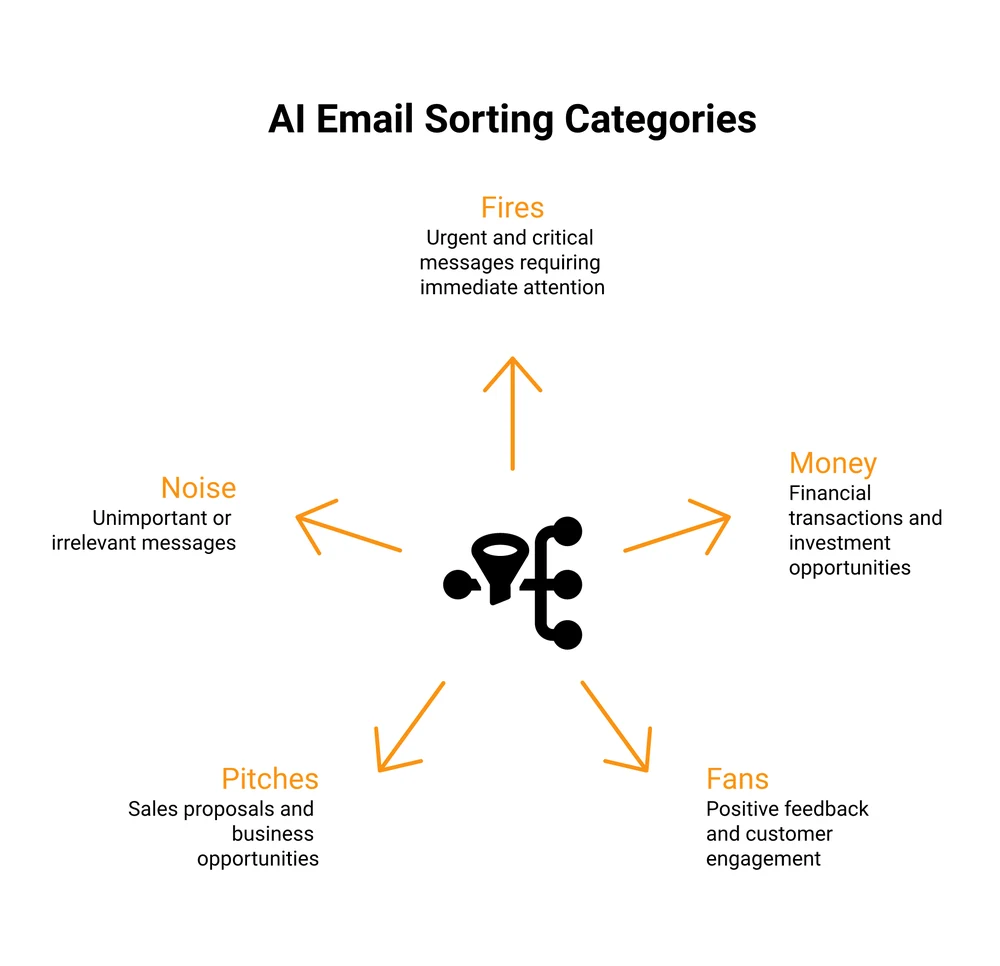
AI changes that math. Instead of you processing each email, an AI email assistant reads the whole inbox, sorts every message into buckets, and drafts the replies for you. You stop processing and start approving.
Think of it as an email chief of staff. It looks at each message and decides: is this a fire that needs you now, a buyer question, a genuine reply, a pitch, or just noise. It groups them, drafts responses in your voice for the ones that need a reply, and hands you a short list to approve. The triage that used to eat a chunk of your morning happens before you sit down.
I recorded a full walkthrough of the exact setup I use, one AI command that clears my Gmail inbox every morning. It sorts real mail into buckets and drafts the replies, all from a single prompt. Watch it here:
If you want the workflow itself, I put it up as a free download: the Email chief of staff AI workflow. It is the same setup from the video, ready to copy.
A fair warning: AI triage needs a little setup and a short trust period. You will want to review its buckets and drafts for the first week before you rely on it. But once it is tuned, it does the part of inbox zero that people usually quit: the daily sorting. It pairs well with the same thinking behind a good lead magnet email sequence, where the repetitive writing gets systematized once and reused.
Inbox Zero vs the Other Ways to Handle Email
Inbox zero is not the only email philosophy, and it is not right for everyone. Here is how the main approaches compare, so you can pick the one that fits your volume and your role.
| Method | How it works | Best for | Effort | Downside |
|---|---|---|---|---|
| Inbox zero | Process every email to a decision, keep the inbox clear | People stressed by backlog | High daily upkeep | Can tip into busywork |
| Inbox infinity | Let mail pile up, search instead of sort, ignore the count | Very high-volume inboxes | Low | Important messages get buried |
| Email batching | Clear email in 2 to 3 fixed blocks a day | Deep-focus work | Medium | Slower replies, not for urgent roles |
| AI triage | AI reads, sorts, and drafts, you approve | Solo creators with mixed email | Low after setup | Setup plus a short trust curve |
The right pick depends on what lands in your inbox. If most of your mail is low-stakes, inbox infinity plus good search is fine. If your inbox mixes buyer questions with noise, AI triage surfaces the ones that matter.
For most people running a small business, a blend works: batch your check-ins, let filters and AI handle the sorting, and reserve real attention for the few emails that move money. If you send client work, an organized inbox also makes email marketing for consultants far less chaotic.
Is Inbox Zero Actually Worth It? (the Honest Take)
Time for the criticism, because the method has real critics and some of them are right.
The strongest one: strict inbox zero can become its own kind of busywork. If you spend as much energy guarding an empty inbox as you used to spend drowning in a full one, you have not gained anything. You have just found a tidier way to procrastinate.
There is a sharper version of this on Hacker News, where one commenter put it plainly: your inbox is someone else’s to-do list, and starting your day inside it drops you straight into reactive mode. That is the real risk. An inbox is a stream of other people’s requests. Living in it means letting other people set your priorities.
So is it worth it? For most people, a softer version is. Aim for a processed inbox, not an empty one. Check it on your schedule, not every time it buzzes.
And if you run a business, add one twist: the emails that matter are a small slice of the pile. Buyer questions, sales, refunds, and abandoned cart follow-ups are worth real attention. The rest can be batched, filtered, or handed to AI. Inbox zero is worth it only when it clears space for that, instead of becoming the work itself.
FAQ
What is the inbox zero method?
It is an email approach from Merlin Mann where you process each message to a decision instead of letting it sit. For every email you delete it, delegate it, respond if it takes under 2 minutes, or defer it to a scheduled time. The aim is to stop email from occupying your attention, not to hit a literal empty screen.
Is inbox zero realistic?
For most people, strict literal zero is not realistic every day, and chasing it can backfire. A processed inbox is realistic: one where every message has a decision attached, including the ones you snooze for later. Filters and AI triage make it far more achievable than doing it all by hand.
How much does inbox zero cost?
The method itself is free, since it is a habit rather than a paid tool. Costs only come in if you add paid software, like a premium email client or an AI email assistant. You can reach inbox zero with nothing but Gmail’s built-in filters, labels, and snooze.
What does it mean to get to inbox 0?
It means every email in your inbox has been handled: deleted, archived, delegated, replied to, or deferred to a set time. The empty screen is the visible result of clearing the decision behind each message. A snoozed email still counts as handled, because it has a plan and a set return date.
What are the criticisms of inbox zero?
The main criticism is that guarding an empty inbox can become busywork that feels productive but is not. Critics also point out that an inbox is a list of other people’s requests, so living in it makes you reactive. The fix is to aim for a processed inbox and to batch your check-ins rather than react all day.
How do you keep inbox zero once you reach it?
You keep it by cutting incoming volume and batching. Unsubscribe aggressively, build filters that auto-sort mail, check email in 2 to 3 blocks a day, and use snooze for anything you cannot handle now. AI triage helps most here, since it does the daily sorting that people usually abandon.
Own the Other Half of Your Email
Reaching inbox zero handles one half of email: the mail coming at you. The other half is the list you send to, the one audience that stays yours no matter what any algorithm does. I run an email tool called BirdSend for exactly that: email that actually lands, made for creators instead of bloated enterprise teams. If you want to grow a list you own, take a look.
Then comes the part that pays for all of it: selling to that list. That is the other tool I run, CartMango, a checkout built for digital sellers. Every buyer drops straight into your email tool, so selling and emailing them run as a single system, and the built-in upsells help you make more on each sale instead of chasing more traffic. It is free through the beta, then $10 a year.
About the Author

👋 I’m Welly, founder of CartMango (the site you’re on), a checkout platform for digital product sellers. We’ve previously processed $179M+. I also run BirdSend (email marketing tool, 3.1B+ emails sent). On the side I show other non-techie digital sellers how I use AI workflows to automate 50%+ of my operations. Find me on LinkedIn.
Related Reading
- How to make money from a newsletter: turn the list you own into income
- Email marketing partnerships: grow your list through other creators
- Marketing without social media: 8 channels that do not need an algorithm
- Paid newsletter economics: the honest numbers on charging for email