

Here’s how to cancel GoHighLevel: switch to Agency View, open Settings, then Billing, and click “Want to modify/cancel your subscription?”. Choose Show More, then Cancel Plan, pick a reason, accept the data loss warning, write at least 30 words of feedback and submit. Only the agency account that pays HighLevel can do this.
After you cancel, every sub-account loses access and workflows stop. Phone numbers are deleted after 14 days and billed until then. Account data is kept for 90 days, then permanently deleted. Fees are non-refundable under HighLevel’s terms, and leftover wallet credit becomes HighLevel’s 30 days after cancelling unless you ask for it back.
GoHighLevel’s billing help article contradicts itself on pausing. Near the top, it says agency accounts cannot be paused. Near the bottom, the same article says you can keep your data on the $27 a month Pause Plan instead of cancelling.
Mixed messages like that cost people money on the way out. So do phone numbers that keep billing for 14 days, a wallet balance that stops being yours after 30 days, and a login you can’t cancel because another agency owns it.
You’ll leave with the exact clicks for your situation, a list of what to save first, and the 3 dates to watch after you press Submit.
Key Takeaways
- Only the paying agency can cancel. If your login came through another agency or a coaching program, HighLevel says it can’t cancel it for you.
- Export before you cancel. Sub-accounts lose access to contacts and funnels once you cancel, so download them first, 1 sub-account at a time.
- Move phone numbers out first. HighLevel deletes them 14 days after you cancel and bills you for them until then.
- Claim wallet credit within 30 days. Under HighLevel’s terms, wallet money unclaimed 30 days after cancelling becomes HighLevel’s, and you have to ask.
- A pause costs $27 a month, if your account offers it. HighLevel’s own articles disagree on whether agencies can pause, so check your billing menu.
How to cancel GoHighLevel depends on your situation
The steps change with 2 things: who pays HighLevel for the account, and what has to keep working after you leave. (The company behind it is called HighLevel, the name its help center uses.) That gives 5 situations, and you can be in 2 at once:
- You pay HighLevel yourself.
- You’re still inside the 14-day free trial.
- Your login came from another agency or a coaching program.
- You want a break, not a full stop.
- A phone number or domain has to survive.
Leaving because sales were slow? My Online Selling Mistakes Challenge walks through the 5 mistakes I see most often, 1 short email a day.
Whatever your situation, read the phone number section too if you call or text customers from a GoHighLevel number, because that clock starts the day you cancel.
If you pay GoHighLevel yourself
If you pay GoHighLevel yourself, you cancel from the agency’s billing page. HighLevel’s billing article lists the steps once you’re in Agency View:
- Log in and switch to Agency View, not a sub-account.
- Open Settings and click Billing.
- Click “Want to modify/cancel your subscription?”
- Click Show More in the pop-up.
- Select Cancel Plan.
- Choose your reason for cancelling, then click Next.
- Read the data loss warning.
- Confirm that you want to cancel.
- Write your feedback, at least 30 words.
- Click Submit.
The pop-up behind step 3 is also where the save offers live: upgrade, downgrade, and a one-time financial assistance request that gives approved accounts 1 month at 10% of their plan price. Cancel Plan sits behind Show More, so look for it there.
HighLevel’s terms of service say all fees are non-refundable, including subscription fees, and they rule out refunds for partly used months. So the cheapest moment to cancel is shortly before your next renewal, once your export is done. On a yearly plan, $970 a year for Starter, the unused months fall under the same rule. Switching an existing yearly plan back to monthly needs HighLevel support.
What you give up: every sub-account loses access once the cancellation goes through, and the data is deleted 90 days later unless you reactivate.
No “Want to modify/cancel” link on your billing page? Check that you’re in Agency View first. If it’s still missing, the billing article says to contact support through live chat. The terms also accept a cancellation by support ticket or by phone on (888) 732-4197, which is toll free.
One more thing before you click anything: set up whatever replaces GoHighLevel first, so no form, booking link or checkout points at a dead page. Agency work usually needs another all-in-one such as HubSpot or Zoho. A course business needs a course platform such as Kajabi (see our GoHighLevel vs Kajabi breakdown). If you mainly sold digital products, ThriveCart and CartMango (the checkout I run) both cover the selling part.
If you’re still inside the 14-day free trial
Cancelling a GoHighLevel free trial uses the same Settings, then Billing path, and it has to happen before day 14 ends. GoHighLevel’s pricing page says billing begins automatically at the end of any free trial unless you cancel, and usage fees for phone, messaging and other third-party services can be charged during the trial itself.
What it costs: nothing for the plan if you cancel in time. Miss day 14 and the first charge is the plan you picked, $97 a month on Starter.
Need more time to decide? GoHighLevel’s Modify Subscription page lists a Trial Extension option alongside Cancel.
Missed the deadline by a day? In a thread on Reddit, a user who forgot to cancel “by just one day” asked support for a refund and later wrote that support “has already processed the refund.” The terms call fees non-refundable but leave refunds to HighLevel’s discretion, so ask fast and ask in writing.
Don’t plan on starting a fresh trial under a new email later.
The terms say trials aren’t meant to be used back to back, and HighLevel can suspend or ban accounts that do it.
If your login came from another agency or a coaching program
If your GoHighLevel login came from another agency, only that agency can cancel it. HighLevel’s billing article puts it plainly: “HighLevel cannot cancel an account managed by another agency.”
This catches a lot of coaching program students. A user explained it in an r/gohighlevel post: “I got recruited into a coaching program. One of the pre-requirements was to register via the program’s HighLevel as a SAAS.” When they wanted out, the cancel option had been removed, and HighLevel support told them it had to go through the agency owner.
That’s by design: on SaaS sub-accounts, the setting that lets clients cancel for themselves is off by default. HighLevel’s help article on SaaS cancellations says agencies get the choice because taking the cancellation request gives them a chance to save the client.
What you can do:
- Ask the agency or coach to cancel, in writing. Include your sub-account name and the email you log in with, and read any contract you signed first.
- Ask for a sub-account transfer if you want to keep your data on GoHighLevel. The agency owner sends the whole sub-account to the relationship number of your own GoHighLevel agency, and it moves once you approve. Phone numbers only travel with it when both agencies use LC Phone, and Mailgun or SMTP email settings are removed.
- Spend any SaaS wallet credit first. HighLevel’s SaaS help article says remaining balance or credits are forfeited when the client cancels.
You pay the agency, so your contract with that agency sets the cost.
If you only want a break from GoHighLevel
GoHighLevel’s Pause Account plan costs $27 a month and keeps your account data while nobody can log in, according to HighLevel’s pause article. Whether your agency can use it is less clear, because HighLevel’s billing article contradicts itself.
Near the top, the billing article says: “Agency accounts cannot be paused or placed on hold.” Its FAQ at the bottom answers “Will my data be deleted if I cancel?” with “To keep your data, you can use the $27 per month Pause Plan instead of canceling.” The pause article, written for agency users, gives the same $27 price and tells you to pick Pause Account from the billing menu.
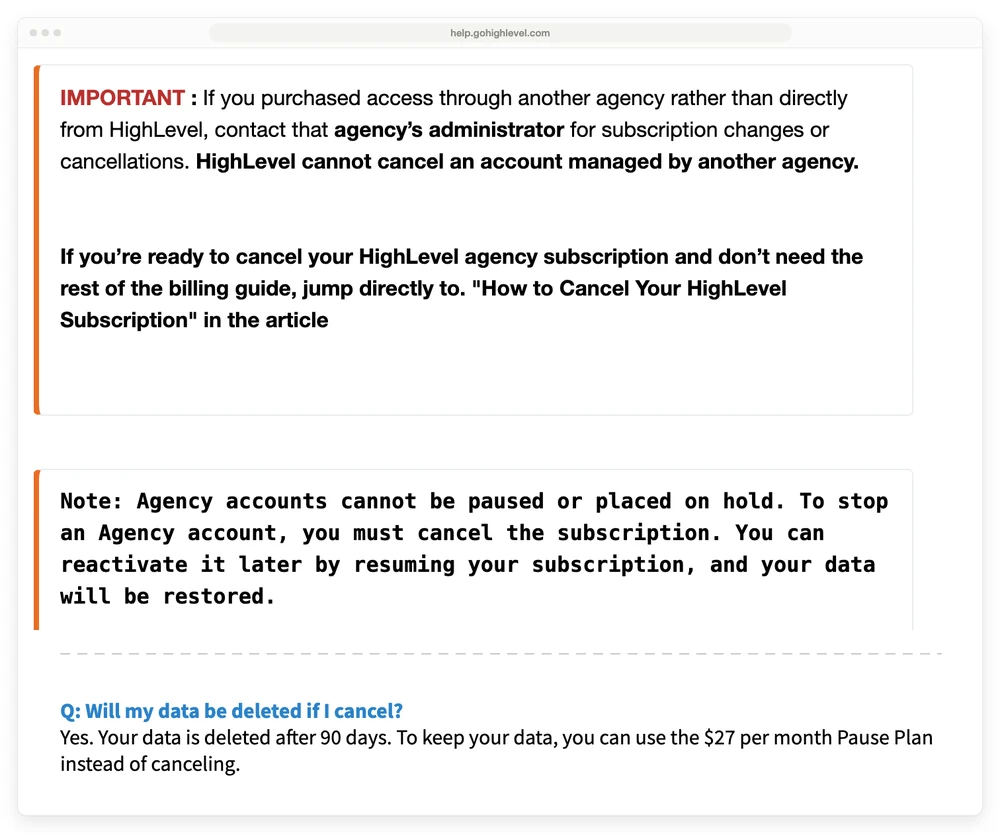
GoHighLevel’s billing help article. Top: the note saying agency accounts cannot be paused. Bottom: the FAQ on the same page offering the $27 a month Pause Plan.
So check your own account. Open Settings, Billing, “Want to Modify/Cancel Your Subscription?” and look for Pause Account.
If it isn’t there, ask support in live chat before you cancel, and save the transcript.
If you do pause, here’s what changes:
- Kept: contacts, conversations, funnels, workflows, calendars, media, snapshots, products, orders, coupons, transactions and subscription records.
- Moved to draft: published funnel pages, workflows, booking links and scheduled email campaigns. Client portal access turns off.
- Deleted or cancelled: phone numbers and A2P registrations 14 days after the pause starts. Reselling, Marketplace and SaaS subscriptions are cancelled and don’t restart when you come back.
- At risk: a domain bought through HighLevel, because renewals fail while the account is paused.
A pause turns off every live funnel page and booking link, so it only works as a break when nothing is earning. On price alone, $27 is about 28% of the $97 Starter plan, and 3 paused months cost $81, less than 1 month of Starter.
Watch the screens closely. A user posting on Reddit while trying to cancel says the billing page glitched, then “the system automatically paused the account and instantly smacked me with a $27 Cold Storage / data retention invoice.”
If money is the reason you’re leaving, 2 cheaper moves sit in the same menu. You can downgrade, for example from Unlimited at $297 a month to Starter at $97. Downgrading doesn’t cancel add-ons, Marketplace apps or phone numbers, so cancel those separately. Or you can request the one-time financial assistance discount mentioned above.
If your phone number or domain has to survive
Move a GoHighLevel phone number out before you cancel.
HighLevel deletes phone numbers and A2P registrations 14 days after cancellation, and its help center says you keep paying for them during those 14 days.
The safe order is simple. Pick a new home for the number (Twilio or any phone provider that accepts ports), start the port, and keep GoHighLevel active until calls and texts work at the new provider. A reply in a Reddit thread on porting says it well: “you’ll likely need to keep your GHL account open until after the porting is complete.”
If a client ported their own number into a sub-account, HighLevel’s terms say that number belongs to the sub-account owner, and HighLevel may release it to them on request after you cancel.
Domains work like this:
- Bought through GoHighLevel: transfer it out while the account is active. After cancelling, use HighLevel’s domain release request form at gohighlevel.com/domain-transfer within 90 days of cancelling. Support reviews each request, so nothing happens instantly.
- Bought somewhere else: it stays yours. Point its DNS records away from GoHighLevel so visitors don’t land on a dead page.
Which cancel path fits your situation
Pausing costs $27 a month, and both pausing and cancelling put phone numbers on a 14-day clock.
| Situation | What to do | Cost | The catch |
|---|---|---|---|
| You pay HighLevel yourself | Cancel Plan under Settings, Billing | No refund for unused time | Access ends, phone numbers go after 14 days, data after 90 |
| Free trial | Same path, before day 14 ends | $0 plan fee if done in time | Phone and messaging usage can bill during the trial |
| Login from another agency | Ask the agency in writing, or request a transfer | Whatever your agency contract says | HighLevel can’t cancel it for you |
| You want a break | Pause Account, if your billing menu shows it | $27 a month | Funnels and booking links go to draft, phone numbers go after 14 days |
| Keeping a number or domain | Port or transfer first, cancel after | Your current plan until the move finishes | A cancelled number is deleted after 14 days |
Export from GoHighLevel first, because access ends once you cancel
Export everything you want to keep from GoHighLevel before you cancel, because sub-accounts lose access to contacts, conversations, calendars and funnels once the cancellation goes through. HighLevel’s own checklist covers contacts, conversations, appointments, funnels and websites, automations, invoices, payments, orders, products, memberships and courses, and reports.
The contact export has a few traps, according to HighLevel’s help article on it:
- Exports run 1 sub-account at a time, and only admins can export.
- The CSV only includes the columns visible in your Contacts table, so add custom fields with Manage Fields before you export.
- Only each contact’s latest note is exported, capped at 255 characters, and past emails and texts are left out.
- The file waits in Bulk Actions for 30 days, which won’t help once you’ve lost access. Download it straight away.
Screenshot every workflow you rely on, trigger and steps included. If your next platform can’t import them, those pictures are what you rebuild from.
Subscriptions need their own check. Download your list from Payments, then Subscriptions. Then open your Stripe or PayPal dashboard to see which ones are still active there.
HighLevel’s help article on the Subscriptions page says Stripe-created subscriptions can stay in sync with Stripe. Its articles on cancelling and pausing don’t say what happens to them after an agency cancels, so decide each one yourself. Stripe’s guide shows how to cancel subscriptions from the dashboard.
Subscriptions created inside Memberships don’t appear on that Payments page at all, so check those separately.
That’s also the question to ask whatever you move to: what happens to my subscriptions if I leave you? Our breakdowns of Circle’s pricing and Passion.io’s pricing cover how 2 other platforms answer it.
Disconnect Google Calendar and Zoom too. A user wrote on Reddit that cancelling wiped their personal Google Calendar. Nobody else in that thread had seen it happen, but unlinking takes a minute.
What happens on day 0, 14, 30 and 90 after you cancel GoHighLevel
After you cancel GoHighLevel, your account runs on a 90-day clock, and 2 shorter deadlines land first.
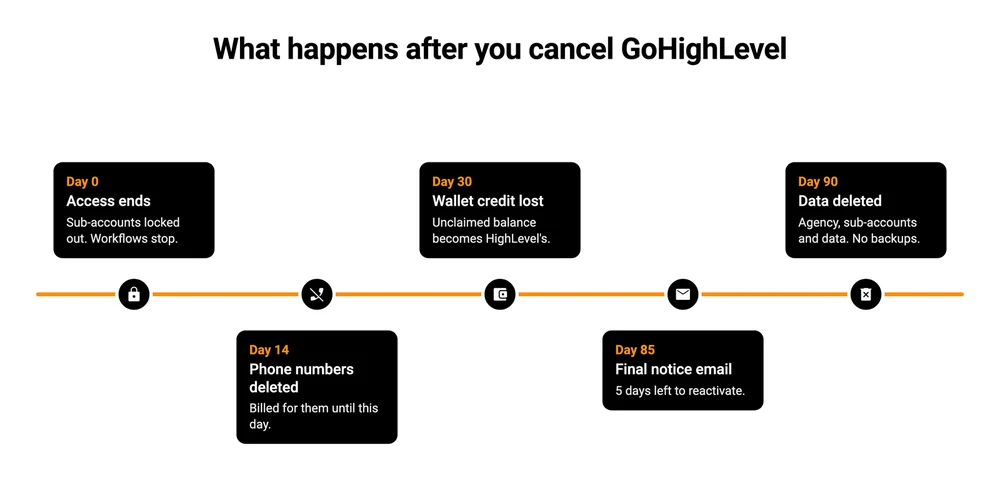
- Day 0. Every sub-account loses access, workflows stop and add-on or reselling subscriptions cancel.
- Day 14. Phone numbers and A2P registrations are deleted. You’re billed for the numbers until then.
- Day 30. Any wallet balance you haven’t asked for becomes HighLevel’s property, under its terms. Request it from the billing team at [email protected]. Free promotional credits have no cash value.
- 60, 30 and 5 days before deletion. HighLevel sends reminder emails from [email protected].
- Day 90. The agency account, its sub-accounts and their data are permanently deleted. HighLevel says it keeps no backups of purged accounts and its teams can’t reverse it.
Changed your mind? Log in any time inside the 90 days and you’ll see a Reactivate Account screen.
Want the data gone sooner instead? HighLevel has a Data Deletion Request Form for that.
Where cancelling GoHighLevel goes wrong
2 mistakes turn a GoHighLevel cancellation into an extra bill: removing your card instead of cancelling, and forgetting add-ons with commitments.
Removing your card. A failed payment gives you 21 days of access, then the account locks, and HighLevel keeps retrying the charge for up to 30 days. The terms make you responsible for fees until a proper cancellation, and say no refunds are given for failing to cancel properly.
Forgetting add-ons with commitments. Online listings carry a 3-month commitment, and you cancel them through chat. The terms also say some add-ons, the HIPAA package included, can’t be cancelled or refunded once switched on.
Where to take your business after GoHighLevel
Your next platform after GoHighLevel should match the part of it you used. Agencies running client CRMs, texting and reviews need another all-in-one, and our GoHighLevel alternatives guide compares HubSpot and Zoho among 7 options priced against the wallet charges the $97 plan leaves off the bill, CartMango included. Our GoHighLevel pricing breakdown explains how that Agency Wallet bills, which helps when you compare.
If you used GoHighLevel mainly to sell digital products and take subscriptions, a checkout covers the selling part. CartMango is one, and I run it. CartMango handles checkout, order bumps and subscriptions, and it passes buyers to your email tool rather than sending emails or texts itself. CartMango doesn’t host courses or a community yet. Both are planned for October 2026 on CartMango’s $30 a year plan, so today a course business is better off on Kajabi and a community on Circle or Skool.
FAQ
Do you get a refund when you cancel GoHighLevel?
Usually not. HighLevel’s terms say all fees are non-refundable, subscription fees included, and rule out refunds for partly used or unused subscriptions. They also let HighLevel refund at its own discretion, and refund requests go to the billing team at [email protected]. Wallet credit is separate: ask for it within 30 days of cancelling or it becomes HighLevel’s.
How do I delete a GoHighLevel account?
Cancel the subscription first. HighLevel then permanently deletes the agency account, its sub-accounts and their data after 90 days. If you want it gone sooner, submit HighLevel’s Data Deletion Request Form. Deletion is final, and HighLevel says it keeps no backups of purged accounts.
Can I cancel GoHighLevel by phone?
Yes. HighLevel’s terms list 3 ways to cancel: inside your account, by support ticket, or by calling (888) 732-4197, which is toll free. Whichever you use, get the confirmation in writing, because the terms make you responsible for every fee until the cancellation actually happens.
Can I come back after cancelling GoHighLevel?
Yes, within 90 days. Log in, pick Reactivate Account, pay, and your data comes back. Eligible accounts can also drop to a lower plan while reactivating. Phone numbers are the exception, since they’re deleted 14 days after cancelling, so a reactivated account may need new ones.
What happens to my clients’ sub-accounts when I cancel?
They go with you. Cancelling the agency subscription cuts off every sub-account, and after 90 days they’re deleted with the agency. If a client wants to keep their account, transfer their sub-account to another agency before you cancel, using Transfer Sub-account and that agency’s relationship number.
Picking a checkout you can leave later
If GoHighLevel also took your payments, the subscriptions list is where this cancellation gets risky. Before you pick the next checkout, ask it the same question: what happens to my subscriptions if I leave you?
Subscriptions you create in CartMango keep paying you after you leave CartMango, and moving over from your old platform is included free. CartMango is free right now, with paid plans starting in November 2026, from $10 a year.
About the Author

👋 I’m Welly, founder of CartMango (the site you’re on), a checkout platform for digital product sellers. We’ve previously processed $179M+. I also run BirdSend (email marketing tool, 3.1B+ emails sent). On the side I show other non-techie digital sellers how I use AI workflows to automate 50%+ of my operations. Find me on LinkedIn.
Related Reading
- GoHighLevel alternatives: where to move once you know how to cancel GoHighLevel, with 7 options priced against the wallet charges
- GoHighLevel pricing: the 3 plans, the Agency Wallet and the markup question
- GoHighLevel vs ClickFunnels: what each one costs once usage is counted
- How to cancel ThriveCart: no cancel button, and what to do instead
- Cancel a SamCart subscription: the billing steps and the no-refund rule on monthly plans