

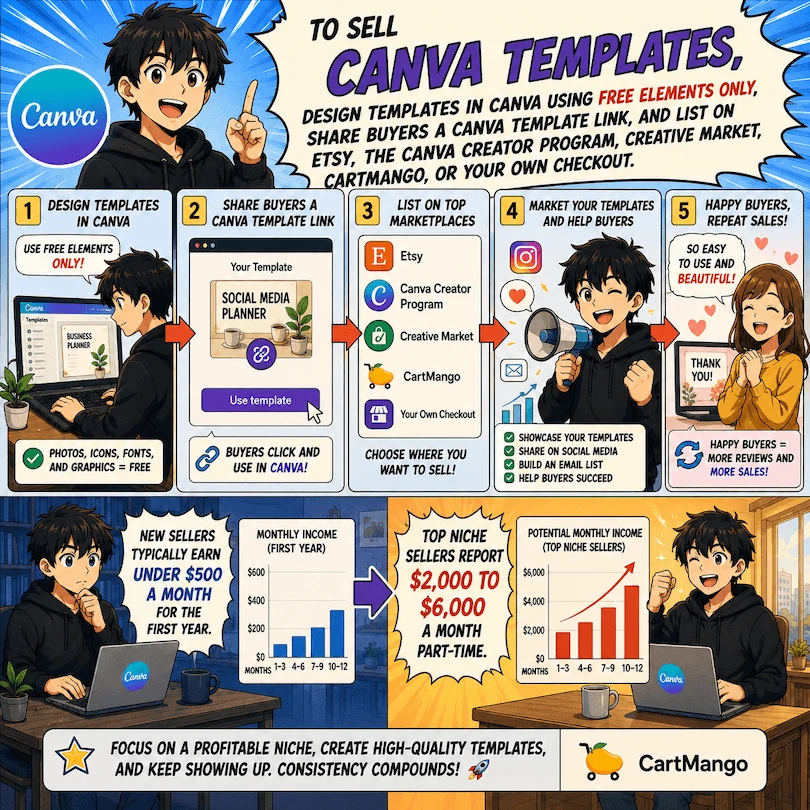
To sell Canva templates in 2026, design templates in Canva using free elements only, share buyers a Canva template link, and list on Etsy, the Canva Creator program, Creative Market, or your own checkout. New sellers typically earn under $500 a month for the first year. Top niche sellers report $2,000 to $6,000 a month part-time.
The honest version of selling Canva templates
You’ve seen the income screenshots. Someone on TikTok at $4,000 a month while their kid naps. A Reddit seller at $5,000 a month part-time. The pitch sounds simple: open Canva, build a template, list it on Etsy, wait for the money.
The reality is messier. Most people who try this earn nothing. A small group makes real money. The gap between those two outcomes is rarely talent or design skill. It’s a handful of decisions made before a single template gets listed. Niche selection. License compliance. Where you sell. How you price. Delivery experience.
This guide walks through each decision in order. You’ll learn what kinds of templates actually sell, the Canva license rule that gets sellers shut down before they make a single sale, the four real places to list them, a 12-month income roadmap with honest ranges, and when to use a marketplace versus your own checkout. By the end you’ll know if this path fits your situation, and if it does, how to start without repeating the mistakes most beginners make.
Key Takeaways
- Most beginner sellers earn $0 to $500 a month. Sellers in narrow niches with strong delivery report $2,000 to $6,000 a month part-time on Etsy alone.
- Templates with Canva Pro elements violate Canva’s license whenever the buyer is on a Free account. Stick to free elements only, or use the locked-PNG plus editable text boxes workaround.
- The four real places to sell are Etsy, the Canva Creator program, Creative Market, and your own checkout. Each fits a different traffic source.
- Use marketplaces for marketplace traffic. Use your own checkout for traffic you bring yourself (email, social, organic search). Stop paying marketplace fees on traffic you already own.
- Single templates sell for $5 to $15, bundles for $19 to $49. Underpricing on Etsy traps you in a race to the bottom you cannot win.
- Delivery experience makes or breaks reviews. Most Etsy buyers are on Canva Free and have never edited a template. Design like they have never used the tool.
Can you really make money selling Canva templates?
Yes, with a giant caveat: the people earning real income are the exception, not the average. What separates earners from non-earners is rarely talent. It’s the decisions made before a single template gets listed. Niche selection. License compliance. Where you sell. How you price. Delivery experience. If you want to see the specific decisions that quietly drain online sellers’ profits before you start designing, take a look at the free 5-day Online Selling Mistakes Challenge. It walks through the top 5 mistakes solo digital creators make and how to fix them. Most apply directly to selling Canva templates.
The Side Blogger has documented running a Canva template business that averaged over $2,000 a month from 2019 through 2024, in founder Maliha’s own write-up of the business. In a r/DigitalMarketing thread, an Etsy seller posting as Main-Kaleidoscope526 reported earning $5,000 to $6,000 a month part-time, with the comment that her products are “pretty easy to create.”
The same Reddit thread is full of sellers who tried this and earned close to nothing. Another commenter in that thread, SkullRunner, described the category this way: “It’s painfully saturated with crap unless you are one of the few doing fully custom designs for a specific niche, which can then expect to be copied if the niche turns out to trend/be profitable.”
So the income exists. The path to it is narrower than the income reports suggest.
What you need before you start
Three things must be in place before you build a single template. Skipping any of them sets you up for refunds once buyers arrive.
A Canva Pro account
You can technically design on Canva Free, but you cannot share templates as Canva template links from a Free account. The shareable link is the entire delivery mechanism. Canva Pro currently runs $15 per month or $120 per year per person. A single $15 template sale covers the monthly cost.
There is a deeper reason for Pro. On Free, every design sits in your personal account with no organization layer. On Pro, you can build templates inside dedicated folders, version them, and keep buyer-facing previews separate from working drafts. That matters once your catalog grows past a dozen templates.
A defended niche
“Social media templates” is too broad to be a niche. Real niches look like “wedding planner timelines for outdoor venues,” “Pinterest pins for life coaches,” “lead magnet covers for personal finance bloggers,” “invoice templates for dog groomers.”
The Etsy search bar tells you which niches have demand. Type a candidate niche. If Etsy autocompletes it and shows 200 to 3,000 listings, that’s the sweet spot: demand exists, saturation hasn’t crushed margins yet. Under 200 listings often means the buyers aren’t there. Over 10,000 listings means you’re entering a fee war you cannot win.
Why does “defended” matter? Because any working niche gets copied within 90 days. The sellers who keep earning are the ones who picked something narrow enough that copycats don’t find it for a year or two. By the time they do, the original seller has the review count and listing history that keeps them ranking above new entrants.
A delivery method that does not embarrass you
Delivery is a Canva template link, sent immediately after purchase. Most sellers include a one-page PDF with instructions: how to open the link, how to make a copy, how to edit text without breaking the design.
Buyers on Free Canva accounts have never edited a template before. If your delivery assumes they have, your first refund request will tell you why. The delivery checklist in our guide to creating digital downloads covers what to include so support tickets stay rare.
How to design templates people actually buy
Step 1: Pick the niche from Etsy data, not your gut
Open Etsy. Type your candidate niche into the search bar. Note the listing count. Click into the top 10 listings. Read their reviews. The complaints in those reviews are the gaps in the market.
What goes wrong: sellers pick what they personally find interesting. The buyer pool isn’t there. Six months of work, zero sales.
Step 2: Design with free elements only
Open Canva. Set up a folder for the niche. Build the template using only free elements, free fonts, and your own photos or graphics. If you must use a Pro element, lock the design with the workaround in Step 3.
What goes wrong: a buyer on Free Canva opens your template and sees watermarks on every Pro element. They request a refund. Your review average drops. Etsy demotes the listing.
Step 3: For Pro elements, use the locked-PNG workaround
If you need Pro elements in the visible design, download the final design as a PNG. Open a new Canva project. Upload the PNG and lock it to the background. Add editable text boxes on top. The buyer now sees a clean design with editable text and no watermarks, regardless of their Canva plan.
What goes wrong: sellers skip the workaround and ship templates with raw Pro elements. Canva’s license violation rules apply. Listings can be removed and accounts suspended.
Step 4: Design for the buyer’s least-skilled friend
Test the template with a long name, a short name, three lines of text, one word. Resize boundaries so nothing breaks. Use one or two font choices, not five. Limit color customization to a swatch palette inside the template.
What goes wrong: experienced designers build for what they personally would tweak. Real buyers want to change two fields and hit download. If they have to touch more than three things, they request a refund.
Step 5: Test on a Free Canva account before launch
Sign into a second browser with a fresh Free account. Open your own template link. Walk through the customization a buyer would do. Note every friction point. Fix them before you list.
What goes wrong: sellers test only on their own Pro account. The buyer experience on Free is completely different. The first one-star review will be about something that worked fine in your testing.
Common mistakes that kill Canva template sellers
The mistakes that actually drain sellers’ income, sourced from real seller threads on r/canva and r/DigitalMarketing rather than generic advice:
- Selling templates with raw Pro elements. Reddit user Adorable-Berry1911 contacted Canva directly and got confirmation: templates with Pro Content cannot be sold to Free Canva users without violating the license. Sellers who do this anyway get listing removals and bad reviews from buyers who see watermarks.
- Picking a niche from your interests instead of Etsy data. If Etsy’s search autocomplete doesn’t show your niche, the buyers don’t search for it.
- Designing for yourself instead of for the least-skilled buyer. Most Etsy template buyers have never edited a Canva file before. Plug-and-play wins. Clever customization options lose.
- Underpricing to “get the first sale.” Once your reviews anchor at $4 per template, you cannot raise prices without breaking listing momentum. Start where you want to end up.
- Spreading across 5 platforms before nailing one. Each platform has different keyword, image, and review systems. Master one. Then expand.
- Quitting at month 2. The Side Blogger’s $2,000 per month average came from a 5-year business. The Etsy seller at $5,000 per month posted that she’d been at it long enough to have a catalog. Month 2 is when most sellers quit. Month 6 is when revenue starts to compound.
Is it legal to sell Canva templates?
Yes, with rules. Canva publishes the rules in the Content License Agreement and the Canva Creators program terms. The short version:
- You can sell templates that you designed in Canva, where the buyer receives a Canva template link.
- Templates containing Canva Pro Content can only be sold as Canva template links, not as flat PDFs or PNGs. The buyer needs Canva Pro to use the Pro Content elements without watermarks.
- You cannot sell individual Canva-stock elements as “your” design. The buyer is paying for your composition and customization work, not for the underlying stock asset.
- You cannot use trademarked brands, characters, logos, or licensed photos that you don’t own. No Disney. No NFL. No Taylor Swift. No celebrity faces.
- Anything you create from scratch inside Canva using only free elements is fully yours to sell in any format you want.
The piece sellers get wrong most often is the Pro Content rule. Canva states it directly in its help center: “If you want to create and sell templates that include Pro Content, you can only sell these as Canva template links.” If your template uses Pro elements and your delivery is a PDF, you’re out of compliance.
The safe path: stick to free elements, or use the locked-PNG workaround from Step 3.
If you sell digital downloads, also read our guide to protecting digital downloads from sharing and resale. The Canva template link itself is shareable, which has its own pricing and licensing implications worth thinking through.
Where to sell Canva templates
The four real options are Etsy, the Canva Creator program, Creative Market, and your own checkout tool like Gumroad, Payhip, Sellfy, or CartMango. Each fits a different traffic source. The smartest sellers use more than one at the same time.
| Platform | Traffic source | Fees on a $10 sale | Payout timing | Best for |
|---|---|---|---|---|
| Etsy | Marketplace search (built-in) | ~$1.80 (more if Offsite Ads triggered) | 3 days after sale | Sellers with no audience yet who need marketplace discovery |
| Canva Creator program | Canva’s full user base (hundreds of millions of MAU) | Royalty-only (Canva sets the rates) | Monthly | Long-term passive scale, application required, no price control |
| Creative Market | Premium designer marketplace | Platform fee + processing | Monthly ($50 minimum) | Polished work targeting professional buyers |
| Your own checkout (Gumroad, Payhip, Sellfy, CartMango) | You bring it (email, social, organic) | $0.59–$1.10 (Stripe + tool fee) | 2 days via Stripe | Any seller with an existing audience |
Etsy: when it makes sense
Etsy works because Etsy sends you buyers. The Reddit seller Main-Kaleidoscope526 said it plainly: “It’s easy to sell on there if you’ve got good products because they send all the traffic. I don’t have to drive any traffic myself.”
The trade-off is fees. Etsy charges a $0.20 listing fee, a 6.5% transaction fee on the sale and shipping, and a US payment processing fee of 3% plus $0.25 per transaction. Etsy’s Offsite Ads program adds a separate 12% to 15% fee, but only when Etsy itself paid an external publisher to send the buyer to your listing (not on every ad-driven sale). By the time a $10 template sale settles, you’re keeping roughly $8.20 on an organic sale, less if Offsite Ads triggered.
Pick Etsy when you have no audience yet and need the marketplace to send you your first 50 customers. Their search algorithm rewards new listings, so the first 90 days have a discovery window that gets harder later.
The Canva Creator program: free traffic, royalty payouts
Canva runs its own creator program where approved designers contribute templates that appear inside Canva itself. The traffic potential is large. Canva has publicly reported hundreds of millions of monthly active users globally. You don’t drive any of that traffic yourself.
The trade-off is twofold. First, the program is application-based. Not every applicant gets in. Second, the payout is royalty-only, calculated by Canva on a metric called “Editable Template Uses.” You don’t set your price. Canva sets the structure. Sellers who get in typically earn smaller per-template amounts than they would on Etsy, but with much higher volume.
Pick this when you want long-term passive income at scale and you’re comfortable with Canva controlling the economics.
Creative Market: premium positioning, higher prices
Creative Market attracts professional designers and business buyers, not hobbyists. Listings sell at higher prices than Etsy ($20 to $80 is normal). Approval is stricter. Your design quality has to clear their bar.
Pick this when your templates target professional buyers and your designs are polished enough to compete with full-time graphic designers.
Your own checkout: when you have any audience at all
The fourth option is your own checkout page. You list the same Canva template on your own site, link to the checkout, and the buyer pays you directly. Tools that do this well for solo creators include Gumroad, Payhip, Sellfy, and CartMango. For a fuller comparison of the checkout-only category, see our roundup of Payhip alternatives.
The trade-off is traffic. Nobody finds your checkout page through a marketplace search. You have to bring the buyer yourself.
Here is where the math gets interesting. Run a $10 template sale through Etsy and you keep $7 to $8 after fees. Run the same sale through your own checkout and you keep $9.40 to $9.70 (Stripe charges 2.9% plus $0.30, your own checkout tool typically takes 0-5% on top). Across $1,000 a month in revenue, that’s a $1,200 to $1,800 a year difference, before counting Etsy ads spend.
The principle: use Etsy for buyers who find you through Etsy. Use your own checkout for everyone who already follows you, opens your emails, or finds you through Google. There is no reason to pay Etsy’s fees on traffic you already own.
If you’re at the stage where pricing is the next decision, our guide to pricing digital products walks through the PPF method for setting prices that hold up at scale.
How do you get paid for a Canva template?
The mechanic is simple. The buyer pays through your chosen platform (Etsy, Canva Creator, Creative Market, your own checkout). The platform processes the payment. Then the buyer receives your Canva template link, either through an automated email or a download page.
The buyer clicks the Canva template link. Canva opens in their browser. They click “Use template” which creates a new copy of the design inside their own Canva account. They edit the text and any free elements. They download the final file as PDF, PNG, or another format. Done.
Three things about this delivery flow decide your reviews and refund rate.
First, the speed of delivery matters. Automated immediate delivery beats manual email sending. Buyers expect their template within seconds of payment.
Second, the instructions matter more than the template itself. A clear one-page PDF that explains “click here, click here, click here” prevents most support questions. Skip the instructions and you’ll answer the same question 50 times a month.
Third, payout timing varies by platform: – Etsy: payouts arrive 3 days after the sale, weekly or daily depending on your account settings. – Canva Creator: royalty payouts are calculated monthly and paid the following month. – Creative Market: payouts run monthly with a $50 minimum threshold. – Your own checkout: payouts depend on Stripe or PayPal settings, often 2 days after the transaction settles.
Pricing your templates without underselling
The standard pricing tiers for Canva templates in 2026:
- Single template: $5 to $15
- Bundle (5-10 templates): $19 to $49
- Premium bundle (20+ templates, with bonuses): $49 to $99
The trap is underpricing to “get the first sale.” Etsy buyers expect to pay something for digital downloads. Pricing your template at $3 signals low quality, attracts buyers who refund more often, and locks in a price point that’s hard to raise once your listing has reviews anchored at that level.
The fix: start at the middle of the range. $9 to $12 for a single template, $29 to $39 for a bundle. Raise prices after you hit 50 sales and a 4.7+ star average. Higher-priced listings also pay better Offsite Ads ROI because Etsy’s 12-15% offsite fee bites less on bigger ticket sizes.
Bundles tend to lift revenue per buyer because the same buyer who paid $9 for a single template will often pay $39 for a bundle of related templates in the same niche. Build singles first to test what sells, then bundle the winners.
A realistic 12-month income roadmap
Honest expectations matter more than aspirational ones. Here’s the realistic curve based on documented sellers:
Months 1-3: 0 to 10 sales per month. You’re learning what works. Most sellers earn under $100 per month in this window. Many aspiring sellers quit here.
Months 4-6: 10 to 50 sales per month if your niche is right and your delivery is clean. Revenue between $100 and $500 per month. Reviews start compounding.
Months 7-12: 50 to 300+ sales per month for sellers who narrowed their niche and kept publishing. Revenue between $500 and $2,500 per month. This is where the sellers who stayed pull ahead of the ones who quit.
Year 2 and beyond: the documented earners at $2,000 to $6,000 per month are almost all 18+ months into the business. The Side Blogger’s documented average came from a 5-year run. Main-Kaleidoscope526’s $5,000+ per month was after enough time to build a sizeable catalog.
What kills the curve: spreading across 5 platforms in month 2, redesigning your store branding instead of publishing new templates, ignoring the niche-specificity rule because it feels limiting. The earners stayed boring. They picked a narrow niche and shipped templates inside it for months on end.
Tips from sellers who lasted
Three patterns show up across the sellers who actually built durable Canva template businesses, drawn from the cited Reddit threads and the Side Blogger’s documented run.
- Sell what’s already selling, not what you wish would sell. Main-Kaleidoscope526 mentioned starting as a customer who bought Canva templates herself before becoming a seller. She noticed what worked, then made her own. That’s the cheap version of market research.
- Price for the customer experience, not for the sale. Main-Kaleidoscope526’s $5,000+ per month came partly from selling “finished PDFs mostly” rather than fully customizable templates, because the buyer’s preferred outcome was a polished file with light edits, not a design exercise. Match the deliverable to what the buyer actually wants to do at 9pm after work.
- Stay narrow long enough for the algorithm to reward you. The Side Blogger ran the same business for five years. Etsy’s algorithm and Canva’s discovery surface both prefer sellers with longevity, review depth, and a consistent niche. Most sellers quit before the algorithms have enough data on them.
Frequently asked questions
Do I need to be a graphic designer to sell Canva templates?
No. Most successful sellers are not trained designers. They picked a narrow niche, learned what that niche’s buyers want, and used Canva’s existing free elements thoughtfully. Design skill matters less than niche selection and delivery experience.
Can I use AI to generate Canva templates?
You can use AI tools (including Canva’s own Magic Design) for ideas, color palettes, and rough layouts. The output still has to comply with Canva’s license: no Pro Content for buyers on Canva Free, no trademarked imagery, no third-party stock you don’t have rights to. AI doesn’t change the license rules. It just helps you draft faster.
What about Pro elements from my Canva Pro subscription, can I include them?
No, with one workaround. Including raw Pro elements in a template you sell violates the license whenever the buyer is on Canva Free. The workaround is to download your design as a flat PNG, upload it as a locked background in a new template, and add editable text boxes on top. The buyer sees the design but can’t extract the Pro elements as individual editable objects.
Can I sell the same Canva template on Etsy and my own checkout at the same time?
Yes. Etsy does not require exclusivity. Many sellers list on Etsy for marketplace traffic and on their own checkout for traffic they bring through email, social, or search. The two listings can have different prices and bundles.
How long does it take to make one Canva template?
For an experienced designer with a clear niche, 1 to 3 hours. For a beginner, 4 to 8 hours including testing and writing the buyer instructions. The first 10 templates take longer because you’re learning your process. From template 11 onward, production speed roughly doubles.
Should I offer customization services on top of templates?
Optional. Some sellers (like the Etsy seller Main-Kaleidoscope526) report selling “finished PDFs mostly” rather than customizable templates. The trade-off: customization services raise per-buyer revenue but cap your scale because each one takes manual time. Pure templates scale infinitely with zero added work after publishing.
About the Author

👋 I’m Welly, founder of CartMango (the site you’re on), a checkout platform for digital product sellers. We’ve previously processed $179M+. I also run BirdSend (email marketing tool, 3.1B+ emails sent). On the side I show other non-techie digital sellers how I use AI workflows to automate 50%+ of my operations. Find me on LinkedIn.