

Sellfy is a hosted ecommerce platform for selling digital and physical products, subscriptions, and print-on-demand merch. SureCart is a WordPress ecommerce plugin for digital downloads and physical products. Both charge platform fees. Both hold your recurring revenue hostage.
Your Customers’ Payments, Held by a Platform You Don’t Own
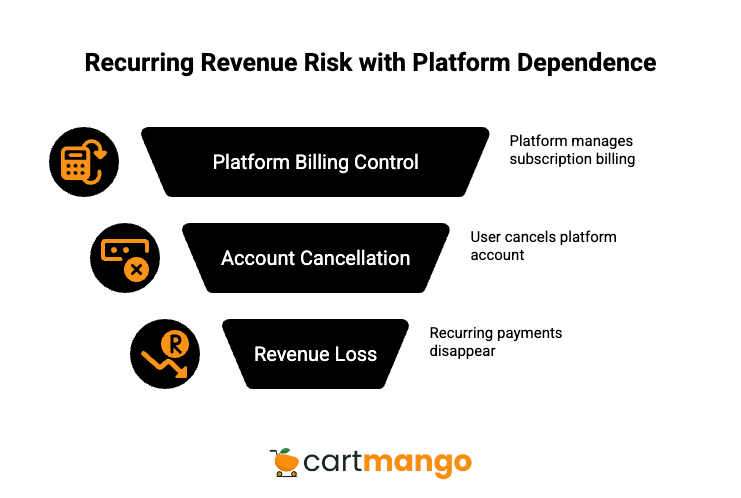
Then you decide to switch platforms.
And the recurring payments? Gone. Both Sellfy and SureCart manage subscription billing on their own servers, not directly on your Stripe or PayPal account. It does not matter that you plugged in your own payment processor. The platform controls the billing cycle. If you cancel your account, those subscription payments vanish.
This is the reality when you compare Sellfy vs SureCart. Both platforms let you sell subscription products and collect monthly revenue. But neither stores those recurring subscriptions on your actual Stripe or PayPal.
Think about what that means. You spent months building a base of paying customers. They trust you. They handed over their card details. The platform sitting between you and them holds the keys to that revenue.
If Sellfy shuts down, your monthly income disappears with it. If SureCart changes their terms, you have zero backup. Your recurring revenue lives on their infrastructure, not yours.
For creators selling ebooks, online courses, and other digital goods, recurring revenue is often the most stable income they have. Losing it because you moved to a different cart is not a minor inconvenience. It is a real business risk.
And both Sellfy and SureCart put you in exactly this position.
How to Keep Your Recurring Revenue When You Switch
If recurring revenue matters to your ecommerce business, the first thing you should check before picking any platform is: where do the subscriptions actually live?
Some platforms store recurring billing on your Stripe or PayPal account directly. Others manage it on their own servers. The difference is everything. If the subscriptions are on your Stripe, you keep those payments no matter what happens to the platform. If they are on the platform’s servers, you are one cancellation away from losing it all.
That is the approach behind CartMango (full disclosure: this post is published by CartMango, and we include our limitations alongside the comparison). CartMango connects recurring subscriptions directly to your Stripe and PayPal account. If you ever leave CartMango, your customers keep paying you. The subscriptions stay on your payment processor.
Beyond that, CartMango charges zero transaction fees and zero monthly fees. All features are included, free until 2027. And if you run into a problem, you get founder-led personal support with an average response time of 2 hours 16 minutes. No chatbots. No ticket queues where you wait days for a reply.
I am not saying CartMango is the right pick for everyone. But if you are trying to sell digital products and you want to actually own your recurring revenue, it is worth knowing that this option exists. Especially when the two platforms you are comparing both hold that revenue hostage.
The rest of this post breaks down the SureCart vs Sellfy comparison honestly, including where CartMango falls short.
Sellfy vs SureCart vs CartMango
Here is a side-by-side comparison of all three platforms. Every row comes from hands-on research.
| Feature | Sellfy | SureCart | CartMango |
|---|---|---|---|
| Your recurring payments gone if you leave the platform? | ❌ Recurring payments disappear if you leave, even when you connect your own Stripe / PayPal | ❌ Recurring payments disappear if you leave. SureCart manages subscriptions on its own platform, not directly on Stripe / PayPal | ✅ You keep recurring payments |
| Totally free? (note: Stripe / PayPal fees are standard across all cart platforms) | ❌ $29/mo for up to $833/mo revenue $79/mo for up to $4,166/mo revenue $159/mo for up to $16,666/mo revenue | ❌ Free Launch plan with 1.9% transaction fee on every sale. Pro (1 store): $179/yr Pro (5 stores): $249/yr Pro (unlimited stores): $399/yr | ✅ Yes, 0 monthly fees, 0% commission. All features included (until 2027). |
| Learning management system (LMS) | ❌ No | ❌ No | ❌ Future |
| Funnels (upsells & downsells) after customers paid for the main product | ❌ Does not support upsells / downsells | ✅ Yes | ✅ Yes |
| Customer support | Generally quick and friendly for everyday questions, but no live chat. Mixed feedback when issues get more technical or urgent. | Email/ticket only, no live chat. Free plan: 24-48hr weekday response. Pro plan: priority support. Thorough knowledge base and video tutorials. Reviewers praise support quality. | Founder-led personal support, no chatbots, no live chat. Average response time is 2hr+ |
| Buy now, pay later (BNPL) for your customers | ⚠️ Only through PayPal Pay Later. No popular BNPL services like Klarna, Affirm, Afterpay. | ✅ | ✅ |
| Order bumps | ⚠️ Only on Business & Premium plans. | ✅ | ✅ |
| Subscriptions (trials & setup fees) | ⚠️ No support for trials or setup fees. Only standard subscriptions. | ✅ | ✅ |
| Flexible coupons & discounts | ✅ | ✅ | ✅ |
| Quick & smooth checkouts | ✅ | ✅ | ✅ |
| Customers do NOT need to log in before buying (quick checkout) | ✅ | ✅ | ✅ |
| Direct, instant payout to your Stripe / PayPal (no withholding payments) | ✅ | ✅ | ✅ |
| If download links are shared by rogue customers, will they work? | ✅ Links are protected | ✅ Links are protected | ✅ Links are protected |
| Integrations | ⚠️ Few native connections: mainly analytics and ad pixels (Google Analytics, Facebook/X ads, Google Merchant Center). Zapier gives you access to thousands of external apps. | ⚠️ Few native connections: LearnDash, LifterLMS, TutorLMS, SureMembers, and BuddyBoss. Payments: Stripe, PayPal, Mollie, Paystack, Razorpay. Connects to thousands of apps through OttoKit or Zapier. | ⚠️ Few native connections for now, but Make.com gives you access to 3,000+ apps. Current native connections: Stripe, PayPal, Kit, ActiveCampaign, Beehiiv, and BirdSend, with more coming soon. |
| Affiliate management | ✅ | ✅ | ❌ Coming soon |
| Best for | Creators who want an all-in-one online store for digital products, subscriptions, and print-on-demand merch, and who are fine without post-purchase upsells and downsells. | WordPress users who want an ecommerce plugin without WooCommerce bloat. Great for selling digital and physical products, online courses, subscriptions, and for agencies running multiple stores. Requires a self-hosted WordPress site, so not ideal for non-technical users wanting a hosted ecommerce solution. | Solo digital creators who do not want their recurring revenue held hostage, plus instant setup, human support, and 0 platform fees (free until 2027). |
| Free migration | ⚠️ Full migration only on the most expensive Premium plan. Other plans get limited migration support. | ❌ No free migration | ✅ Free migration included |
These are the links for each platform: Sellfy, SureCart, CartMango.
CartMango Isn’t for Everyone, and That’s the Point
CartMango is built for solo creators and creators or small businesses that want to sell digital products without losing their recurring revenue. If that describes you, it is a strong fit. If it does not, there are better options.
Here is what CartMango does well:
- Zero platform fees, zero transaction fees (free until 2027).
- Your recurring subscriptions live on your Stripe / PayPal. They stay with you.
- Founder-led support. Average response: 2 hours 16 minutes. A real person reads your message.
- Upsells, downsells, order bumps, BNPL, protected downloads.
- Free migration from your current platform.
And here is what CartMango does not do right now:
- No learning management system (LMS) yet. If you sell online courses and need built-in course delivery, CartMango is not there yet. It is on the roadmap.
- No affiliate management yet. This is coming soon, but if you need an affiliate program today, Sellfy or SureCart both offer that.
- Limited native connections for now. CartMango works with Stripe, PayPal, Kit, ActiveCampaign, Beehiiv, and BirdSend natively. For everything else, Make.com opens up 3,000+ apps. But if you need deep WordPress connections or LMS plugins, SureCart has more to offer right now.
CartMango is not trying to be the best ecommerce platform for everyone. It is for creators who want to sell simple digital products, keep their recurring revenue, and not worry about monthly fees eating into profits.
If you need print-on-demand, advanced branding and layout control, or a WordPress plugin with LMS connections, Sellfy or SureCart are better picks. CartMango is for businesses that want something simpler.
Sellfy: The All-in-One Store for Digital Creators
Sellfy is one of the more straightforward platforms for digital products out there. You sign up, upload your files, and start selling. No WordPress needed. No code. No complicated setup. It is easy to use, and that simplicity is the main reason people choose it.
Sellfy is a hosted ecommerce store, meaning everything runs on their servers. You get a storefront, checkout, file delivery, and even built-in email marketing all in one place without needing any external tools. Unlike Shopify, which is built for general retail, Sellfy focuses specifically on digital creators. You can also sell physical products and print-on-demand merch from the same store.
What Sellfy offers
- Digital downloads (pdf files, ebooks, music, video, software, templates)
- Physical products and print-on-demand merch
- Ability to sell subscriptions (recurring payments)
- Built-in email marketing with automations
- Embedded buy buttons (sell from any existing website)
- Discount codes
- Cart abandonment recovery (Business plan and above)
- Analytics and sales tracking
- Affiliate management
- Download link protection
- Stripe and PayPal payments
You can bundle products together and sell physical and digital products from one store. For creators selling ebooks, templates, or other simple digital products, Sellfy covers the basics.
Sellfy pricing
Sellfy has no free plan. Pricing starts at $29/mo and scales based on your revenue:
- Starter: $29/mo (up to $833/mo in revenue)
- Business: $79/mo (up to $4,166/mo in revenue)
- Premium: $159/mo (up to $16,666/mo in revenue)
These revenue caps matter. Once you cross a threshold, you get bumped to the next tier. At $50,000/mo revenue, you exceed all published plans and need custom pricing.
Sellfy charges zero transaction fees on all plans. You only pay standard Stripe/PayPal processing fees (2.9% + $0.30 per transaction).
The limitations
- No upsells or downsells. Post-purchase funnels are not supported.
- No trial periods or setup fees for subscriptions. Basic recurring billing only.
- BNPL limited to PayPal Pay Later. No Klarna, Affirm, or Afterpay.
- Order bumps only on Business and Premium plans (not Starter).
- Limited native connections. Mainly Google Analytics, Facebook/X ads, Google Merchant Center. You need Zapier for anything else.
- No LMS.
- Full migration only on the Premium plan ($159/mo). Other plans get limited migration support.
- Revenue caps force you into higher plans as you grow.
Best for
Sellfy works for creators who want an all-in-one ecommerce platform for selling physical products alongside digital ones, subscriptions, and print-on-demand, all without touching code. If you are looking to sell and you want an email tool built into your store, Sellfy handles that.
But if the Sellfy vs SureCart decision comes down to recurring revenue ownership, or if the revenue caps push you to look for Sellfy alternatives, keep reading.
This is the link for Sellfy.
SureCart: The WordPress Ecommerce Plugin
SureCart is a WordPress ecommerce plugin built as a lighter, more modern alternative to WooCommerce. If you already use WordPress, SureCart lets you add a full ecommerce store to your existing wordpress site without the bloat that WooCommerce often brings.
The key difference from Sellfy: SureCart is not a hosted platform. It is a plugin you install on your self-hosted wordpress website. Your product pages, your checkout, your design, all of that lives on your WordPress site. But the actual commerce logic (subscriptions, payments, customer data) runs on SureCart’s cloud servers.
What SureCart offers
- Digital downloads, physical products, subscriptions, donations
- Order bumps and upsells
- Subscription trials and setup fees
- Cart abandonment recovery
- Built-in affiliate management
- License key generation
- Native checkout blocks for Gutenberg, Bricks, and Elementor
- Customer self-service portal
- Payments: Stripe, PayPal, Mollie, Paystack, Razorpay
- BNPL support
- Download link protection
- Works with LearnDash, LifterLMS, TutorLMS, SureMembers, BuddyBoss
SureCart pricing
SureCart pricing includes a free tier:
- Launch (Free): $0/mo with a 1.9% transaction fee on every sale
- Pro (1 store): $179/yr
- Pro (5 stores): $249/yr
- Pro (unlimited stores): $399/yr
Pro plans remove the 1.9% transaction fee. Even on the free plan, you get most features, but that 1.9% fee adds up. At $5,000/mo in revenue, you pay $95/mo in transaction fees on the free plan versus $14.92/mo on Pro ($179/yr).
The limitations
- Requires a self-hosted WordPress site. If you do not already use WordPress, SureCart is not an option without setting one up first. WooCommerce is a powerful ecommerce plugin too, but SureCart positions itself as the leaner alternative.
- Recurring payments disappear if you leave. SureCart manages subscriptions on their servers, not your Stripe/PayPal.
- No free migration. You handle the move yourself.
- Commerce depends on SureCart’s cloud. If their servers go down, your store stops working. The frontend runs on your WordPress site, but the commerce layer does not.
- 1.9% transaction fee on the free plan.
- Email template customization requires HTML knowledge.
Best for
SureCart is the pick for people who already use WordPress and want to add ecommerce without WooCommerce. It is also strong for agencies managing multiple stores (the Pro unlimited plan at $399/yr covers unlimited sites) and for sellers who want WordPress connections with LMS plugins like LearnDash.
If you do not have a WordPress site and do not want to build a full website just to sell digital products, SureCart is not the right fit. Platforms like Podia, Gumroad, or Payhip might be a better starting point. And if you want to sell digital products while keeping your recurring revenue safe, CartMango is worth a look.
This is the link for SureCart.
What You’ll Actually Pay: A Pricing Breakdown
Here is what each platform costs at four revenue levels. All calculations include standard Stripe/PayPal processing fees (2.9% + $0.30 per transaction), assuming a $50 average order value. For Sellfy, I used the cheapest plan that fits each revenue level. For SureCart, I used the Pro 1-store plan ($179/yr = $14.92/mo) since it is cheaper than the free plan above roughly $785/mo in revenue.
| Monthly Revenue | Sellfy Cost (per month) | SureCart Cost (per month) | CartMango Cost (per month) | CartMango Savings vs Sellfy (per year) | CartMango Savings vs SureCart (per year) |
|---|---|---|---|---|---|
| $1,000 (20 orders) | $79 platform + $35 processing = $114 | $14.92 platform + $35 processing = $49.92 | $0 platform + $35 processing = $35 | $948/yr | $179/yr |
| $5,000 (100 orders) | $159 platform + $175 processing = $334 | $14.92 platform + $175 processing = $189.92 | $0 platform + $175 processing = $175 | $1,908/yr | $179/yr |
| $10,000 (200 orders) | $159 platform + $350 processing = $509 | $14.92 platform + $350 processing = $364.92 | $0 platform + $350 processing = $350 | $1,908/yr | $179/yr |
| $50,000 (1,000 orders) | Custom pricing (exceeds $16,666/mo cap), minimum $159 platform + $1,750 processing | $14.92 platform + $1,750 processing = $1,764.92 | $0 platform + $1,750 processing = $1,750 | $1,908+/yr | $179/yr |
The difference between Sellfy and CartMango adds up fast. At $5,000/mo in revenue, Sellfy’s platform fees alone cost $159/mo, which is $1,908 per year in additional cost compared to CartMango. At $1,000/mo, Sellfy already requires the Business plan ($79/mo) because the Starter plan caps out at $833/mo in revenue.
SureCart is cheaper than Sellfy at every revenue level. The Pro plan is a flat $179/yr regardless of how much you sell. CartMango saves you that $179 per year since it charges nothing.
The bigger question is not just price. It is what happens to your recurring revenue when you leave. Both Sellfy and SureCart hold your subscription revenue hostage. CartMango does not.
Sellfy vs SureCart vs CartMango: Which Fits Your Business?
These are the links for each platform: Sellfy, SureCart, CartMango.
There are many platforms for digital products, and each one fits a different type of seller. Among the best tools for digital creators, these three cover different ground. Here is how to decide.
Choose Sellfy if:
- You want an all-in-one hosted ecommerce store. No WordPress, no code, no tech stack to manage.
- You want to sell physical and digital products plus print-on-demand merch from one place.
- You want built-in email marketing without needing a separate email tool.
- You do not need upsells, downsells, or advanced subscription features (trials, setup fees).
- You are OK with revenue caps that push you into higher plans as you grow.
Choose SureCart if:
- You already use WordPress and want to turn your custom store into a functioning ecommerce store.
- You need upsells, order bumps, and subscription trials.
- You want connections to WordPress LMS plugins like LearnDash or TutorLMS.
- You are comfortable managing a self-hosted WordPress site (or have a team that does).
- SureCart pricing works for your budget, and you are fine with the 1.9% fee on the free plan or paying $179/yr for Pro.
Choose CartMango if:
- You are one of the many solo creators, course creators, or part of a small team, and you want to sell digital products and memberships without your recurring revenue disappearing if you ever switch platforms.
- You want zero transaction fees and zero monthly fees.
- You want to start selling fast without needing to set up a WordPress site or build a full website.
- You want human support from a real person, not chatbots.
- You can live without an LMS, affiliate management, and deep WordPress connections for now.
No platform is perfect. If you want to sell digital products and keep things as simple as possible, CartMango gives you the most for $0. If you want a complete hosted store with email marketing and print-on-demand, Sellfy is the all-in-one pick. If you are a WordPress user looking to sell without WooCommerce, SureCart fills that gap.
Sellers who want full control over their recurring revenue should pay close attention to what happens when they leave a platform. Pick the one that fits how you work today, and make sure you understand where your subscription payments live before you commit.
Related Reading
- Gumroad vs SureCart: the “catch” (2026)
- Payhip vs SureCart: the hidden catch nobody talks about (2026)
- Sellfy vs SureCart: your recurring payments at risk (2026)
- SendOwl vs SureCart: recurring revenue you don’t own (2026)
- SamCart vs SureCart: the recurring payment problem (2026)
- ThriveCart vs SureCart: who really owns your customers? (2026)
- Sellfy vs Easy Digital Downloads: the revenue hostage (2026)
- SendOwl vs Easy Digital Downloads: the revenue prison (2026)
- SamCart vs Easy Digital Downloads: the revenue trap (2026)
- Easy Digital Downloads vs Payhip: the revenue ransom (2026 )