

Podia is an all-in-one platform with built-in email marketing, an online course builder, and a website builder. Gumroad is an ecommerce platform that works best for creators who want to sell digital products fast with automatic sales tax handling.
The Hidden Problem: Recurring Revenue Handcuffs
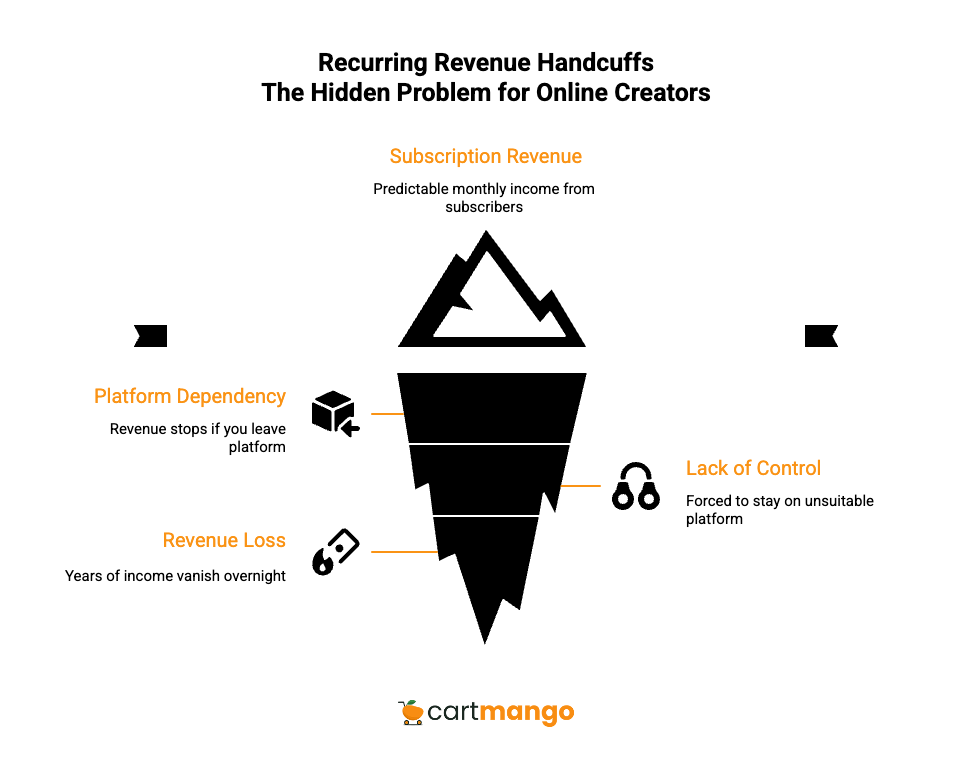
You’ve built something real. A subscription online business with 100, maybe 500 paying customers who trust you enough to hand over their card details every month. It feels stable, predictable, safe.
Then you discover the truth about many platforms, including Podia and Gumroad: if you leave, your recurring revenue stops. Not “slows down” or “needs migration work.”
It just stops. Your subscribers vanish. Your monthly income drops to zero overnight.
This isn’t a billing hiccup. You’re forced to choose between staying on a platform that doesn’t work for you, or burning down years of predictable customer payments and starting over.
The goal of this post is to help solo digital creators pick based on real tradeoffs: fees, payout timing, flexibility, payment processing choices, what actually breaks when you scale.
Podia & Gumroad Made Me Realize Something Was Broken – So We Built CartMango
I kept seeing the same pattern. Creators would build a subscription business on Podia or Gumroad, hit decent revenue, then realize they needed to switch platforms. And when they tried, their recurring payments stopped working.
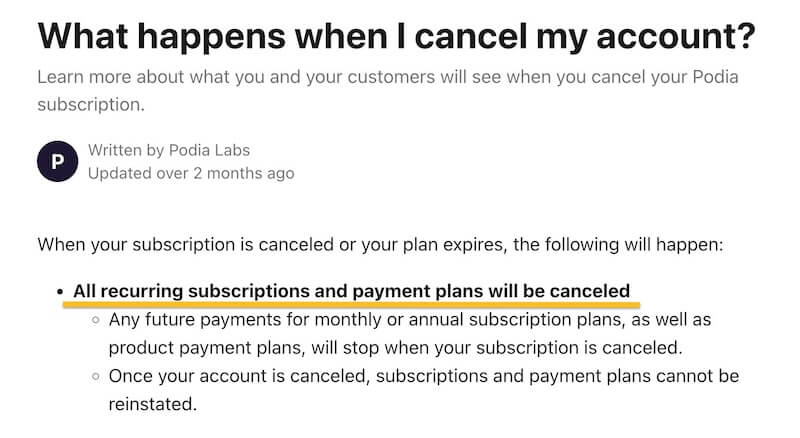
Not because of a technical bug. The platforms are designed that way. If you leave, your subscribers don’t come with you.
That’s why we built CartMango. Recurring payments shouldn’t vanish just because you switch tools, especially when you’re trying to grow your online business.
This comparison includes CartMango because it addresses the platform lock-in risk you run into once you start growing. I’m not claiming CartMango is perfect for everyone., and the pros and cons matter.
Some creators need the all-in-one features Podia offers. Others want Gumroad’s simplicity and don’t mind the transaction fees or the pricing structure.
But if you want to avoid recurring revenue handcuffs, that’s what CartMango was built to solve. It’s about choosing the least risky fit for your business model when you’re looking to sell for the long run.
Cart Comparison
| Feature | Podia | Gumroad | CartMango |
|---|---|---|---|
| Your recurring payments gone if you leave the platform? | ❌ Recurring payments lost if you leave, even when you connect to your own Stripe / PayPal (source) | ❌ Your subscriptions stop working if you switch platforms | ✅ Your recurring revenue stays with you |
| TOTALLY free? (note: Stripe / PayPal fees are standard across all cart platforms) | ❌ $39/mo + 5% commissions. Can’t use PayPal in this plan.$89/mo for no commissions, PayPal is available in this plan. | ❌ 10% platform fee + $0.50 per sale | ✅ 0 monthly fees, 0 commission on sales. Every feature unlocked (through 2027). |
| Funnels (upsells & downsells) AFTER customers paid for the main product | ⚠️ Supports just 3 upsells. No downsells. | ⚠️ Has upsells, but conditional downsells don’t exist (you can’t show alternate offers based on what customers reject) | ✅ Full funnel support |
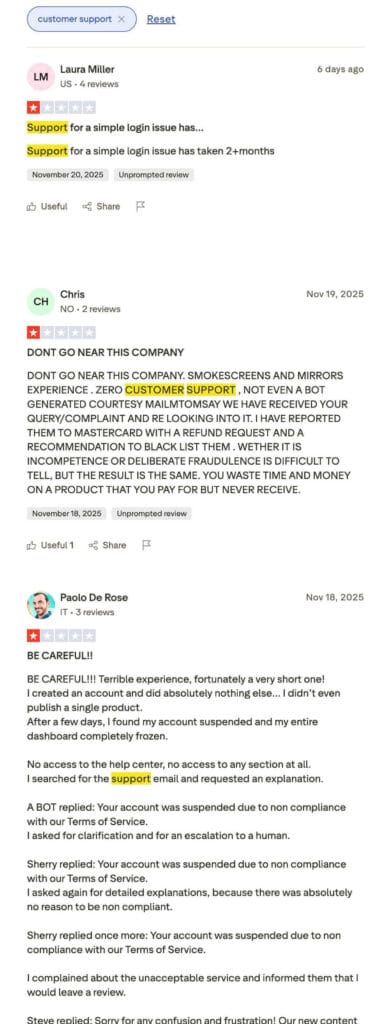
| Customer support | ⚠️ Inconsistent support quality. Email support 7 days/week. Trustpilot: 3.6/5 stars (slow, AI bot errors). Capterra: 4.6/5 stars. This is a “depends who you ask” thing. | ❌ Weak support with automated bots. Reports of deleted feedback, unanswered emails (source). | Real humans respond. No bots, no live chat. Typical reply under 1hr+ |
| Buy now, pay later (BNPL) support for your customers (boost your sales) | ❌ No true BNPL: Podia’s installment plans pay you over time, not upfront. So you risk missed payments if customers bail before finishing what they owe. | ❌ No real BNPL: Their payment plans give you money slowly, not immediately. You absorb the loss if buyers quit paying. | ✅ |
| Order bumps to boost sales | ❌ No order bumps | ✅ | ✅ |
| Subscriptions (support trials & set up fees) | ✅ | ✅ | ✅ |
| Dynamic coupons & discounts | ✅ | ✅ | ✅ |
| Optimized & fast checkouts | ✅ | ✅ | ✅ |
| Customers need NOT log in before buying (quick checkout experience) | ✅ | ✅ | ✅ |
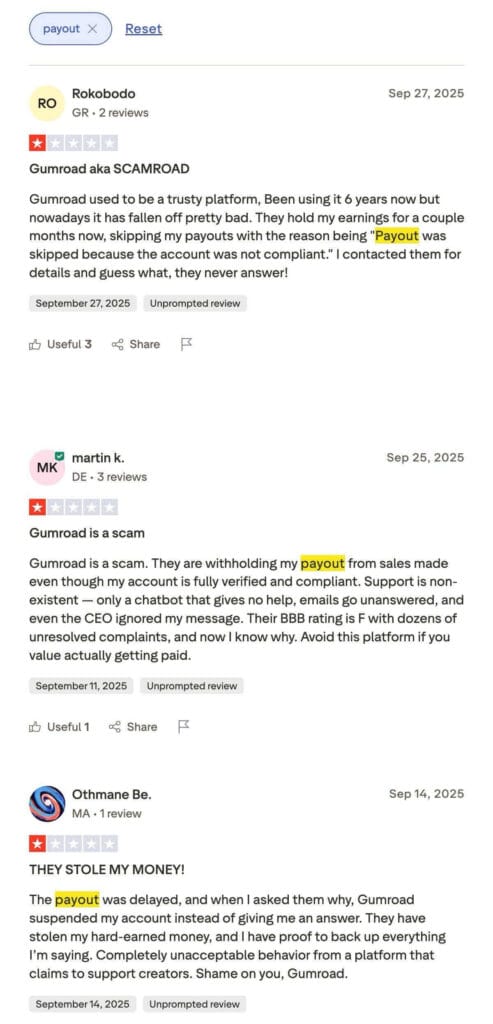
| Direct, instant payout to your Stripe / PayPal (no withholding payments) | ✅ | ❌ Standard 7-day wait, but sellers report weeks-long holds with zero explanation (source) | ✅ |
| If download links are shared by rogue customers, will they work? | ✅ Links are protected | ✅ Download links stay protected | ✅ Links are protected |
| Integrations | ✅ Natively integrates with 10 email platforms, Google Analytics, Zoom, YouTube Live, Discord.Zapier (plan-dependent) connects WordPress, Shopify, Webflow. No public API or webhooks. | ⚠️ Direct connections: Discord & Circle only for instant membership access. Everything else requires Zapier. | ⚠️ Few direct integrations, but Make.com opens 3,000+ app connections. Direct support now: Kit, ActiveCampaign, Beehiiv, BirdSend. More rolling out. |
| Affiliate management | ✅ Available on the $89/mo plan | ✅ | ❌ Coming soon |
| Best for | Creators wanting an all-in-one platform with email marketing built-in (free for the first 100 subscribers, then paid add-on). It’s ideal if you don’t need advanced funnels. | People who want quick setup with no upfront costs and accept giving away 10% of revenue forever, while skipping complex funnel features and deep control. | Solo digital creators who need a lightweight, high-converting cart and currently don’t need bells & whistles. |
| Free migration | ⚠️ No free migration during 30-day trial. After trial: free migration for 20 products ($39/mo plan) or 30 products ($89/mo plan). | ❌ No free migration | ✅ Free migration included |
Here are the links for each platform: Podia, Gumroad, CartMango.
CartMango: Not Better, But Different
CartMango isn’t trying to compete with all-in-one platforms. We built it as a focused checkout tool for solo digital creators who need clean transactions without the bloat.
What it optimizes for:
You get fast setup. The dashboard doesn’t bury you in settings or force you through tutorials. You add a product, connect Stripe or PayPal, and you’re selling.
It’s checkout-first. Not “platform-first” where checkout is one feature among fifty. The whole tool exists to turn visitors into paying customers without friction.
Support is founder-led and personal. No chatbots pretending to understand your problem. No canned responses that ignore what you actually asked. When you email, you’re talking to people who built the product and can actually fix things.
What’s included (being realistic):
Funnels work the way you’d expect. Upsells and downsells after the main purchase, including conditional flows where you show different offers based on what customers accept or reject.
You get order bumps, coupons, subscriptions (with trials and setup fees), protected download links. The core selling mechanics are there.
Payouts hit your Stripe or PayPal account immediately. No holds, no review periods, no “we’ll release your money when we feel like it.”
Where you hit limits:
Affiliate management is coming soon. Learning management system (LMS) is not yet built, so if you also need an online course builder today, Podia is a better fit.
When to consider CartMango:
You want to reduce “platform tax” as revenue grows. Paying 10% forever on every sale adds up fast when you’re doing $5,000 or $10,000+ every month.
You care about not losing predictable recurring payments. If you leave CartMango, your recurring payments keep running through your own Stripe or PayPal. No recurring revenue handcuffs.
You’d rather pay for a focused checkout tool than pay for an all-in-one suite where you use 20% of the features and ignore the rest. If you wish to sell digital downloads and get clean checkout plus funnels, CartMango is built for that.
Podia
Podia positions itself as an all-in-one platform. You can sell online courses and digital products. You also get email marketing, a website builder, custom domain, an online store, and community features under one login. For creators who want everything in one place, that’s the appeal.
What Podia does well:
The environment is unified. You’re not juggling five different tools with five different logins and billing cycles. Course creation, email sequences, membership access, it all lives in the same dashboard.
Online courses are podia’s main strength. If you’re building structured content with drip schedules, quizzes, and progress tracking, podia allows you to deliver that experience. Podia also allows creators to add nline courses and memberships on the same site.
The email add-on is called podia email, and it’s a marketing tool that can replace your email platform if you’re just starting. Free for the first 100 subscribers, then you pay extra. Podia claims it can work like a full email marketing platform with automations.
Where you hit limits:
If you want a free plan, podia doesn’t offer one that lasts forever, just a 30-day free trial. After that, you’re paying monthly whether you use all the features or not. If you only need checkout and subscriptions, the monthly fee feels heavy compared to leaner tools.
Podia’s pricing structure includes commissions on the Mover plan. Compared to Gumroad though, it charges a smaller percentage but adds a monthly fee.
Funnel mechanics exist but they’re constrained. Three upsells maximum, no downsells. If you want complex conditional flows, you’ll bump into walls.
Best for:
Podia is a better platform for course creators and membership builders who will actually use the community features, the email platform, and the website builder. If you’re going to use 70% of what Podia offers, the cost makes sense.
Creators who value convenience over optimization. One login, one bill, less tool management.
Gumroad
Gumroad doesn’t charge monthly fees. You pay per sale instead of paying upfront, which appeals to creators who want to test products without committing to a subscription.
What Gumroad does well:
No upfront commitment. You’re not locked into monthly billing before you make your first sale. The fee structure is per-transaction, so you only pay when you earn.
Sales tax handling is automatic. Gumroad acts as Merchant of Record and collects/remits sales tax worldwide. If you don’t want to deal with tax compliance, that’s one less thing to manage.
Where you hit limits:
The fees compound as you grow. Gumroad charges 10% plus $0.50 per transaction doesn’t sound terrible at $500/month revenue, but at $5,000 or $10,000 per month, you’re handing over serious money.
You get less control compared to dedicated cart tools. Advanced funnel mechanics, conditional offers, the kind of optimization that matters when you’re scaling, those features either don’t exist.
Payout timing matters if you rely on that income for bills or contractors. The standard schedule exists, but understand how it works before you depend on it for cash flow.
Best for:
Early-stage creators validating an idea quickly. You want to see if anyone will buy before you invest in infrastructure.
Gumroad creators who value simplicity and want sales tax handled automatically. You’re willing to accept per-sale fees in exchange for not thinking about compliance.
Pricing: Real Cost Breakdown
Most platform comparisons stop at listing monthly fees. That’s not very helpful. What matters is total cost when you’re actually running a business at different revenue levels.
This table shows platform fees plus processor fees. I’m using 2.9% + $0.30 per transaction for processor fees because that’s standard across Stripe and PayPal. Every platform pays this, so it’s fair to include it in total cost comparisons.
Assumptions:
- Processor fees: 2.9% of revenue + $0.30 per order
- Gumroad platform fees: 10% of revenue + $0.50 per order
- Podia uses the Shaker plan ($89/month) for the “no commissions” comparison
- CartMango platform fee: $0
- Order counts in the left column reflect a $20 average order value
These numbers let you see the actual monthly cost at three realistic revenue levels: someone just starting to get traction, someone building a real business, and someone scaling past five figures.
| Monthly revenue | Platform | Platform fees | Processor fees (2.9% + $0.30) | Total monthly fees | SAVINGS vs Gumroad | SAVINGS vs Podia |
|---|---|---|---|---|---|---|
| $1,000 (50 orders) | Podia (Shaker) | Plan: $89 | 2.9% of $1,000 = $29 $0.30 × 50 = $15 Total: $44 | $133 | $36/mo | — |
| Gumroad | 10% of $1,000 = $100 $0.50 × 50 = $25 Total: $125 | Same $44 | $169 | — | — | |
| CartMango | $0 | Same $44 | $44 | $125/mo | $89/mo | |
| $5,000 (250 orders) | Podia (Shaker) | Plan: $89 | 2.9% of $5,000 = $145 $0.30 × 250 = $75 Total: $220 | $309 | $536/mo | — |
| Gumroad | 10% of $5,000 = $500 $0.50 × 250 = $125 Total: $625 | Same $220 | $845 | — | — | |
| CartMango | $0 | Same $220 | $220 | $625/mo | $89/mo | |
| $10,000 (500 orders) | Podia (Shaker) | Plan: $89 | 2.9% of $10,000 = $290 $0.30 × 500 = $150 Total: $440 | $529 | $1,161/mo | — |
| Gumroad | 10% of $10,000 = $1,000 $0.50 × 500 = $250 Total: $1,250 | Same $440 | $1,690 | — | — | |
| CartMango | $0 | Same $440 | $440 | $1,250/mo | $89/mo |
Look at the $10,000/month row. Gumroad costs you $1,690 total. Podia costs $529. CartMango costs $440. That’s the difference between percentage-based fees and flat fees when revenue scales.
The “no monthly fee” pitch sounds good until you do the math. At any meaningful revenue level, you’re paying more with per-transaction fees than you would with a flat subscription or zero platform fees.
Here are the links for each platform: Podia, Gumroad, CartMango.
Customer Service & Ease of Use
When money is involved, support quality stops being a nice-to-have. It becomes part of the product. A stuck payout, a broken checkout link, a customer who can’t access their purchase, these problems cost you real revenue every hour they stay unfixed.
Ease of use isn’t just about clean UI. It’s about how fast you can solve problems when things break.
Podia:
The environment feels guided. You’re not staring at a blank dashboard wondering what to click. The structure assumes you want a full platform experience, not a tool stack you assemble yourself.
Support is email-based, generally responsive. Most creators report reasonable turnaround times, though experiences vary depending on who picks up your ticket.
Gumroad
The interface is minimal, which works well for simple products. But when you need help, you’re often dealing with automated bot responses that don’t understand you or long wait times, if they even get replied back.
CartMango
The approach is different because the team is small. You’re talking to the people who built the tool and can actually change things.
No chatbots, no canned responses, no offshore support reading from scripts. Average response time is under an hour, though complex problems obviously take longer to fix.
The tradeoff: fewer surface features means fewer things that can break. Checkout-focused tools have less surface area than all-in-one platforms.
What Happens After You Choose: Setup Reality
Most comparisons end at features. But what actually happens when you open a Gumroad account, sign up for Podia, or start with CartMango matters just as much.
First Hour Setup
Gumroad allows you to upload a file and publish a product on gumroad in under 10 minutes. No chat support needed for most creators. Gumroad users appreciate that simplicity when they’re just testing demand for digital products online.
But Gumroad without built-in email or a home for your audience means you’re stitching tools together. If you want to use a custom domain or build a brand beyond checkout, you’ll connect external tools.
When you use podia, setup takes longer because you’re configuring more. Podia is easy to navigate, but you’re setting up a sales page, picking a product type, maybe adding a course on podia with drip content. Podia supports this complexity, but it’s not a 10-minute launch.
CartMango setup is just as fast as Gumroad. You get checkout speed that matches Gumroad, but with funnel features neither Podia nor Gumroad can match, even on their highest plans. CartMango supports five-level funnels with conditional downsells, while podia and gumroad offer basic upsells at best.
What You Can Actually Sell
Gumroad is primarily built for digital products online. It’s possible to sell physical products on Gumroad, but fulfillment is manual.
Unlike podia, which is primarily designed for selling digital courses and memberships, Gumroad handles a wide range of digital files without assuming you need course structure.
If you’re planning to run webinars or sell courses with gumroad, you’re delivering access links. Podia doesn’t have native webinar hosting, so creators who want to build structured learning experiences use Podia for course delivery and connect external tools for live sessions.
CartMango focuses on checkout and subscriptions. If you want to sell your digital products and keep recurring payments portable, CartMango handles that. It currently doesn’t have LMS (learning management system) capability yet, but it will in the future.
The Real Question
Do you need an LMS (Podia), a fast way to sell files without setup bloat (Gumroad and CartMango), or a checkout tool that protects your recurring revenue (CartMango)?
Gumroad and podia both allow creators and allows creators to sell. CartMango takes a different approach: fewer features now, but the ones that exist protect your recurring income.
Podia Vs Gumroad vs CartMango: Which Platform Fits YOU?
Digital downloads (templates, ebooks, toolkits):
Podia includes email marketing built into the platform (free for your first 100 subscribers, then you pay extra). If you’re planning to run email sequences alongside your products and want everything in one place, that integration saves you from connecting external tools.
Gumroad gets you launched fast for basic offers. The sales tax handling is attractive if you don’t want to manage compliance yourself.
CartMango is also very suitable for digital downloads and sets up just as fast as Gumroad. You’re not losing speed, but you’re gaining order bumps and post-purchase funnels that can increase average order value.
Courses and memberships:
Podia is the stronger fit when course structure matters. Drip content, progress tracking, community discussions, the infrastructure for actual learning experiences exists in the platform.
Gumroad works for content access but feels thin if you want a real course experience. You’re basically giving people files, not guiding them through a curriculum.
CartMango is best when your core need is selling and collecting payments cleanly, especially subscriptions. If you’re hosting course content elsewhere (like a membership plugin or separate LMS), CartMango handles the checkout and recurring billing without the platform bloat.
Scaling considerations:
If you plan to grow past hobby income, pay attention to margin. A 10% platform fee on $10,000 monthly revenue is $1,000 you’re handing over forever.
Payout reliability matters when you’re paying contractors or running ads. Delayed payouts kill cash flow faster than you’d expect.
Think about portability. If you switch tools two years from now, will your recurring revenue come with you, or are you locked into recurring revenue handcuffs? If keeping control of your recurring revenue long-term matters more than all-in-one features or tax automation, CartMango is the clearest choice.
But I’ll leave it to you…
Here are the links for each platform: Podia, Gumroad, CartMango.
Related Reading
- ThriveCart vs Sellfy: the revenue captivity (2026)
- SendOwl vs Sellfy: the recurring income handcuffs (2026)
- SamCart vs Sellfy: the customer cash hostage (2026)
- Payhip vs ThriveCart: losing what you built (2026)
- ThriveCart vs Gumroad: the recurring revenue trap (2026)
- Where to Buy Digital Products to Resell: 6 Top Places in 2026 (+ a glaring problem)
- SamCart vs Gumroad: who actually owns your customers? (2026)
- Is Gumroad Safe in 2026? Uncovering the Hidden Pros and Cons
- Payhip vs Podia: The Recurring Income Hostage (2026)
- Payhip vs SamCart: The Recurring Revenue Handcuffs (2026)