

To cancel SendOwl, go to Settings > Account > scroll to Close account. Depending on your situation, “cancel” means three different things here, and the steps vary for each.
SendOwl Said It Won’t Happen Again. The Pricing Model Says Otherwise.
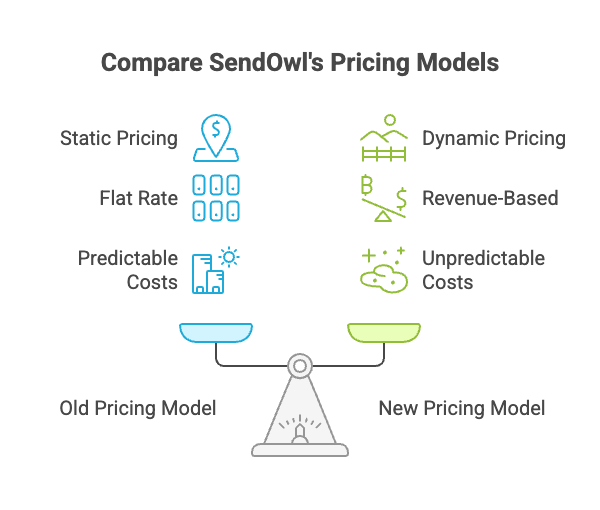
When SendOwl raised prices in 2024, the company’s response on Trustpilot described it as “their first major pricing update in over 15 years.” No official blog post or public commitment about future pricing stability was published.
The structure of the new pricing model is worth understanding before you decide to stay.
SendOwl now charges based on your trailing 12-month revenue and order volume. Your plan adjusts automatically as those numbers change. No announcement from SendOwl required, no action needed on their end.
Here’s what that looks like in practice. Say you have a strong quarter and your trailing 12-month revenue crosses the threshold for the Grow plan. Your plan moves up. You didn’t do anything wrong. You didn’t receive a notice. Your business just did well, and your monthly cost went up with it.
The old model was static, a flat rate regardless of performance. The new model ties your plan to your revenue growth. That’s a meaningful structural change, not just a price adjustment.
Is that fair? Some sellers think so. Paying more as you earn more has a certain logic. Others point out that a seasonal revenue spike can push you into a higher tier for a full 12 months before your trailing numbers drop back down. You might pay Grow-tier prices for a year based on a launch month that never repeated.
If your revenue doubles next year, what does your SendOwl bill look like? That’s a question worth running through before making any decisions.
The 2024 price increase was something SendOwl chose to do. Future increases don’t require that choice. They’re built into how the model works now.
What to Do Before You Cancel SendOwl
Don’t close your account before going through this list. A few of these steps can’t be undone.
1. Note your billing cycle date. Your access continues to the end of the current billing period. Closing today doesn’t stop your charges today. You’ve already paid for the month (or year), and access runs until the cycle ends.
2. Export your order reports and tax data. Go to your dashboard and download everything you need: transaction history, customer records, tax data. Once the account closes, all of that is permanently deleted. SendOwl cannot recover it. This is not temporary, it’s gone.
3. Delete subscription products before you close. Deleting a subscription product triggers cancellation notification emails to all active subscribers, including anyone currently on a free trial. If you close the account without deleting products first, those subscribers don’t automatically get a notice. Give them a clean heads up.
4. Plan your migration before you close, not after. If you’re moving to another platform, get it set up and running first. There’s no reason to have a gap where you can’t accept payments.
I’m the founder of CartMango, a competing checkout platform for solo creators, so I’m not a neutral voice here. If you’re figuring out where to go next, CartMango is free until 2027. No cost pressure while you get set up.
How to Cancel SendOwl: Step-by-Step Account Closure
The actual steps are quick. The choice you make at the end, whether to close immediately or wait until your billing cycle ends, has more consequences than people usually expect.
Here’s the process, step by step:
- Log in to your SendOwl account
- Go to Settings
- Click Account
- Scroll down to the Close account section
- Click the close account link
- Complete the short feedback form
- Confirm
After you confirm, a banner appears at the top of every page showing your scheduled closure date. You’ll have three options:
- Cancel upcoming closure if you change your mind
- Close immediately if you want it done now
- Let it auto-close at your billing cycle end (the default)
Immediate closure means all download links stop working right now. If a buyer tries to access their purchase after that point, they can’t get in. That’s the right choice if you need a clean break fast, but it cuts off buyers with no transition time.
The scheduled close keeps your account fully active until the end of your billing period. At closure, SendOwl calculates any final data overage charges and emails you a receipt. Most sellers go with the scheduled close because they’ve already paid for the remainder of the period and it gives more time to handle loose ends.
After confirming, SendOwl starts processing account-level changes: subscription cancellations begin on the Stripe side, your account status changes to “closing,” and the banner stays visible as a reminder of the date.
What Happens to Your Subscriptions
What payment gateway you’re using determines whether SendOwl handles this cleanup for you, or whether it’s on you to do it manually.
Stripe: SendOwl automatically cancels all active subscriptions. Stripe stops processing subscription payments. Your subscribers receive notification from Stripe.
PayPal: SendOwl transmits the cancellation signal to PayPal. PayPal stops the charges.
Before closing, delete your subscription products. That triggers notification emails to all active subscribers, including those on free trials, and gives them a clean record of the cancellation. It’s a better experience than access suddenly stopping with no explanation.
What to Export Before You Go
You have one shot to get your data out. Everything, transaction records, customer information, product files, is permanently deleted at the end of your billing cycle and there’s no recovery after that.
Before you close:
- Download order reports from your dashboard
- Pull transaction history and any tax records you need
- Export your customer list
As a seller, you are the GDPR Data Controller for your customers’ personal data. SendOwl processes it on your behalf, but the responsibility is yours. If any buyers have submitted data deletion requests, handle those before you close. Once SendOwl deletes all account data, those requests get fulfilled by default, but you should have your own record of handling them.
Account settings and API configurations aren’t exportable, but those are easy to reconstruct on a new platform. Customer and transaction data is what’s irreplaceable.
How to Cancel a Buyer’s Subscription (Seller Side)
If a buyer asks you to cancel their subscription, or you need to stop a recurring charge for any reason, here’s how to do it from your dashboard:
- Go to Orders
- Find the order
- Look for the State field
- Click Cancel subscription
- Confirm
SendOwl automatically sends the subscriber a cancellation email.
One thing worth knowing before you do this: once you cancel from your end, you can’t reinstate it. The buyer would need to reactivate or make a new purchase. If there’s any chance either of you might want to resume, think about whether canceling is the right call, or whether the pause option works better.
Stripe only: pause instead of cancel. Pausing halts subscription payments without ending the subscription. The subscriber stays in your system, billing stops, and either of you can resume later. This works well for someone who wants a short break without losing their access history or having to go through checkout again.
What about failed payments? SendOwl runs dunning automatically, sending several reminders over the course of about a week before auto-canceling the subscription. You don’t need to do anything unless you want to handle it sooner.
Canceling a subscription stops future subscription payments. It doesn’t issue a refund for payments already processed. If the buyer is also asking for a refund, handle that separately through your payment gateway.
How to Cancel a SendOwl Subscription as a Buyer
If you bought a digital product from a seller who uses SendOwl and want to stop the subscription, start with the manage link.
Look for it in:
- The download page for your product
- Any payment reminder email from SendOwl
Clicking the manage link takes you to a page where you can view your subscription details: next payment date, billing amount, and options to update your payment method or cancel.
After you cancel, what happens to your access depends on how the seller has the subscription set up. Whether you can get a refund for unused time depends on the seller’s policy, not SendOwl’s.
The PayPal exception. If you paid with PayPal, the manage link won’t let you cancel directly. PayPal subscriptions have to be canceled through PayPal’s interface. Log in to PayPal, go to your account settings, find the subscription, and cancel from there.
Can’t find the manage link? Email the seller directly. They can cancel the subscription from their dashboard. If the seller is unresponsive, check the original purchase confirmation email for a support contact.
If you’re canceling a free trial before it converts to a paid subscription, the same process applies. Use the manage link if you paid by card, or go through PayPal if that’s how you paid. Canceling before the trial ends stops the charge when the trial period is up.
Why So Many Sellers Are Canceling SendOwl Right Now
Some sellers went from $9/mo to $87/mo with a single notice email. Others say they got no warning at all. SendOwl’s Trustpilot reviews show how that landed: volume spiked in early 2024 and stayed elevated through late 2024 and into 2025. The pattern across the negative reviews is consistent: the pricing change.
SendOwl moved away from flat-rate plans. Free accounts were eliminated. The minimum plan shifted to $39/mo.
For some sellers the adjustment was manageable. For others, the jump was steep. One reviewer titled her review “736% Price Increase”, describing her plan going from $19 to $159/mo. Another wrote that going from $15 to $159 “feels like gouging.”
SendOwl’s response on Trustpilot described it as their “first major pricing update in over 15 years.” No standalone public commitment about future pricing stability was made.
Current tiers per sendowl.com/pricing:
Plans auto-adjust based on trailing 12-month revenue and order counts. Data overages are billed separately at $1/GB.
For sellers who had been on SendOwl for years, the change felt like more than a price adjustment. Some sell exclusively through SendOwl, building their entire digital product operation around the platform over 5-10 years. The repricing gave them a choice between accepting much higher costs or migrating everything from scratch. That’s not an easy decision for anyone with an established catalog and an active subscriber base.
Whether SendOwl’s pricing stays stable going forward is something only time will answer.
SendOwl Cancellation FAQ
Can I reopen my account after I close it? No. SendOwl permanently deletes all account data at the end of your billing cycle. There’s nothing to restore after that. If you’re not fully certain, you can reverse a scheduled closure yourself: after you initiate it, a banner appears on every page with a “Cancel the upcoming account closure” option. Your data isn’t deleted until the billing cycle actually ends, so you have time to change your mind.
Will I get a refund for the unused part of my billing period? No. Your access continues until the billing period ends, but SendOwl doesn’t issue partial refunds for remaining days. If you believe you were charged incorrectly for a plan tier, that’s a separate conversation with SendOwl support. Standard plan fees for a billing period you’ve used aren’t refundable.
Can I downgrade instead of closing? Yes. You can change your plan manually in Settings > Plan at any time, no need to contact support. Plans also auto-adjust downward automatically when your trailing 12-month revenue and order counts drop below the current tier threshold.
Does SendOwl offer a free trial on seller plans? Yes, SendOwl offers a 7-day free trial. A payment card is required to sign up, but you won’t be charged if you process no orders during the trial and cancel before it ends. Full platform access is available during the trial. Note: free trials on subscription products you sell to your own buyers are a separate feature and work differently.
Do my subscribers get notified when I cancel their subscription product? Yes, if you delete the subscription product through your dashboard before closing. That action triggers notification emails to all active subscribers, including those on free trials. If you close the account without deleting products first, subscribers don’t get an automatic notice.
How do I contact SendOwl support? Through the SendOwl help center contact form. No phone number or direct email address, contact form only. Hours are Monday to Friday, 9am to 5pm US Pacific time. Response times were slower during the 2024 pricing period, per multiple Trustpilot reports.
Can I export my customer list before closing? Yes. Download your order reports from the dashboard before you close. That’s the main way to get customer and transaction data out. Once the account is closed and data is deleted at cycle end, there’s no recovery option.
What about GDPR data deletion requests? As the seller, you are the GDPR Data Controller. SendOwl is the data processor. Any deletion requests from buyers are your responsibility to handle before closing. After closure, SendOwl’s deletion of all account data fulfills outstanding requests by default, but keep your own record of having handled them.
SendOwl Alternatives Worth Considering
If you’re moving on from SendOwl, three platforms that serve a similar audience:
Payhip Free plan with a 5% transaction fee per sale. The Plus plan is $29/mo with a reduced 2% fee, and the Pro plan is $99/mo. Supports digital downloads, courses, coaching, and memberships. VAT handling is built in, which some international sellers appreciate. Lighter on funnel features compared to SendOwl, but the setup is quick and support is generally responsive.
Gumroad No monthly fee, but takes 10% plus $0.50 per transaction. One of the most widely used platforms for solo creators who sell ebooks, templates, presets, and digital downloads. Checkout is simple and familiar to buyers. Payout holds can run long for newer accounts, and support quality gets mixed reviews. Less suited to complex subscription setups, but fine for one-time digital product sales.
CartMango I built CartMango for solo creators selling digital products and subscriptions. No transaction fees. Supports post-purchase upsells, order bumps, and subscriptions. Free until 2027, then starting at $9.99/year. If you’ve been frustrated by revenue-based plan escalations or percentage cuts on every sale, those are the two main differences. You can check the full feature list on the pricing page.
Whatever you pick, set it up and test it before you close your SendOwl account. That way there’s no gap in your ability to take orders during the transition.
If you’re a seller closing your account, work through the prep checklist before you touch the close button.
If you’re a seller who needs to cancel a specific buyer’s subscription, the Orders page is where you do that. Stripe users have the pause option if you want to give the subscriber a break without ending things permanently.
If you’re a buyer trying to cancel SendOwl subscription billing, the manage link in your original purchase email is the starting point. PayPal users have to go through PayPal directly.
One thing to keep in mind if the pricing model is what brought you here: what you pay SendOwl next year isn’t fixed. The auto-adjusting tiers mean a strong revenue stretch can move you up a level without any notice. If you decide to stay, build that into your cost planning.
Related Reading
- How to cancel Payhip (2026)
- Cancel SendOwl: 3 scenarios, 3 different processes (2026)
- Is Gumroad a scam? (2026)
- How to cancel ThriveCart (seller & buyer steps) (2026)
- ThriveCart reviews complaints: a competitor’s take (2026)
- Is ThriveCart legit? (2026)
- ThriveCart lifetime deal: $495 base vs $985 reality (2026)
- Cancel SamCart subscription: no refunds for monthly plans (2026)
- SamCart complaints: billing, upsells & the exit trap (2026)
- Ejunkie vs SureCart: No Subscriptions vs No Ownership (2026)