

You can cancel your SamCart subscription from the billing page in about two minutes. But there are things SamCart doesn’t make obvious about refunds and recurring subscription charges.
Why cancelling SamCart is harder than it looks
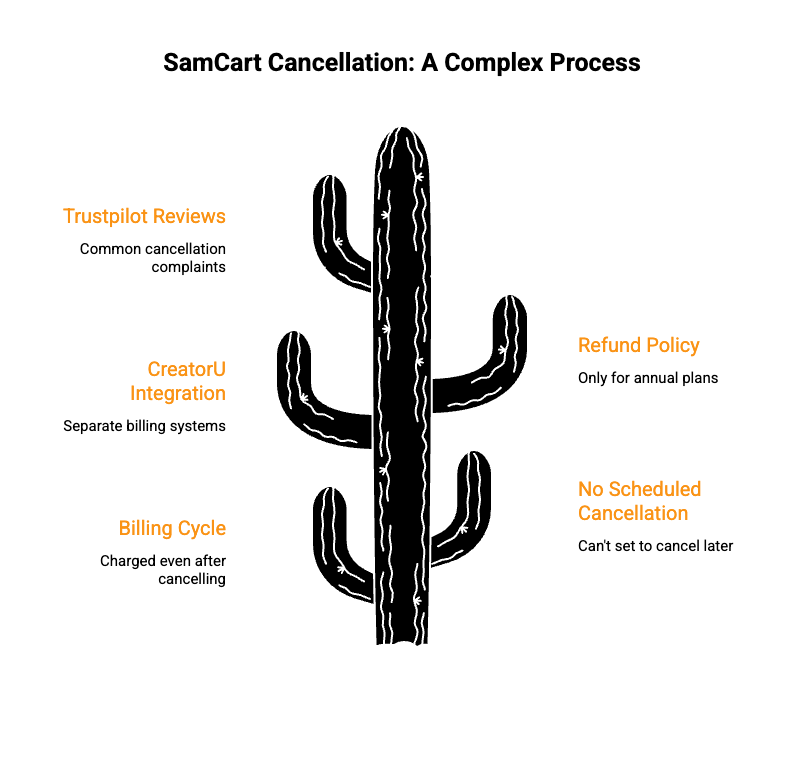
Every guide on this topic walks you through the same five clicks. Log in, go to billing, hit cancel. Done.
What they skip is the part where you still get charged.
SamCart requires you to cancel at least 5 days before your next billing date. Miss that window and you’re locked into another full billing cycle with no prorated refunds. No exceptions. There’s no scheduled cancellation option for your own account either. You can’t set it to cancel at end of term and forget about it.
Then there’s the CreatorU problem. SamCart and CreatorU are marketed together, but they run on separate billing systems. Cancelling your SamCart subscription does not cancel CreatorU. People find this out when a $120+ charge shows up months later.
SamCart’s refund policy is technically a “30-day money-back guarantee.” Sounds reasonable until you read the fine print. It only applies to annual plans. Monthly subscribers get nothing back. And even for annual plans, refunds are discretionary. SamCart decides.
Trustpilot reviews reflect this. Complaints about post-cancellation charges, surprise renewals without reminders, and slow support responses are common patterns.
So why does subscription management have to be this complicated? The cancellation steps are simple. The billing policies around them are not. And compared to most SaaS tools, SamCart’s approach to subscription cancellation feels designed to keep you paying rather than let you leave cleanly.
How to cancel your SamCart subscription
Here’s the step-by-step process to cancel your account from inside the app.
- Log into your account at samcart.com
- Click the blue icon in the top right corner
- Go to Billing
- Click Manage next to your active subscription
- Click Cancel My Subscription
- Complete the cancellation survey
- Click through the retention offers (there will be a few)
- Click Confirm and Cancel
Your access to your SamCart account continues until the end of your current billing period. No partial refunds for the remaining days.
One thing to note. SamCart does have a customer portal for end buyers of SamCart sellers. That’s different from this. If you bought a product through someone’s SamCart checkout page and want to cancel recurring subscriptions, look for a “Manage Your Subscription” link in your charge receipt email. That’s the self cancellation feature for buyers, not for SamCart account holders.
Timing matters. Cancel at least 5 days before your next billing date. If you cancel too late, SamCart’s terms say the next charge still processes and is non-refundable.
Alternative method: Email billing@samcart.com with your account details and cancellation request. Customer support hours are Monday through Friday, 10 AM to 6 PM EST. Expect a response within one business day. No phone support.
Keep a screenshot of the confirmation receipt. You’ll want proof if a subscription charge shows up later.
The SamCart knowledge base has their official walkthrough. It doesn’t mention the 5-day rule or the retention screens. Now you know.
Want to modify your subscription instead of cancelling outright? SamCart’s subscription settings let you change plans, but downgrading still follows the same billing cycle rules. The change takes effect at your next billing date, not immediately. Keep that in mind if you’re trying to save money before deciding to fully cancel.
SamCart refund policy
SamCart offers a 30-day money-back guarantee, but the conditions are narrow.
Annual plans: You can request a refund within 30 days of your original purchase date. Not your renewal date. Your original signup date. And it’s discretionary, meaning SamCart’s terms and conditions say they decide whether to approve it. So even if you qualify, there’s no guarantee you’ll see that money back.
Monthly plans: No refunds. You pay for the current billing period and that’s it. At $79 to $319 per month depending on your plan, that’s a significant amount to lose if you cancel mid-cycle. And there’s no way to get a partial refund for unused days.
CreatorU subscriptions: Completely excluded from the money-back guarantee. If your subscription is associated with CreatorU, refunds do not apply. Credits may be offered within 30 days for annual or one-time payments, but that’s at SamCart’s discretion too.
Renewal charges: Handled case by case. SamCart doesn’t send renewal reminders, so people get hit with annual charges they forgot about. Multiple Trustpilot reviewers report being charged hundreds of dollars for renewals with no prior notice. One reviewer said they were charged for 3 consecutive years without a single reminder email.
Number of payments doesn’t matter either. Whether you’ve paid once or 12 times, the refund eligibility window is the same. SamCart doesn’t give loyalty discounts on refunds.
To issue a refund request, email billing@samcart.com. Include your account email, the charge amount, and when you purchased. There’s no self-service refund option in the dashboard. You can’t issue a refund to yourself from account settings.
If you’re on a monthly plan, there is no safety net. On annual, you have a narrow 30-day window and no guarantee it gets approved. Either way, SamCart’s refund policy puts the risk on you.
How to make sure your cancellation sticks
Cancelling through the app is step one. Here’s a checklist to make sure you don’t get charged again.
- Cancel 5+ days before your next billing date. This is the single most important step. Late cancellations mean another full charge.
- Check for a separate CreatorU subscription. Log into your account and look for any CreatorU billing. Cancelling SamCart does not cancel CreatorU. These are separate.
- Remove your payment information. Go to your account settings and delete your saved card. If SamCart can’t charge you, they can’t charge you.
- Screenshot everything. Save the cancellation confirmation page. Screenshot the email confirmation if you get one.
- Email billing@samcart.com as a paper trail. Even if you cancelled through the app, send a follow-up email stating you’ve cancelled and want to confirm no further charges. This gives you evidence if you need to dispute a charge later.
- Set a calendar reminder for your next billing date. Check your bank statement after it passes.
Does this seem like overkill? Based on the number of people who report being charged after cancelling, it’s not. A few minutes of prep now saves you from fighting a billing dispute later.
If SamCart does charge you after cancellation, contact your bank or payment provider. You’ll need that receipt and confirmation screenshot for the dispute. Most banks side with you if you can show a cancellation confirmation dated before the charge.
A simpler alternative to SamCart
Full disclosure, I’m the founder of CartMango.
I built it because checkout platforms like SamCart got expensive for what most solo creators actually need. SamCart starts at $79/month and goes up to $319/month for their Scale plan. Their cancellation process has retention screens and a 5-day billing window. Their refund policy mostly says “maybe.” That’s a lot of friction for a checkout page.
CartMango is free during beta (until 2027). After that, $9.99/year. Not per month. Per year.
No cancellation maze. No separate billing systems. No discretionary refund policies.
If you sell digital products, courses, or coaching… and you want a checkout platform that doesn’t make leaving harder than signing up, CartMango is worth a look. You can cancel your account anytime. No 5-day window. No retention screens.
What it comes down to
If you’re cancelling your SamCart subscription, follow the checklist above. Do it at least 5 days before your billing date. Check for CreatorU charges. Screenshot the confirmation.
And if you’re shopping for a checkout platform where you don’t need a cancellation guide in the first place… where the subscription charges are transparent and cancelling doesn’t require a checklist, check out CartMango.
Related Reading
- Cancel SamCart subscription: no refunds for monthly plans (2026)
- SamCart complaints: billing, upsells & the exit trap (2026)
- Ejunkie vs SureCart: No Subscriptions vs No Ownership (2026)
- Ejunkie vs Easy Digital Downloads: too simple or complex (2026)
- Ejunkie vs Sellfy: your recurring revenue has no future (2026)
- Ejunkie vs ThriveCart: budget cart or big upfront bet? (2026)
- Ejunkie vs SendOwl: the recurring revenue problem (2026)
- Ejunkie vs Samcart: the case with the recurring revenue (2026)
- Ejunkie vs Payhip: 0 recurring revenue safety (2026)
- Ejunkie vs Gumroad: no subscriptions vs no ownership (2026)